Model: GW - Billing AR Aging
The GW - Billing AR Aging model includes monthly snapshots of accounts receivable aging balances, at the grain of the invoice. It calculates the number of days that an invoice is past due and buckets it into over 30, 60, or 90 days. Analysts can use the model to create visualizations of aging balances by producer, account, line of business, and other attributes.
Source tables
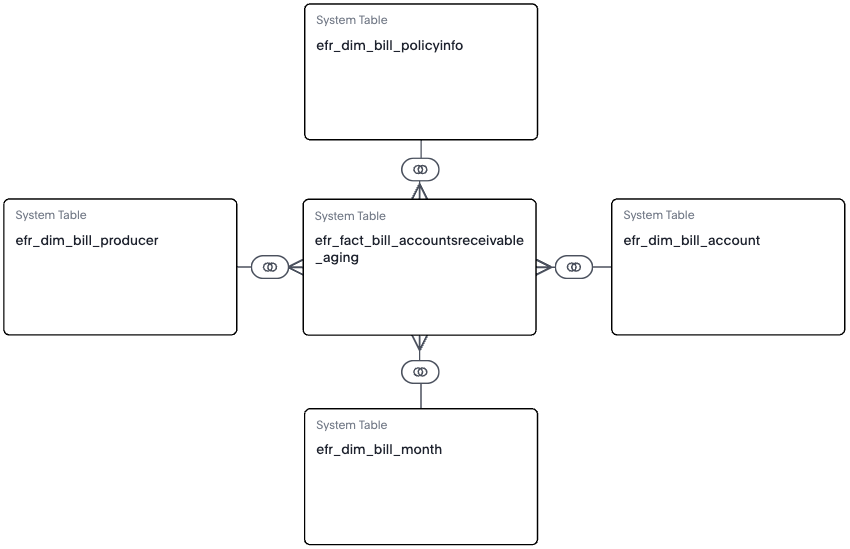
The GW - Billing AR Aging model is built from a fact table and multiple dimension tables, as shown in the diagram.
efr_fact_bill_accountsreceivable_aging
efr_dim_bill_producerefr_dim_bill_policyinfoefr_dim_bill_accountefr_dim_bill_month
From each table, Guidewire selected specific columns to include in the model. They’re typical columns used in reporting and analysis. For details about each column in the model, see the Data dictionaries for Explore models.
Invoice-level amounts
- Month-to-date (MTD) billed
- MTD paid
- MTD written off
- Ending balance
Aging days formula
Invoice aggregate formulas
- All invoices
- Invoices past due by over 30, 60, or 90 days
- All past due invoices
Snapshot parameter
The Snapshot parameter is created on the model in Explore. Use it in liveboards and searches to select the month for which you want to view aging details. Input a year and month in the format YYYYMM. For example, 202408 for August 2024.