Model: GW - Policy Financial Premium - Calendar Year
The GW - Policy Financial Premium - Calendar Year model includes monthly snapshots of premium amounts based on the transaction booking date. The snapshots are aggregates of different types of premiums, such as written, inforce, and unearned. Analysts can use the model to create visualizations of premium amounts within accounting periods. They can view amounts by line of business, coverage, producer, and other attributes.
Source tables
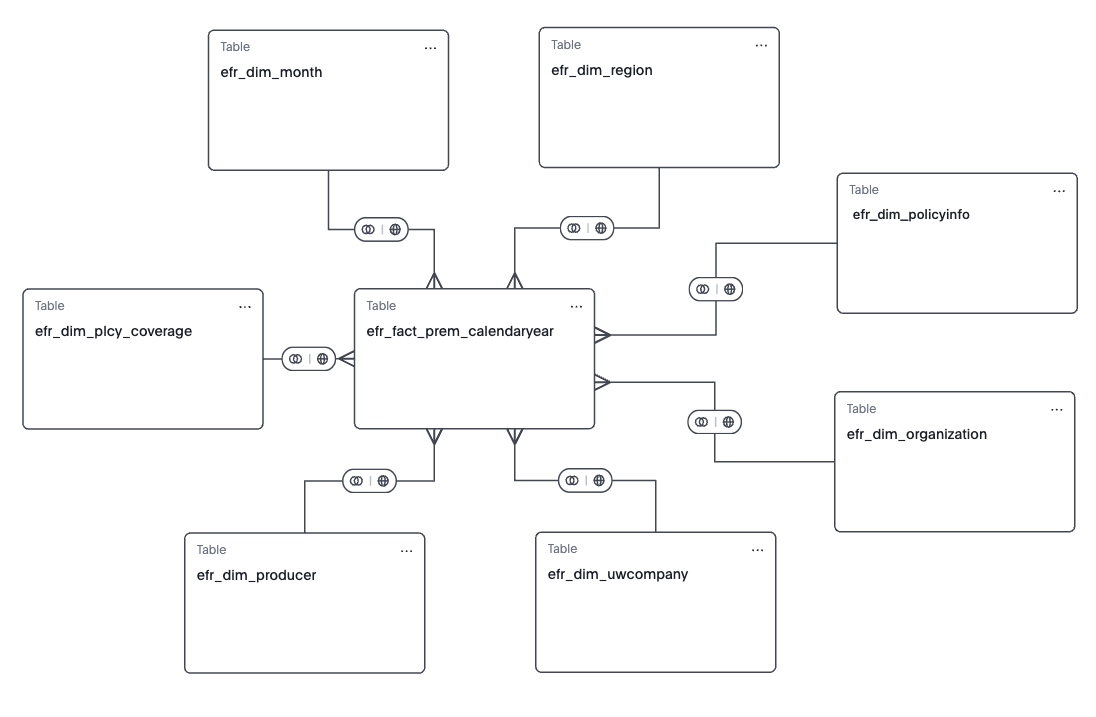
The GW- Policy Financial Premium - Calendar Year model is built from a fact table and multiple dimension tables, as shown in the diagram.
efr_fact_prem_calendaryear
efr_dim_monthefr_dim_policyinfoefr_dim_uwcompanyefr_dim_organizationefr_dim_producerefr_dim_regionefr_dim_coverage
From each table, Guidewire selected specific columns to include in the model. They’re typical columns used in reporting and analysis. For details about each column in the model, see the Data dictionaries for Explore models.
Formulas
The Accounting Period formula converts the month end date into a
business-friendly string. The result is an additional column called
Accounting Period in the model. For example, if the
Month End Date column has a value of 20250331,
the Accounting Period column has a value of 'March 2025'.
The formula is created on the model in Explore. They aren’t part of the source tables in Explore or datasets Data Studio.
MTD, QTD, and YTD aggregates
- MTD, QTD, and YTD Earned Premium
- MTD, QTD, and YTD EBUR Premium
- MTD, QTD, and YTD Written Premium