Model: GW - Claim Loss Financial - ITD
GW - Claim Loss Financial - ITD includes inception-to-date snapshots of claims financials. Aggregates span the period from the time that a loss occurred to right now. The snapshots aggregate various transaction line item amounts, such as loss incurred, expense payments, salvage recoveries, and medical reserves. Analysts can use the model to create visualizations of amounts by accident year. They can view amounts by loss cause, location, claim severity, and other attributes.
Source tables
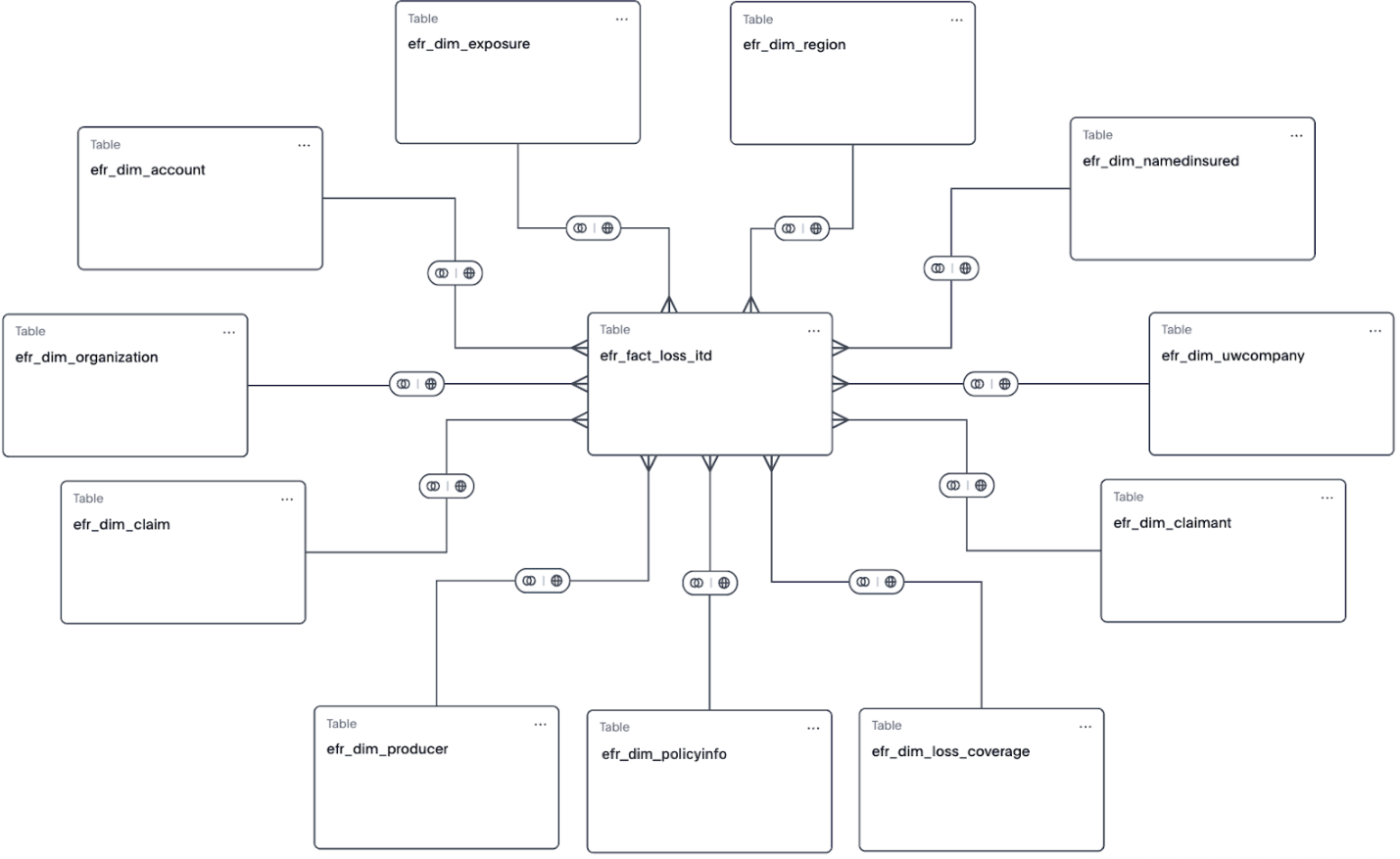
The GW - Claim Loss Financial - ITD model is built from a fact table and multiple dimension tables, as shown in the diagram.
efr_fact_loss_accidentyear
efr_dim_uwcompanyefr_dim_namedinsuredefr_dim_organizationefr_dim_exposureefr_dim_producerefr_dim_claimantefr_dim_claimefr_dim_accountefr_dim_policyinfoefr_dim_loss_coverage
From each table, Guidewire selected specific columns to include in the model. They’re typical columns used in reporting and analysis. For details about each column in the model, see the Data dictionaries for Explore models.
Formulas
Many of the model’s columns are the result of formulas created on the model in Explore. The formula columns aren’t part of the source tables in Explore or Data Studio. Each formula performs a calculation or conversion, usually using source table columns, and the result is an additional column in the model.
For a list of all formula columns and their expressions, see the Data dictionaries for Explore models.
- ITD aggregate amounts, including net and total aggregates
- Outstanding aggregate amounts, including net aggregates
Filters
12/31/9000.| Source table | Model column name | Filter expressions |
|---|---|---|
efr_dim_account |
Account Row Exp Date | >= 12/30/9000 |
efr_dim_claim |
Claim Row Exp Date | >= 12/30/9000 |
efr_dim_claimant |
Claimant Row Exp Date | >= 12/30/9000 |
efr_dim_exposure |
Exposure Row Exp Date | >= 12/30/9000 |
efr_dim_organization |
Organization Row Exp Date | >= 12/30/9000 |
efr_dim_producer |
Producer Row Exp Date | >= 12/30/9000 |
efr_dim_uwcompany |
UW Company Row Exp Date | >= 12/30/9000 |
Hidden columns
- Account Row Exp Date
- Claim Row Exp Date
- Claimant Row Exp Date
- Exposure Row Exp Date
- Organization Row Exp Date
- Producer Row Exp Date
- UW Company Row Exp Date
To learn more about hidden columns, see Model column properties.