Explore for Claims: Financial Insights content
In the base configuration, Explore for Claims includes the following financial insights models, answers, and liveboards, with curated data from your InsuranceSuite applications streamed in near real-time.
Lineage of Explore for Claims Financial Insights content
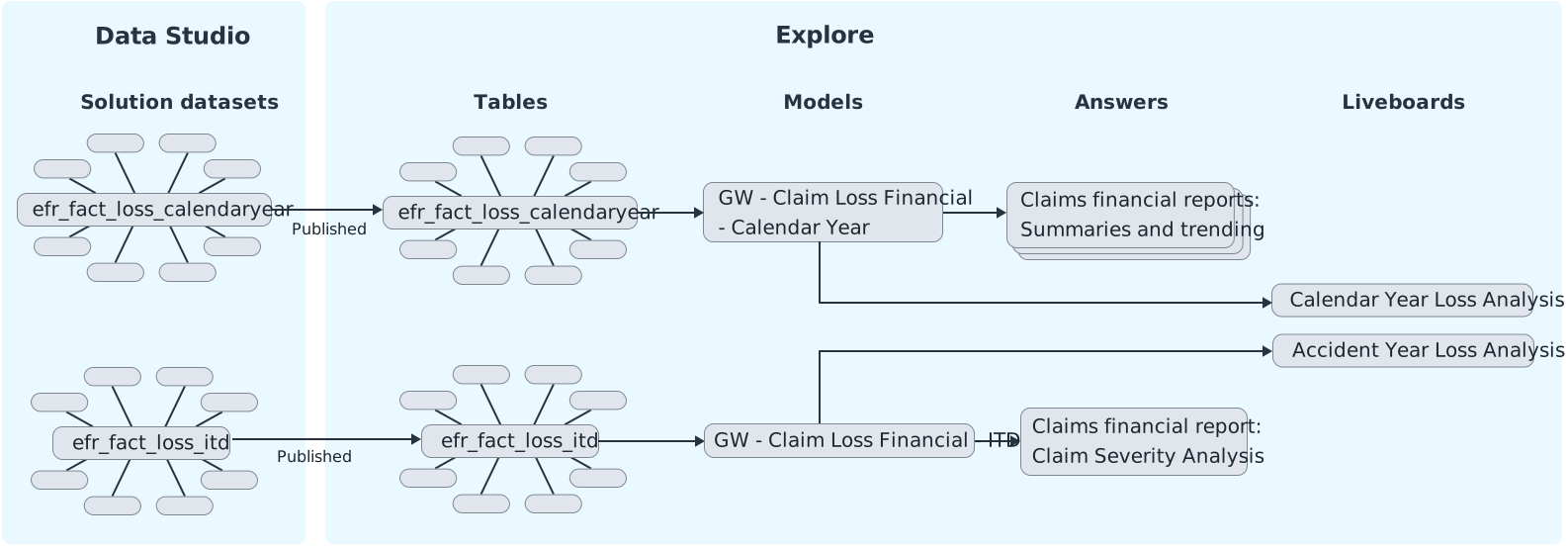
- Guidewire created Explore for Claims Financial Insights solution datasets
that live in Data Studio. They include central fact datasets with several
related dimension datasets.
- The loss datasets are derived from the Claims and Policy Insurance Data Models (IDMs) by applying predefined queries onto the IDM dynamically generated datasets. You can find details about the solution datasets in the Data Studio Data Dictionary. (See the Data Studio guide.)
- The profitability dataset is derived from the Claims and Policy IDMs
in addition to the Explore for Claims and Explore for Policy
solutions. The profitability fact derives metrics from
efr_fact_loss_calendaryearandefr_fact_prem_calendaryear.
- The solution datasets are then published to Explore and used to create models. There's one Explore model for each fact dataset.
- The models are the data source for answers and liveboards.
Implementation for ClaimCenter-only customers
- If an attribute doesn’t exist in ClaimCenter, the value is
NULL. - If a key attribute doesn’t exist in ClaimCenter, the null value is replaced
with
?. This prevents issues that can occur with null keys, such as incorrect joins or misrepresented financial data.
Liveboards for claims financial insights
| Liveboard Name | Key Contents | Data source (Explore model) |
|---|---|---|
| Calendar Year Loss Analysis | Analysis of claims financials by transaction booking date. Includes insights into total incurred losses, reserve changes, recovery patterns, expense payments, regional claim distributions, loss causes, policy lifecycle segmentation, and detailed claim-level views. Use it to monitor trends, assess risk exposure, and compare performance over time. | GW - Claim Loss Financial - Calendar Year |
| Accident Year Loss Analysis | Analysis of claims financials by loss date. Includes insights into total recoveries, expense payments, outstanding reserves, open claims and exposure counts, loss causes, regional open claim distribution, average claim severity, and detailed claim-level views. | GW - Claim Loss Financial - ITD |
| Profitability Analysis | Analysis of expense and loss ratios. Includes expense and loss ratios over time and by location, trends of incurred losses and premium amounts, and detailed metrics by policy. Use it to monitor trends, identify areas of improvement, and analyze profitability over time. | GW - Profitability |
| Claim Inventory History Analysis | Includes month-by-month claim inventory: beginning claim inventory, along with new, reopened, closed, and ending claim counts for a selected reporting month. Lets users filter data by attributes such as line of business, state, and producer, with a detail table at claim-by-month level for reconciliation and drill-through. Helps claims managers see the historical trend of claims that were open at the end of each month and claims that were reopened and closed within each month. | GW - Claim Inventory History |
| Exposure Inventory History Analysis | Includes month-by-month claim exposure inventory: beginning inventory, along with new, reopened, closed, and ending exposure counts for a selected reporting month. Lets users filter data by exposure and policy attributes. Helps claims managers see how many exposures were open at each month-end and how often they were reopened or closed within each month. | GW - Exposure Inventory History |
| Claim Reserve Adequacy Analysis | Analysis of whether reserves are adequate for the actual amount incurred by developing claims so that you can set accurate reserve amounts. Includes reserve development ratios by evaluation checkpoints, line of business, and other attributes. Compares initial reserves to current incurred. Classifies claims as adequate, over-reserved, or under-reserved. | GW - Claim Reserve Adequacy |
Answers for claims financial insights
| Answer Name | Key Contents |
|---|---|
| Claim Overview | Includes totals by accounting period for:
|
| General Loss Summary | Includes totals by accounting period for:
|
| Incurred Loss Trending | Shows current year (CY) and prior year (PY) development of
incurred losses. Includes totals by accounting period for:
|
| Loss Paid Summary | Includes totals by accounting period for:
|
| Claim Severity Analysis | Includes totals for:
|
| Loss Ratio Summary Trending | Includes totals for:
|
| Exposure Inventory History Summary | Includes totals for a selected period:
|
| Claim Inventory History Summary | Includes totals for a selected period:
|
| Claim Reserve Adequacy Summary Trending | Includes totals for:
|
Models for claims financial insights
| Model Name | Key Contents | Source solution dataset from Data Studio |
|---|---|---|
| GW - Claim Loss Financial - Calendar Year |
Includes monthly snapshots of claims financials based on the transaction booking date. The snapshots are aggregates of various transaction line item amounts, such as loss incurred, expense payments, salvage recoveries, and medical reserve changes. Helps analysts create visualizations of amounts within accounting periods. They can view amounts by loss cause, location, policy life cycle, and other attributes. |
efr_fact_loss_calendaryear |
| GW - Claim Loss Financial - ITD |
Includes inception-to-date snapshots of claims financials. Aggregates span the period from the time that a loss occurred to right now. The snapshots aggregate various transaction line item amounts, such as loss incurred, expense payments, salvage recoveries, and medical reserves. Helps analysts create visualizations of amounts by accident year. They can view amounts by loss cause, location, claim severity, and other attributes. |
efr_fact_loss_itd |
| GW - Profitability |
Includes month-to-date and year-to-date loss ratios and expense ratios. Combines calendar year premium and calendar year loss metrics into one model. Helps analysts monitor profitability. They can view loss and expense ratios by state, policy, product, producer, and other attributes. |
efr_fact_profitability |
| GW - Claim Inventory History | Analysis of all claims from near real-time and historical (trending) perspectives. This includes a monthly view at the claim level that tracks new, reopened, and closed claims per month, ensuring that month-end pending counts reconcile over time. Helps claim managers with closure prioritization for claims. | efr_fact_statusactivity_claim |
| GW - Exposure Inventory History | Analysis of all exposures from near real-time and historical (trending) perspectives. This includes a monthly view at the exposure level that tracks new, reopened, and closed exposures per month, ensuring that month-end pending counts reconcile over time. Helps claim managers with closure prioritization for exposures. | efr_fact_statusactivity_exposure |
| GW - Claim Reserve Adequacy | Measures whether reserves are adequate for the actual amount incurred by developing claims so that you can set accurate reserve amounts. Analysts can use the model to create visualizations that compare the initial (day-0) reserve to the current total incurred at multiple evaluation checkpoints over time. They can analyze adequacy by line of business, state, and other attributes. | efr_fact_reserveadequacy |