Explore for Billing: Financial Insights content
In the base configuration, Explore for Billing includes the following financial insights datasets, models, answers, and liveboards, with curated data from your InsuranceSuite applications streamed in near real-time.
Benefits
Explore for Billing Financial Insights helps you analyze accounts receivable (AR) aging, AR premium activity, cash balancing, and commissions. You can monitor billing performance, spot collection issues earlier, and support better cash management and producer performance decisions.
The solution also includes transaction-level datasets in Data Studio for detailed transaction research and troubleshooting.
Lineage of Explore for Billing Financial Insights content
The following diagram shows the lineage. Click to enlarge the image.
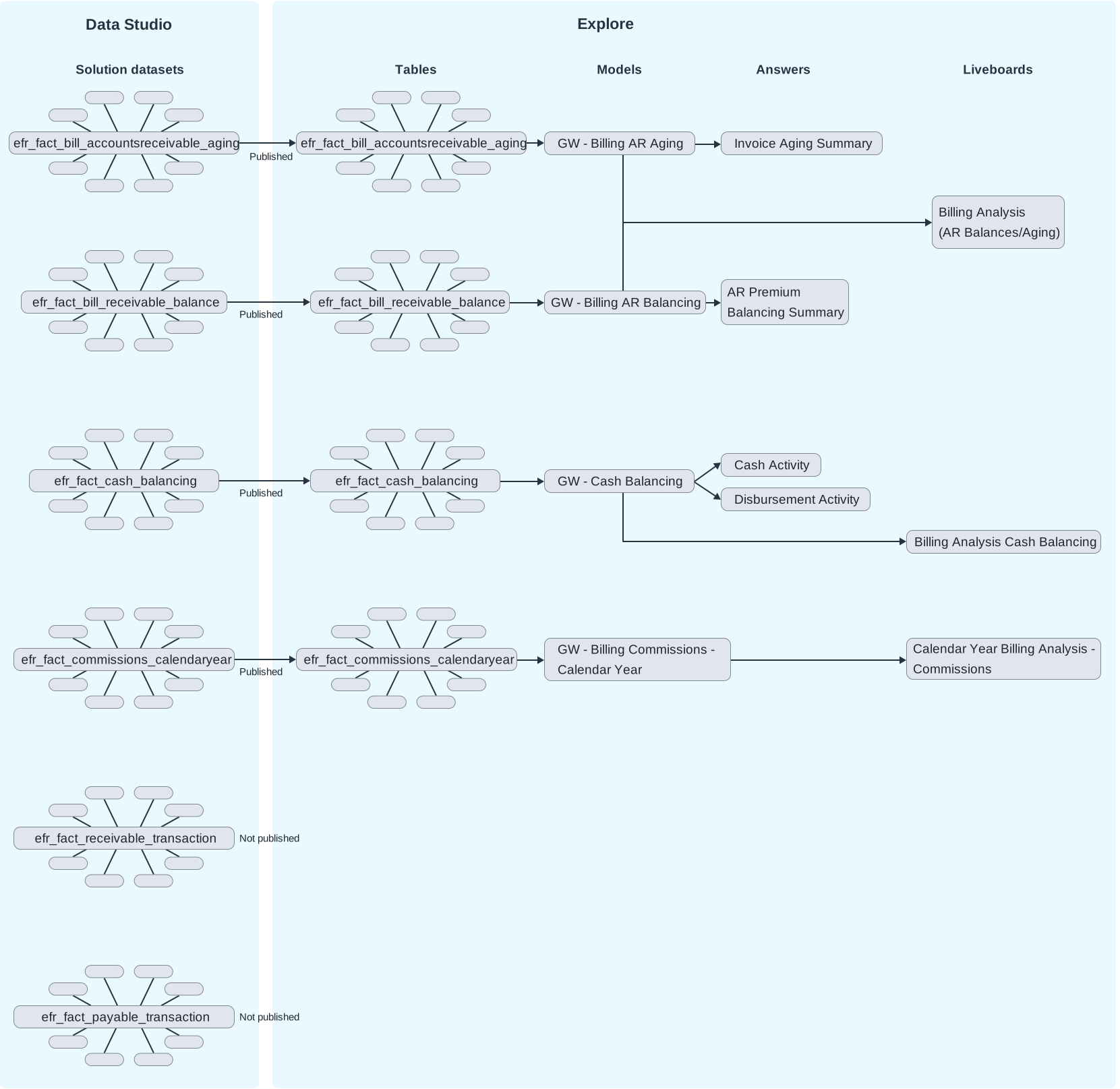
- Guidewire created Explore for Billing Financial Insights solution datasets that live in Data Studio. They include central fact datasets with several related dimension datasets. The datasets are derived from the Billing Insurance Data Model (IDM) by applying predefined queries onto the IDM dynamically generated datasets. You can find details about the solution datasets in the Data Studio Data Dictionary. (See the Data Studio guide.)
- The solution datasets are then published to Explore and used to create models. There's one Explore model for each fact dataset.
- The models are the data source for answers and liveboards.
Liveboards for billing financial insights
| Liveboard Name | Key Contents | Data source (Explore model) |
|---|---|---|
| Billing Analysis (AR Balances/Aging) | Analysis of aging receivables by month-end, producer, state, number of days past due, account, and other attributes. The number of days past due is calculated at the moment you open the liveboard. Also includes monthly ending balances for written and advanced premium. |
|
| Billing Analysis Cash Balancing | Analysis of various cash amounts by month-end, product, producer, and state. | GW - Cash Balancing: Download data dictionary |
| Calendar Year Billing Analysis - Commissions | Analysis of commission amounts by month-end, product, producer, underwriting company, and state. | GW - Billing Commissions - Calendar Year: Download data dictionary |
| Billing Operations - Activities | Analysis of billing operational activities across the billing book each accounting month. Includes how much work was created and completed, how quickly it was completed, and what's overdue. Supervisors and workforce managers can track activities by reason, triggering event, representative assigned team, and other attributes. They can surface backlog, workload imbalance, and compliance risk early enough to balance work before it ages. | GW - Billing Operations Activities: Download data dictionary |
Answers for billing financial insights
The following answers report various billing financial totals. They aren’t pinned to a liveboard, but are separate pivot table reports that you can view and filter. To learn more about filtering, see Explore pivot tables.
| Answer Name | Key Contents |
|---|---|
| Invoice Aging Summary | Includes invoice counts and amounts by the number of days past
due (30, 60, and 90):
|
| AR Premium Balancing Summary | Includes receivable totals by billing method and accounting
period:
|
| Cash Activity | Includes cash totals within a specified date range:
|
| Disbursement Activity | Includes disbursement totals within a specified date range:
|
Models for billing financial insights
For more details, see the linked pages and the Data dictionaries for Explore models.
| Model Name | Key Contents | Source solution dataset from Data Studio |
|---|---|---|
| GW - Billing AR Aging |
Includes monthly snapshots of accounts receivable aging balances, at the grain of the invoice. Calculates the number of days that an invoice is past due and buckets it into over 30, 60, or 90 days. Helps analysts create visualizations of aging balances by producer, account, line of business, and other attributes. |
efr_fact_bill_accountsreceivable_aging |
| GW - Billing AR Balancing |
Includes monthly snapshots of various accounts receivable amounts for policies, such as advance premium new, written premium reclass, and total premium write-off. The snapshots are aggregates over a period of one month, of transaction amounts from the charge context. Helps analysts visualize trends and totals of accounts receivable activities. They can analyze amounts by policy, charge pattern subtype, product, underwriting company, and other attributes. |
efr_fact_bill_receivable_balance |
| GW - Cash Balancing | Includes monthly aggregates of billing transactions that affect
cash or cash held in a pending state. Helps analysts create visualizations of cash amounts by month, transaction subtype, product, producer, and other attributes. |
efr_fact_cash_balancing |
| GW - Billing Commissions - Calendar Year | Includes monthly snapshots of commissions payable to producers,
at the grain of the policy. The snapshots are aggregates of
transaction amounts from the producer context. Helps analysts visualize reserved, earned, and paid out commission amounts. They can analyze amounts by producer name, producer code, product, and other attributes. |
efr_fact_commissions_calendaryear |
| Model: GW - Billing Activity Operations | Provides a detailed view of billing activity operations at the grain of the individual activity. Analysts can use the model to visualize billing operations and give supervisors visibility into their staff workloads. | efr_fact_bill_activity |
Detailed transaction datasets
| Dataset Name | Key Contents |
|---|---|
| efr_fact_receivable_transaction | Includes all accounts receivable transactions from the charge context. Each row represents one charge transaction event at the transaction level. For example, initial charges (premium, fees) payments (from customers or producers) write-offs, and billed charges. Includes derived balance measures that can be used for general ledger reconciliation. |
| efr_fact_payable_transaction | Includes all transactions from the producer context. Each row represents one producer transaction event at the transaction level. For example, payment, commission earning, reserve movement, advance, write-off, or adjustment. Includes derived balance measures that can be used for general ledger reconciliation. |
- Query in Data Studio to view sample data.
- Curate and publish from Data Studio to query the data in external applications.
- Curate and publish from Data Studio to extend Explore liveboards with detailed, transaction-level analysis.