Drop-down lists in mind map in Advanced Product Designer
Drop-down list attributes in Advanced Product Designer mind maps define a fixed set of field values using a marker with subtopics for each item. Advanced Product Designer also supports referencing an existing drop-down list or platform typelist, avoiding manual list item entry.
Drop-down lists let you choose an option from a predefined list of choices. You can add drop-down lists to risk objects and exposures. You can also add drop-down lists to clauses (coverages, conditions, and exclusions), to create option and package clause terms.
 marker to the topic, and attach subtopics for each item in the list. For a risk or
exposure field, all list items must be of Text
marker to the topic, and attach subtopics for each item in the list. For a risk or
exposure field, all list items must be of Text  type. For a clause term, if you use Number
  , Decimal
  , or Money
  type, the term is converted to text and imported as an option term. If you use Text
type, the term becomes a typelist term.
type, the term is converted to text and imported as an option term. If you use Text
type, the term becomes a typelist term.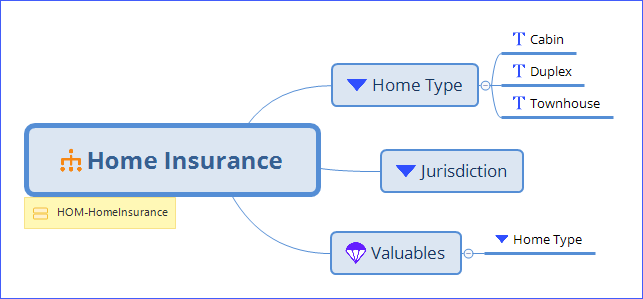
Coverage terms
You can use drop-down lists to model coverage terms.
See also
Use existing drop-down list or PolicyCenter typelist
- A drop-down list defined in the current product. In the mind map above, Home Type on Valuables is an example. After you generate the Home Insurance product, Home Type becomes a typelist that other products can use.
- One of the many PolicyCenter typelists. PolicyCenter includes general purpose typelists such as Country, Jurisdiction, and Currency. PolicyCenter also includes typelists defined in installed products. In the mind map above, Jurisdiction is an example of a general purpose typelist. You must, however, add the required typekey codes in APD, from the externally managed typelist, in order to use them in APD App rules.
To create a drop-down list that gets it values from another list, create a drop-down list
topic with the name of the list. Do not add list items.