What's new in InsuranceNow for Palisades
Here are the Palisades release highlights for InsuranceNow. For more details, see the InsuranceNow Core Release Notes.
Integration with ProNavigator
InsuranceNow now includes a direct integration with ProNavigator. ProNavigator is embedded in the right-side Quick Access panel. This enhancement provides access to ProNavigator across key workspaces: quote, application, policy, First Notice of Loss (FNOL), and claim. It uses the current quote, application, policy, or claim context plus carrier documents and guidelines to answer coverage, eligibility, and procedure questions.
For example, an adjuster can ask:
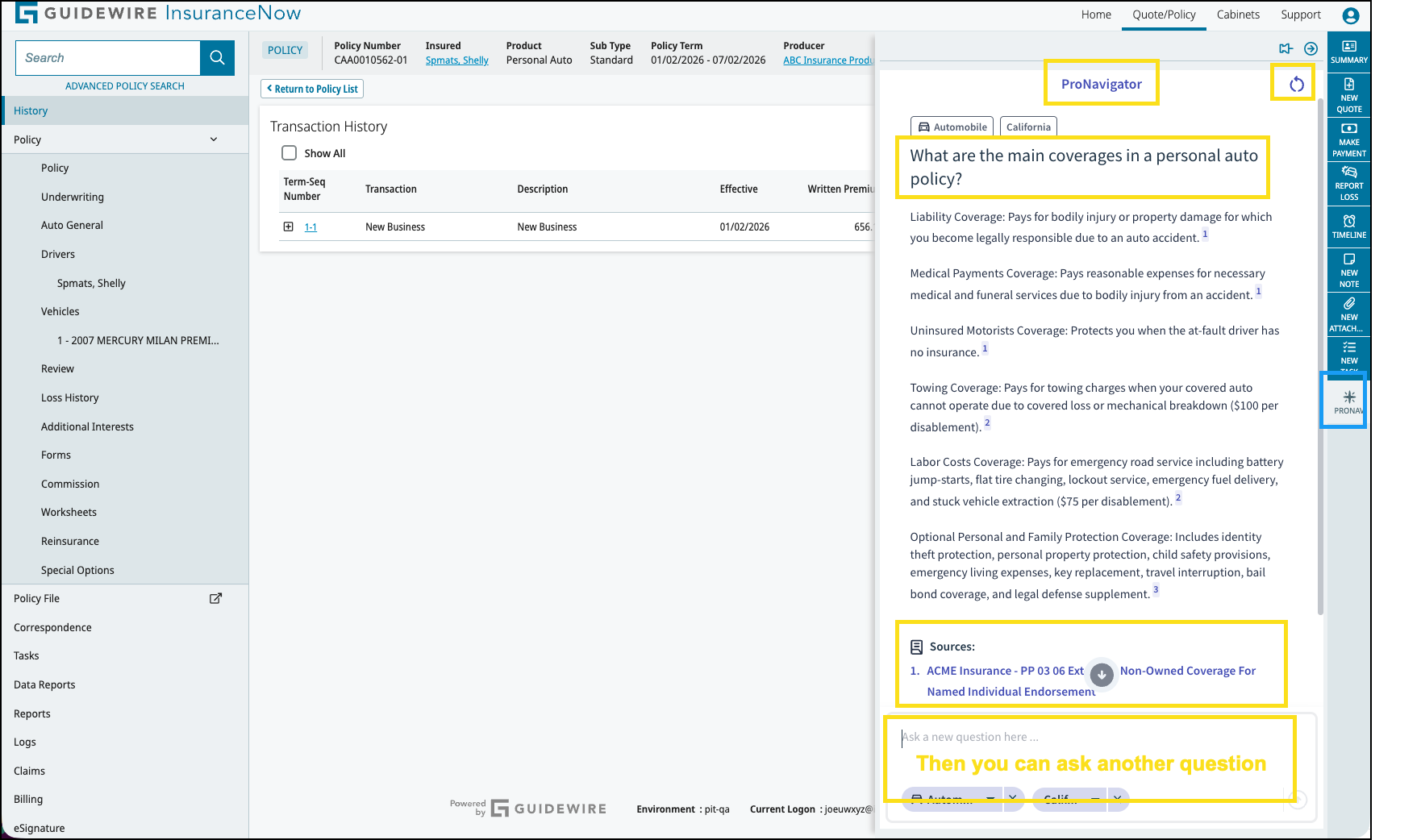
ProNavigator returns a concise answer, plus coverage details or step-by-step procedures, directly within InsuranceNow. ProNavigator dramatically improves efficiency and reduces the need to navigate multiple external systems or lengthy documents.
ProNavigator is available from:
For a short demonstration, watch this video:
New API endpoints
| Endpoint | Description |
|---|---|
GET
/billingStatementAccounts/{systemId}/paymentSpread |
Returns how payments are distributed across charges or installments for the specified billing statement account (payment “spread” details). |
GET
/claimProducts/{productVersionId}/claimSetup |
Returns claim-setup information for the specified claim product version (for example, configuration needed to open a claim for that product). |
GET
/claimProducts/{productVersionId}/claimSetup/full |
Returns the full set of claim-setup details for the specified claim product version. |
GET /claims/{systemId}/contacts |
Returns the list of contacts associated with a claim, such as insureds, claimants, and other related parties. |
POST
/policies/{systemId}/newLossRequest |
Submits a request to create a new loss (first notice of loss) against the specified policy, for consumer claim reporting flows. |
POST
/policies/{systemId}/placeHoldTransactionRequest |
Places a hold on a pending policy transaction for the specified policy (for example, to prevent further processing until the hold is cleared). |
POST
/policies/{systemId}/removeHoldTransactionRequest |
Removes an existing hold from a pending policy transaction for the specified policy so processing can continue. |
POST
/policies/{systemId}/startNonrenewalTransactionRequest |
Initiates a nonrenewal transaction for the specified policy based on the supplied effective date and reason. |
GET
/statementAccounts/paymentPlanList |
Returns the list of available payment plans that can be used with statement accounts in Billing. |
Retain sticky notes across policy terms
Sticky notes are now retained on a policy from one term to another. Previously sticky notes, often used as important reminders, were lost after a policy renewal. With this update, sticky notes and their content will now persist through the renewal process, ensuring that critical notes remain visible on the policy even after issuing the renewal.
Identity Hub settings support SERVICE-type client
SERVICE-type
client in Guidewire Hub by using Identity Hub settings. This enables secure
service-to-service communication and aligns configuration across Guidewire Cloud
Platform, classic, and local environments.- For Guidewire Cloud Platform tenants, the
SERVICEclient and its credentials are provisioned automatically by the Cloud Platform infrastructure. - For Classic environments, the InsuranceNow CloudOps team can provide the
SERVICEclient credentials, which you then configure locally in identity-hub-settings.xml.
GWHUB-0060 template
must target the SERVICE client, not the WEB client. New protected section of custSTART build.gradle
// vvvvvvvvvv --- Anything below this line is managed by the automated update process --- vvvvvvvvvv
//
// DO NOT CHANGE anything between this line and the similar one at the bottom
// Changes between the two lines will likely make update automation fail

...

// ^^^^^^^^^^ --- Anything above this line is managed by the automated update process --- ^^^^^^^^^^
// DO NOT CHANGE anything between this line and the similar one at the top
// Changes between the two lines will likely make update automation fail
Consumer Service Portal
- Display confirmation number for ACH payments: In this release, you can view payment confirmation numbers for completed payments made through the service portal in the Recent Payments section on the Billing Details screen. The service portal displays confirmation numbers for ACH (if One Inc is chosen as the payment vendor) or credit card payments if your payment service provided this information.
- Display payment pending message for ACH payments: You can now see a Pending Payment banner when using the anonymous payment flow to prevent unintended duplicate payments. The ACH payment pending banner now appears for users making payments anonymously, alerting them that a payment is already pending. The same banner is shown at the end of the payment process in the logged-in flow is also added for the anonymous pay flow. This feature is not configurable via a feature flag; it is enabled by default. The enhancement ensures anonymous payers are informed of pending payments without revealing the exact amount, maintaining security and privacy.
- Email address verification in the Service Portal: To improve security, the Service Portal requires email address verification. Verification is required during new account registration and when updating the existing registration email address in the user profile. For new user registration, the email address entered must match the email address attached to the policy or customer account saved in InsuranceNow, and must be verified from it. Users receive a one-time verification at the existing email address on file in the Service Portal when updating their email address. The code must be validated to proceed with the update. This feature ensures only valid users are able to access the Service Portal, and improves security to ensure the email address can only be updated by intended users, who are logged in and own the existing, registered email address. Note: Carriers are required to use this security feature unless they explicitly sign off on risk acceptance for not implementing it.
- Show password while typing: You can customize the option for users to allow them to view their password entry as they are typing it". An eye icon displays next to the password entry field, that when selected, unmasks the password entry. This allows users to make corrections as needed, reducing the chance of entering an incorrect password.
- Configurable payment failure banner: You can now configure the banner message shown when an online payment fails in the Service Portal, for both logged-in and non-logged in payment flows. With this enhancement, you can define your own message so customers are guided to the right support channel to get help faster. For example: “Please try again later or contact Customer Support at 1‑800‑XXX‑XXXX or support@example.com." Your implementation team can configure this message in the Service Portal i18n configuration (for both authenticated and anonymous Make a Payment flows). If you’d like to change this text, contact your Guidewire implementation or support team.
- Enhanced error messages: To improve user experience, the Service
Portal standardizes default error messages for common scenarios (such as
request failures, resource not found, and system errors), ensuring
consistency and clarity across the portal. Additionally, you may now include
tailored information such as contact numbers or additional instructions when
error messages are displayed, without altering the existing default
messaging. Default messaging, as shown below, and custom message text are
available for the following locations in the Service Portal:
- Claim Details: Unable to load claims at this time. Please contact your agent or try again later.
- Claim Details > Claim attachments: There was an error loading your attachments.
- Report Claim > Report Claim Confirmation: Your request cannot be processed at this time.
- Report Claim > Report Claim Step One: Unable to confirm your claim. Please contact your agent or try again later.
- Open Quotes: Unable to get open quotes at this time. Please contact your agent or try again later.
- Open Quotes > Get Quote: We are unable to start a quote right now. Please contact your agent or try again later.
- Customer information: Please contact your agent or try again later.
genericErrors.genericErrorMessageproperty configured to include custom information in error messages for your company, contact Guidewire support.
- Improved driver selection for auto claims: When reporting an auto claim in the Service Portal, the Driver field is now enabled only after you select a Vehicle. The list of drivers is automatically filtered to show only those associated with the same policy as the selected vehicle. If you change the vehicle, the driver selection is cleared so you can choose a driver that matches the new vehicle’s policy. This change helps ensure that the driver and vehicle information on your claim come from the same policy, supporting more accurate claim setup and processing.