What's new in Cloud Platform for Niseko
Here are the Niseko release highlights for Guidewire Cloud Platform. For more details, see the Cloud Platform Release Notes, Advanced Product Designer Release Notes, and Guidewire Home and Guidewire Functions documentation.
Bring-your-own code repository to Cloud Platform
- Authenticate through Git.
- Work on your code in either the Guidewire or your external VCS.
- Synchronize the code between your Guidewire and external repositories.
This feature improves the developer experience and increases convenience when publishing and versioning InsuranceSuite code changes that were implemented outside of existing Guidewire Cloud Platform BitBucket instances. It also automatically runs cloud assurance checks on them.
Latest activity journal for planet deployment activities
Use the latest activity journal (in the InsuranceSuite overview) to check each phase of the latest InsuranceSuite activity for a given planet. The latest activity journal shows the start date, deployment phase and phase details for the last deployment activity that happened on the selected planet. (Deployment activities are Deploy all IS, Deploy selected, Undeploy, Roll back blue/green, and (for production planets) Roll back.)
You can access the latest activity journal from the Planets app in Guidewire Home. After you've selected the planet, and then selected InsuranceSuite from Applications and add-ons, you can view the journal by selecting Show details under Latest activity .
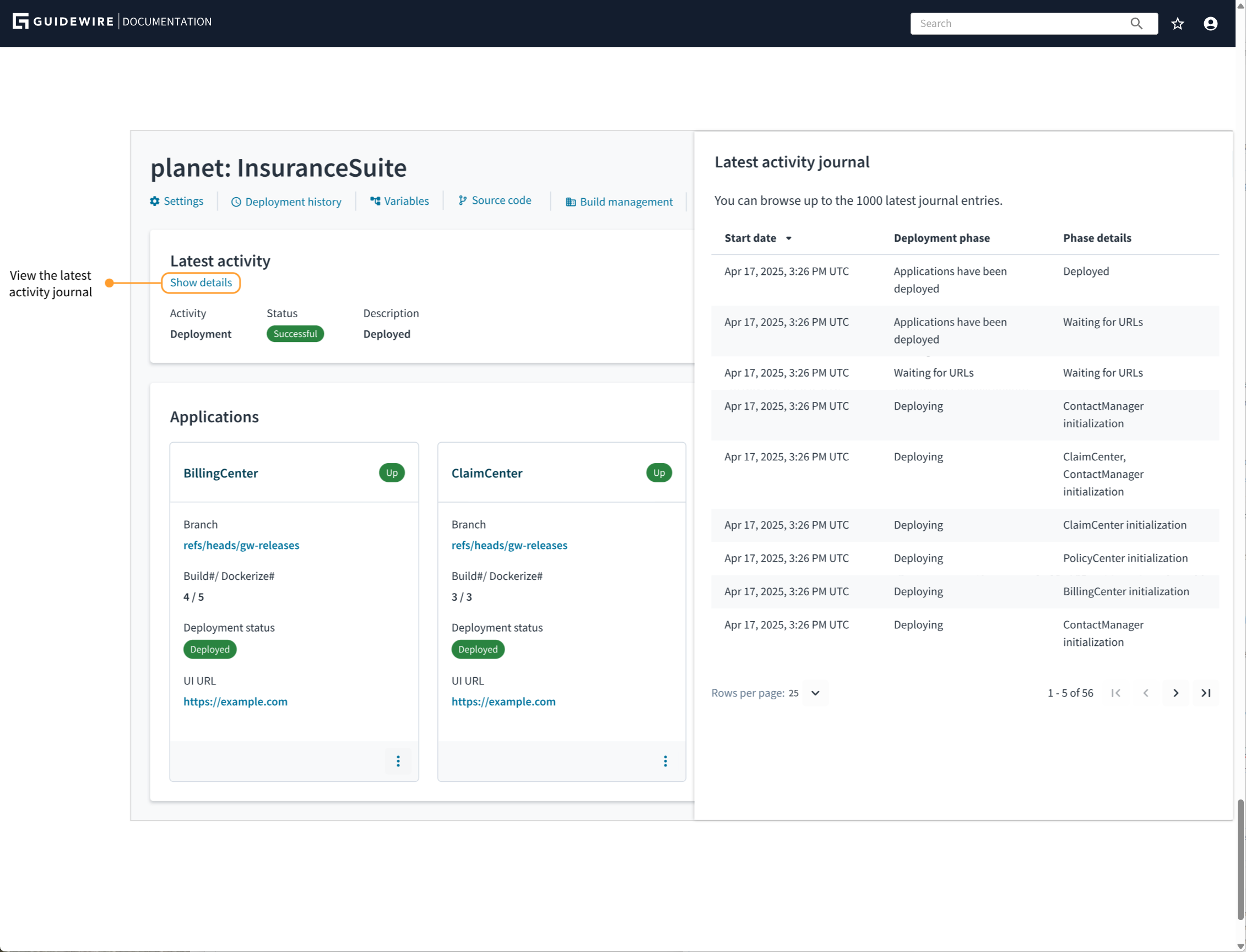
The journal shows each deployment phase as a separate entry. This allows you to see which phase is completed, which phase is still in progress, or at which phase the activity failed. Each deployment phase might consist of several actions, which are described in the phase details.
When you initiate another activity, the latest activity journal clears and then starts showing phases for the new, in-progress activity.
Add deployment checks for InsuranceSuite apps
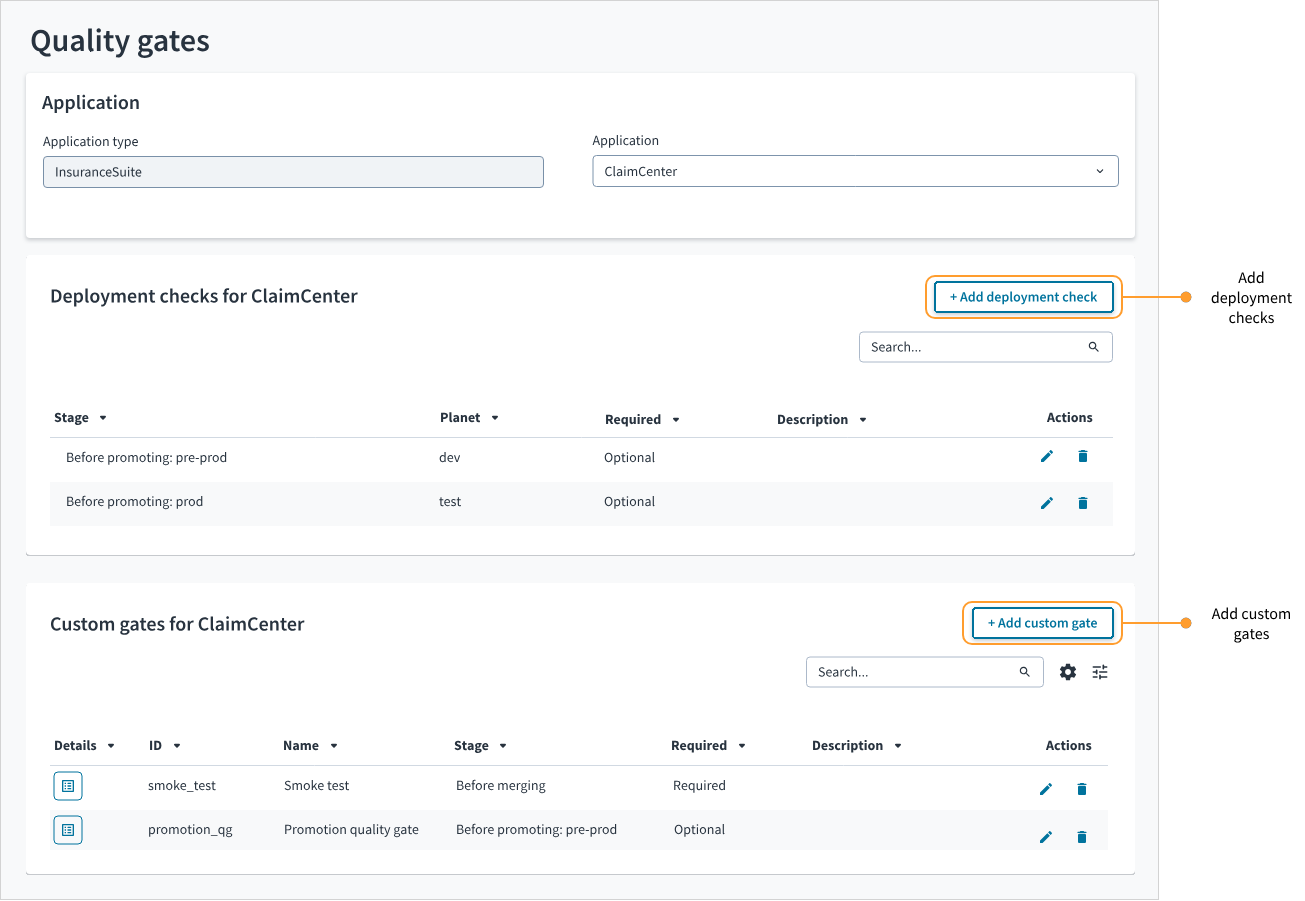
In the Quality Gates app, you can add deployment checks for InsuranceSuite apps. Deployment checks are default quality gates that allow you to check before the build promotion if the deployment of an InsuranceSuite app was successful. You can also use CI/CD Manager API to manage the deployment checks and override their verification statuses.
Guidewire Functions (Restricted Availability)
Guidewire Functions are independently deployable, stateless units designed for single-transaction operations in a cloud-native environment. They provide seamless integration with Guidewire applications and external APIs through JSON REST interfaces.
- Provide a modern framework for business logic, enabling the development and deployment of individual, reusable, and custom functions.
- Replace code faster and more reliably, featuring scalability that's independent from core applications, rapid updatability, and fine-grained security.
- Ensure flexibility with support for various languages (JavaScript and TypeScript), and support use cases such as process API, workflow logic, and event-driven outputs.
Customization tools for developers (for Early Access customers only)
InsuranceSuite Object Tuner
Create, extend, discover, and manage objects and typelists across InsuranceSuite applications and cloud services, with automatic generation of Cloud APIs, data model, and App Events for seamless integration in Guidewire Cloud.
Extension Layer
Extension Layer provides a new way for InsuranceSuite developers to build managed, upgrade-safe, and packaged extensions on Guidewire Cloud. With Extension Layer, developers can create independent, manageable modules. It simplifies development, reduces risk, and allows partners to update customers faster and more consistently.
Advanced Product Designer
Info panel removed
The info panel has been removed from the user-interface pages for product elements, such as line, risk, product, and blanket. This panel previously contained accordions with information about the edition and element details and a drop-down list with options, such as Edit, Remove, and Add child object.
You can now view information about editions on the Editions page. You can take the following actions from the Actions menu in the left tree panel for the selected product element:
- View or Edit element details
- Add, Edit, or Remove child objects
- Managed currencies, Manage languages, Manage rate factor types, and Attach Line (from the product node only)
For a short demonstration, watch this video:
Updated CI/CD activity section in Guidewire Home
The CI/CD activity section now appears at the top center of the Guidewire Home launch page. (Its name has been updated from Latest CI/CD activity to CI/CD activity.)
- Pin the applications (by planet) for which you want to keep pipeline activity visible.
- View the status of the pinned application and of the latest deployments to that planet in one place.
- Link to the application source code branch and build details page from
the information tooltip
 at the far right of each
application row.
at the far right of each
application row. - Link to Lifecycle Manager deployments from the link at the bottom of the section.
The application deployment details that were previously in the Application status section are now part of the CI/CD activity section instead of a separate section on the launch page.
Updated Guidewire Cloud terminology
We've updated our Guidewire Cloud terminology across Guidewire products and documentation as follows:
- A logical star system is now called a star.
- A physical star system is now called a star system.
- A planet class is now called an orbit.
- An asteroid is now a special type of planet that is designed to support containerized workloads created by Guidewire, your company, or third-party software providers.
For more information, see Guidewire Cloud terminology.