What's new in ClaimCenter for Niseko
Here are the Niseko release highlights for ClaimCenter. For more details, see the ClaimCenter section of the InsuranceSuite Release Notes.
Catastrophe Heat Maps available with Azure Maps
This release updates the Catastrophe Heat Map feature to restore configurability of the mapping service provider and to add support for Azure Maps. Microsoft has already discontinued support for the free and basic tiers of Bing Maps, and plans to end service for Bing Maps for Enterprise in 2028. Existing Bing Maps for Enterprise customers can continue to use Bing Maps for this feature.
Payment and Recovery on Account changes
Support for Quick check
ClaimCenter supports the Account payment method in the Quick check wizard for payment on account.
Applicable currencies
When you select a payee contact that is associated with an account and select the Account payment method in the New Check or Quick Check wizard, account information retrieved from BillingCenter appears in the following format in the Account Info field, and includes a list of applicable currencies:
Billing Account Number/Billing Account Name/Applicable currenciesApplicable currencies consist of an alphabetical list of the currencies the account in BillingCenter can accept.
In the following example, this account can only accept EUR (Euro) and USD (US Dollars) for payment on account:
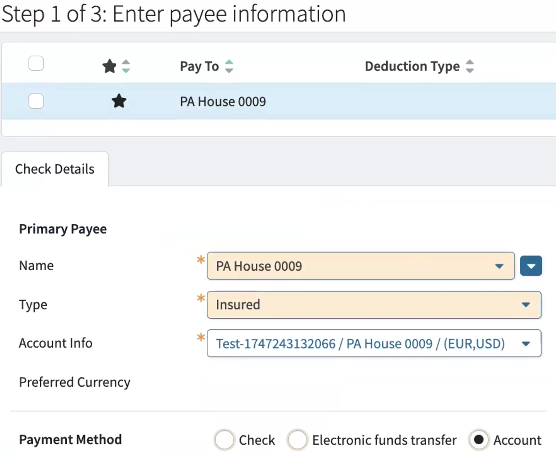
If the check currency differs from one of the applicable currencies for the account, a validation error appears in ClaimCenter, and check creation is prevented.
Workers' Compensation FROI template (for Early Access customers only)
For a short demonstration of this feature, watch this video:
Vendor selection for Personal Auto FNOL template
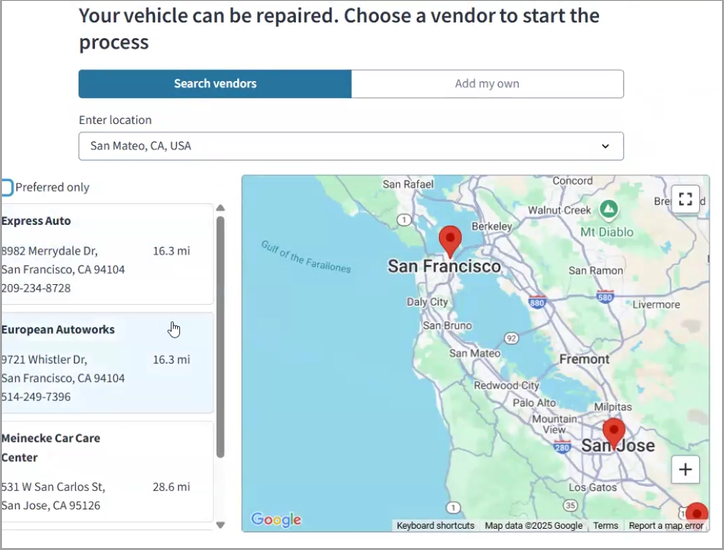
The vendor selection feature helps capture claimant vendor selection for auto body repairs with a pre-built question flow that can be included within the initial First Notice of Loss (FNOL) or sent as a secondary request. Policyholders can select a vendor in Google Maps or add their own. This feature is supported by a Guidewire Function.
Cloud API enhancements
New API endpoints are available for catastrophes.
New endpoints
As of this release, the following endpoints have been added to Cloud API. If you are doing a core update, you might want to add these endpoints to the appropriate role.yaml files to provide authorization to users and services as needed.
Admin API
- GET
/catastrophes - POST
/catastrophes - GET
/catastrophes/{catastropheId} - PATCH
/catastrophes/{catastropheId} - DELETE
/catastrophes/{catastropheId} - GET
/catastrophes/{catastropheId}/catastrophe-zones - POST
/catastrophes/{catastropheId}/catastrophe-zones - GET
/catastrophes/{catastropheId}/catastrophe-zones/{catastropheZoneId} - DELETE
/catastrophes/{catastropheId}/catastrophe-zones/{catastropheZoneId} - GET
/catastrophes/{catastropheId}/perils - POST
/catastrophes/{catastropheId}/perils - GET
/catastrophes/{catastropheId}/perils/{catastrophePerilId} - PATCH
/catastrophes/{catastropheId}/perils/{catastrophePerilId} - DELETE
/catastrophes/{catastropheId}/perils/{catastrophePerilId}
Catastrophes
You can query for, create, modify, and delete catastrophes through Cloud API. You can also query for, create, and delete catastrophe zones through Cloud API. You can also query for, create, modify, and delete catastrophe perils through Cloud API.