Quote emails and reminders in Sales Portal

Consumer Sales Portal sends quote details emails and reminder emails using configured email templates and reminder tasks.

When a Consumer Sales Portal calls the /applications/{resourceId}/consumerEmailRequest API, the system performs the following steps:
  1. It generates a request to send an email with quote details to the email address on the specified quote.
  2. It uses the Email Consumer Portal Quote template to generate the first email that is sent to the consumer.
  3. It uses the Consumer Portal Quote Reminder task (ApplicationTask2035) to trigger the email reminder.
  4. It uses the Email Consumer Portal Quote Reminder template to generate the email that reminds the consumer of their open or incomplete quote.

Configure quote emails in Sales Portal

Configure product rules and email settings to enable Consumer Sales Portal quote notification and reminder emails.

Procedure

  1. For each product, add or verify the consumer-portal coderef is defined in the cw (country-wide) or state-specific product list.xml file.
    ...
    <coderef name="consumer-portal">
      <options key="email-template">
        <option value="ConsumerEmailQuote" name="Quote" />
        <option value="ConsumerEmailQuoteReminder" name="Reminder" />
      </options>
    </coderef>
  2. For each product, add or verify that the APIConsumerEmail-Reminder rule is defined in the cw (country-wide) or state-specific product rule.xml file.
    ...
      <!-- Rules related to Consumer Portal -->
        <ProductRule id="id" RuleTypeCd="APIConsumerEmail-Reminder" Processor="java" 
              RuleSource="com.iscs.uw.api.rule.ConsumerPortalQuoteReminderTask" />
    </ProductRules>
  3. For each product, add or verify that the APIConsumerEmail sequence is defined in the cw (country-wide) product services.xml file.
    ...
      <sequence name="APIConsumerEmail">
        <action type="service" name="UWRuleHandler" param="APIConsumerEmail-Reminder" />
      </sequence>
    </sequences>
  4. Configure the Consumer Sales Portal URL in the following files:
    1. In web/APP-INF/mda/template/api-settings.xml, configure the local ConsumerPortalURL.
      <?xml version="1.0" encoding="UTF-8"?>
      <!--
      	ConsumerPortalURL = URL to consumer portal
      -->
      <APISettings ConsumerPortalURL="portalurl" >
      </APISettings>
      The ConsumerPortalURL setting is used by the email templates to provide the consumer a link to the Consumer Sales Portal.
    2. In the scripts/config.properties for each deployment environment, configure the CONSUMER_PORTAL_URL.
      ...
      #API Settings
      CONSUMER_PORTAL_URL="portalurl"

What to do next

While default email templates are available in the base configuration, you can configure the content of the email.

Configuring quote email content

Configure consumer email templates by specifying email content, sender information, and portal URL settings.

The cw product list.xml file includes the default list of consumer email templates. However, you can configure the email templates to be product-specific.

List of email templates for a product

The list.xml defines the templates that will be used for the product version

...
  <coderef name="consumer-portal">
    <options key="email-template">
      <option value="ConsumerEmailQuote" name="Quote" />
      <option value="ConsumerEmailQuoteReminder" name="Reminder" />
    </options>
  </coderef>

Files that generate email content

A combination of the following files generate the email content.
email templates (.vtl)
The body text of the quote email is defined in the /uw/api/rule/consumer-email-quote.vtl. The body text of the quote reminder email is defined in the /uw/api/rule/consumer-email-quote-reminder.vtl.
Note: You can configure these VTL files to include the following objects: Application, portalURL, and retrieveQuoteURL.
email.xml
The Subject, SenderName, and SenderAddress can be configured in email.xml file. The settings in this file can be product-specific.
api-settings.xml and config.properties
The Consumer Sales Portal URL which can be included in the email is defined in web/APP-INF/mda/template/api-settings.xml. During deployment, the Consumer Sales Portal URL setting in /scripts/config.properties overrides the setting in api-settings.xml.

Quote Email Examples
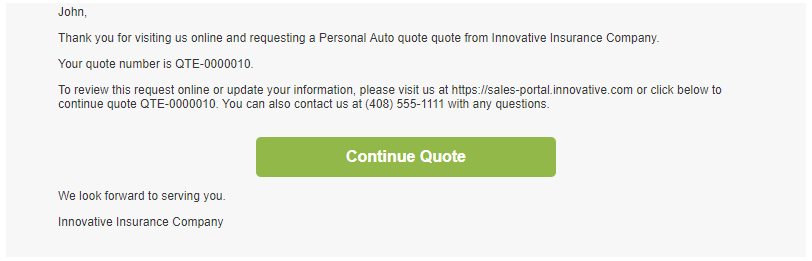
By default, the quote details email includes the quote number, a URL to the portal, contact information, and a link to continue the quote.
Sample quote details email.
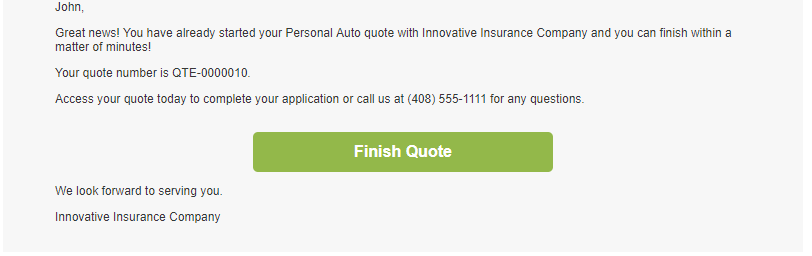
By default, the quote reminder email includes the quote number, contact information, and a link to finish the quote.
Sample quote reminders email.

Quote reminder emails in Sales Portal

Consumer Sales Portal sends reminder emails up to three times at configurable intervals for incomplete quotes.

After the /applications/{resourceId}/consumerEmailRequest API triggers an email to the consumer, the Consumer Portal Quote Reminder task (ApplicationTask2035) is created in the system. This task is a system-wide, reserved task and it cannot be customized per product.

The Consumer Portal Quote Reminder task sends the consumer a email reminder 10 days after the task is created. After a reminder email is sent, another Consumer Portal Quote Reminder task is generated unless the consumer has already received 3 reminder emails.

You can configure the number of days between reminders and the number of reminder emails.

Configure quote reminder emails

Configure the number of days between quote reminder emails and maximum reminder count.

About this task

The email reminder settings are system-wide. They cannot be configured to be product-specific.

Procedure

  1. If you do not already have an application task.xml file in your build-out, create a copy of the \uw\app\model\template\task.xml and register the new task template with the UWApplication package namespace and the task-template repository.
  2. Open the uw\app\model\template\task.xml in your build-out, and verify that the task template includes ApplicationTask2035.
    ...
    <TaskTemplate
      id='ApplicationTask2035'
      Name='Consumer Portal Quote Reminder'
      Priority='1'
      PriorityOverrideInd='No'
      Description='Send a Consumer Portal quote reminder email'
      DescriptionOverrideInd='No'
      DefaultOwner='System'
      DefaultOwnerCd='User'
      DefaultOwnerOverrideInd='No'
      WorkDtDays='10'
      WorkDtOverrideInd='No'
      Text='Send a Consumer Portal quote reminder email'
      TextOverrideInd='No'
      CriticalDtDays=''
      CriticalDtBusinessInd='No'
      CriticalDtOverrideInd='No'
      CriticalDtInd='No'
      ReminderDtDays='0'
      ReminderDtBusinessInd=''
      ReminderDtOverrideInd='No'
      ReportTo=''
      ReportToCd=''
      ReportToOverrideInd='No'
      RepeatingInd=''
      RepeatingOverrideInd='No'
      WorkRequiredInd='Yes'
      DeactivationDt='29991231'
      CompleteRequiredInd='No'
      TaskTypeCd='Automatic'
      Category=''>
      <TaskRule id="consumer-portal-quote-reminder-email" RuleTypeCd="System" Processor="java"
            RuleSource="API::ConsumerPortalQuoteReminderEmail::none::none">
        <Param Name="MaxReminders" Value="3" />
      </TaskRule>
      <TaskRule id="application-task-process-delete" RuleTypeCd="Service" Processor="velocity" 
            RuleSource="UWRule::rule::none::application-task-process-delete.vtl" />
    </TaskTemplate>
    ...
  3. Configure one or more of the following parameters for the task:
    OptionDescription
    WorkDtDays Number of days to wait before triggering the reminder task after the initial email is sent to email address on the quote. Default is 10.
    MaxReminders Number of reminders emails to send for each quote. Default is 3.