Cloud API authentication flow for services with user context
The following diagram identifies the flow of authentication and authorization information for services with user context. Colors are used in the following ways:
- Orange - credentials information
- Blue - endpoint access information
- Green - resource access information
- Red - proxy user and session user information
Some values are used to determine multiple types of access. These values initially appear as black (when they do not apply to a single type of access), and then later appear in one or more specific colors (to reflect the value is being used at that point in the process for a specific type of access).
Services with user context: internal users
Here is a ClaimCenter example: an API call is triggered by the Acme FNOLReporter service on behalf of Andy Applegate, who is an internal user (an adjuster).
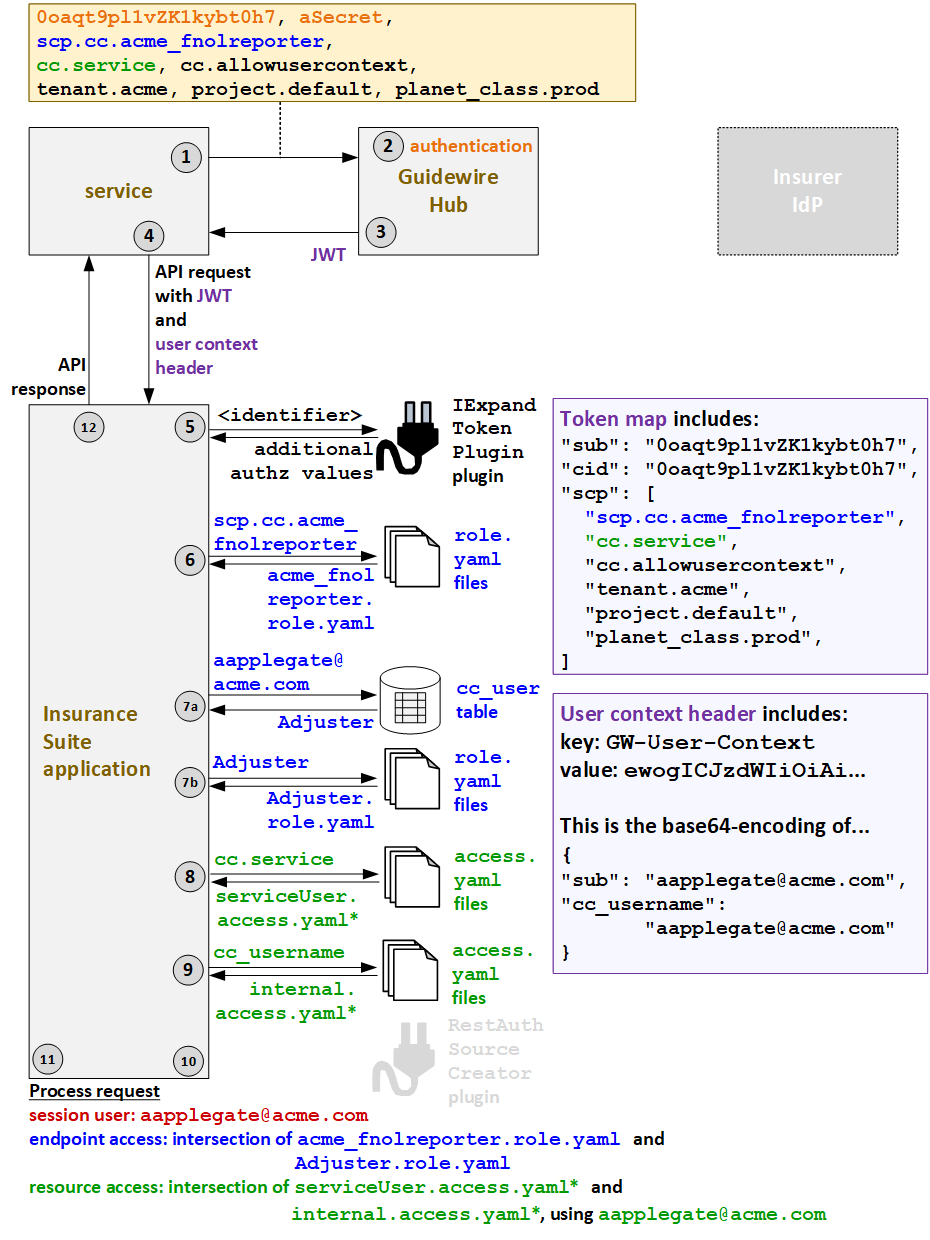
- When FNOLReporter triggers an API call, it must first request a JWT from Guidewire Hub.
The request for the JWT includes the client ID (
0oaqt9pl1vZK1kybt0h7), the secret (aSecret), the application's API role (scp.cc.acme_fnolreporter), the application's resource access strategy (cc.service), the fact that the call will be made for a user (cc.allowusercontext) and additional deployment information (tenant.acme,project.default,planet_class.prod). - Guidewire Hub authenticates the services based on the client ID and secret. It also verifies that the API role and resource access strategy provided in the request match what was specified when the service was registered with Guidewire Hub.
- Guidewire Hub generates a JWT and sends it to the service. This JWT includes the client
ID (
cid) and ascptoken claim which names the API role (scp.cc.acme_fnolreporter), the resource access strategy (cc.service), thecc.allowusercontextvalue (which indicates that user information is specified in an additional user context header), and additional deployment information. - The service sends the API request to ClaimCenter along with the JWT and a user context
header that identifies the user (
aapplegate@acme.com), the user's resource access strategy (cc_username), and resource access ID (aapplegate@acme.com). - ClaimCenter extracts the information in the JWT into a token map. Then, the
IExpandTokenPlugin plugin calls any relevant authorization applications to retrieve any
relevant additional auth values that must be added to or modified in the token map. (The
IExpandTokenPlugin plugin can affect only the information that normally comes in the JWT.
It cannot affect information in a user context header. Therefore, for services with user
context, an insurer could choose to retrieve either the service's API role (such as
scp.cc.acme_fnolreporter) or the service's resource access strategy name (cc.service) using the IExpandTokenPlugin plugin. But the API roles and resource access IDs for the user must be in the user context header when the call is sent to ClaimCenter.) - ClaimCenter must determine the endpoint access at both the service level and the user
level. It starts at the service level. Based on the API role value in the JWT
(
scp.cc.acme_fnolreporter), theacme_fnolreporter.role.yamlAPI role file is used to define the service-level access. - Next, ClaimCenter determines the user-level endpoint access.
- Using the user name in the user context header
(
aapplegate@acme.com), ClaimCenter queries for the user roles that this user has. One role is returned:Adjuster. - Based on the returned role, the
Adjuster.role.yamlAPI role file is used to define the user-level access.
- Using the user name in the user context header
(
- ClaimCenter must also determine the resource access at the service level and the user
level. It starts with the service-level resource access strategy. Based on the resource
access strategy value in the JWT (
cc.service), it grants service-level resource access as defined in theserviceUseraccess.yamlfiles. (* ClaimCenter starts withserviceUser_ext-1.0.access.yaml, but this file references additionalaccess.yamlfiles whose name starts with "serviceUser".) - ClaimCenter determines the user-level resource access strategy. Based on the resource
access strategy value in the user context header (
cc_username), it grants user-level resource access as defined in theinternalaccess.yamlfiles. (* ClaimCenter starts withinternal_ext-1.0.access.yaml, but this file references additionalaccess.yamlfiles whose name starts with "internal".) - Proxy user access is not relevant for services with user context when the user is an internal user.
- ClaimCenter processes the request.
- The session user is the internal user:
aapplegate@acme.com. - The endpoint access is the intersection of the endpoints and operations defined
granted at the service level (
acme_fnolreporter.role.yaml) and at the user level (Adjuster.role.yaml). Endpoints, operations, and fields must be listed at both levels to be available to the call. - The resource access is the intersection of the resources accessible to the service
(as defined in the
serviceUseraccess.yaml) and the resources available to the user (as defined in theinternalaccess.yamlusing the resource access ID ofaapplegate@acme.com). In the base configuration, theserviceuseraccess.yamlfiles make all resources available. Therefore, logically speaking, the service-level resource access does not specify any restrictions. The call can access any resource provided it is available through the user-level resource access.
- The session user is the internal user:
- ClaimCenter provides the response to the initial call.
acme_fnolreporter.role.yaml and Adjuster.role.yaml file
because those roles would be relevant to ClaimCenter. A relevant example of an intersection
between role for PolicyCenter could be between acme_billingapp.role.yaml
and Underwriter.role.yaml, and a elevant example of an intersection between
relevant role file for BillingCenter could be between
acme_lockbox.role.yaml and BillingRep.role.yaml.Services with user context: external users
Here is another ClaimCenter example: an API call is triggered by the Acme FNOLReporter service on behalf of Ray Newton, who is an external user.
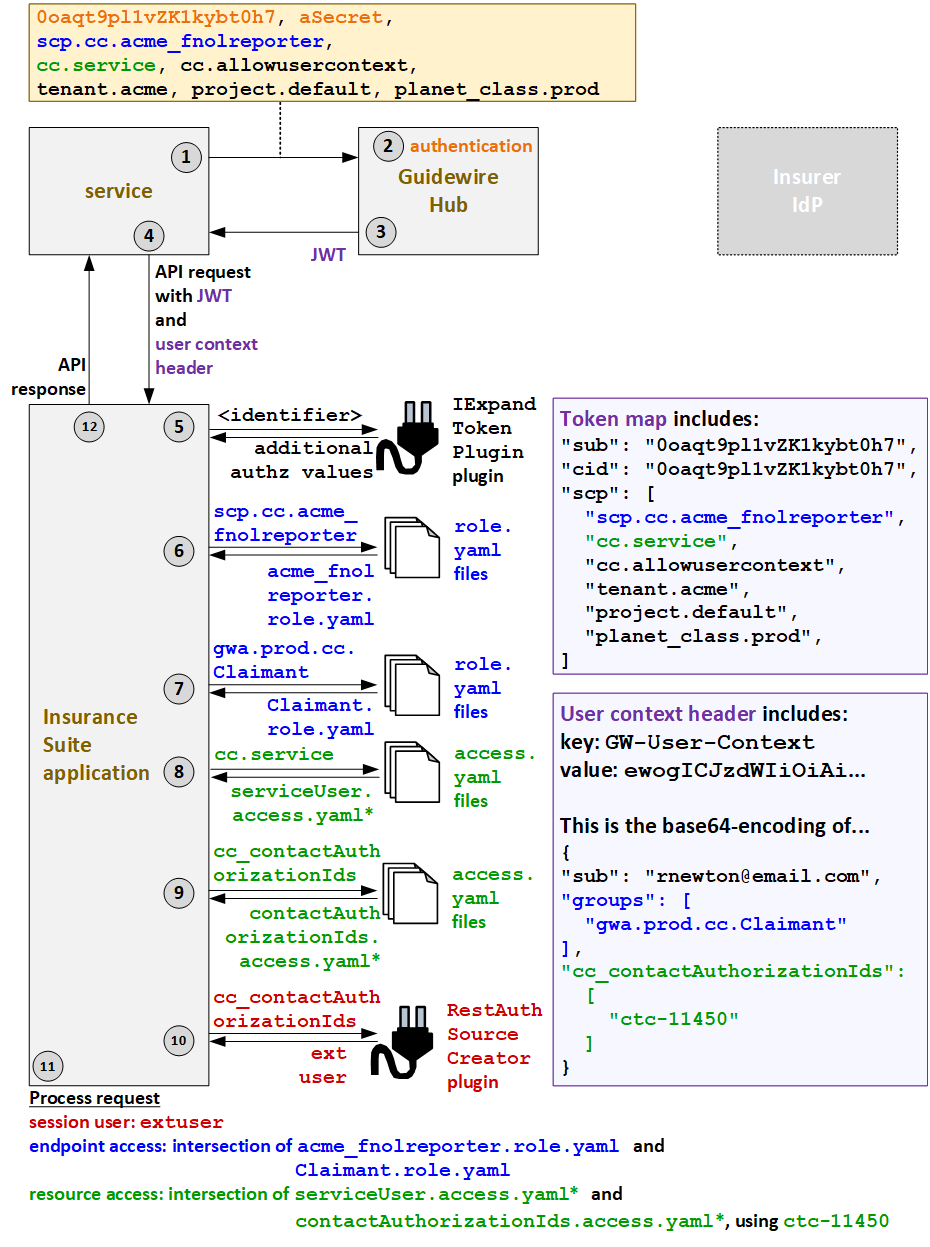
- When FNOLReporter triggers an API call, it must first request a JWT from Guidewire Hub.
The request for the JWT includes the client ID (
0oaqt9pl1vZK1kybt0h7), the secret (aSecret), the application's API role (scp.cc.acme_fnolreporter), the application's resource access strategy (cc.service), the fact that the call will be made for a user (cc.allowusercontext) and additional deployment information (tenant.acme,project.default,planet_class.prod). - Guidewire Hub authenticates the services based on the client ID and secret. It also verifies that the API role and resource access strategy provided in the request match what was specified when the service was registered with Guidewire Hub.
- Guidewire Hub generates a JWT and sends it to the service. This JWT includes the client
ID (
cid) and ascptoken claim which names the API role (scp.cc.acme_fnolreporter), the resource access strategy (cc.service), thecc.allowusercontextvalue (which indicates that user information is specified in an additional user context header), and additional deployment information. - The service sends the API request to ClaimCenter along with the JWT and a user context
header that identifies the user (
rnewton@email.com), the user's resource access strategy (cc_contactAuthorizationIds), and resource access ID (ctc-11450). - ClaimCenter extracts the information in the JWT into a token map. Then, the
IExpandTokenPlugin plugin calls any relevant authorization applications to retrieve any
relevant additional auth values that must be added to or modified in the token map. (The
IExpandTokenPlugin plugin can affect only the information that normally comes in the JWT.
It cannot affect information in a user context header. Therefore, for services with user
context, an insurer could choose to retrieve either the service's API role (such as
scp.cc.acme_fnolreporter) or the service's resource access strategy name (cc.service) using the IExpandTokenPlugin plugin. But the API roles and resource access IDs for the user must be in the user context header when the call is sent to ClaimCenter.) - ClaimCenter must determine the endpoint access at both the service level and the user
level. It starts at the service level. Based on the API role value in the JWT
(
scp.cc.acme_fnolreporter), theacme_fnolreporter.role.yamlAPI role file is used to define the service-level access. - Next, ClaimCenter determines the user-level endpoint access. Based on the contents of
the
groupstoken claim in the user context header (gwa.prod.cc.Claimant), theClaimant.role.yamlAPI role file is used to define the user-level access. - ClaimCenter must also determine the resource access at the service level and the user
level. It starts with the service-level resource access strategy. Based on the resource
access strategy value in the JWT (
cc.service), ClaimCenter grants service-level resource access as defined in theserviceUseraccess.yamlfiles. (* ClaimCenter starts withserviceUser_ext-1.0.access.yaml, but this file references additionalaccess.yamlfiles whose name starts with "serviceUser".) - Next, ClaimCenter determines the user-level resource access strategy. Based on the
resource access strategy value in the user context header
(
cc_contactAuthorizationIds), it grants user-level resource access as defined in thecontactAuthorizationIdsaccess.yamlfiles. (* ClaimCenter starts withcontactAuthorizationIds_ext-1.0.access.yaml, but this file references additionalaccess.yamlfiles whose name starts with "contactAuthorizationIds".) - To determine which proxy user to assign to the session, ClaimCenter calls the
RestAuthenticationSourceCreatorplugin. The user context header specified a resource access strategy ofcc_contactAuthorizationIds. So, the plugin returns the proxy user for external users:extuser. - ClaimCenter processes the request.
- The session user is the proxy external user:
extuser. - The endpoint access is the intersection of the endpoints and operations defined
granted at the service level (
acme_fnolreporter.role.yaml) and at the user level (Claimant.role.yaml). Endpoints, operations, and fields must be listed at both levels to be available to the call. - The resource access is the intersection of the resources accessible to the service
(as defined in the
serviceUseraccess.yaml) and the resources available to the user (as defined in thecontactAuthorizationIdsaccess.yamlusing the resource access ID ofctc-11450). In the base configuration, theserviceUseraccess.yamlfiles make all resources available. Therefore, logically speaking, the service-level resource access does not specify any restrictions. The call can access any resource provided it is available through the user-level resource access.
- The session user is the proxy external user:
- ClaimCenter provides the response to the initial call.
acme_fnolreporter.role.yaml and Claimant.role.yaml file
because those roles would be relevant to ClaimCenter. A relevant example of an intersection
between role for PolicyCenter could be between acme_billingapp.role.yaml
and Account_Holder.role.yaml, and a elevant example of an intersection
between relevant role file for BillingCenter could be between
acme_lockbox.role.yaml and
Account_Contact.role.yaml.