TeamCity builds
Each application comes with a dedicated TeamCity project.
TeamCity builds for InsuranceSuite
Each InsuranceSuite application comes with a dedicated TeamCity project that includes the following builds:
-
Verifies your code against Guidewire Cloud Standards.
-
Runs gwb tasks, builds metadata, and publishes an InsuranceSuite application as an artifact.
-
Dockerizes an InsuranceSuite application and makes it available for deployment.
-
Server Tests
Runs test suites.
-
Verify Blue/Green Compatible
Verifies if a blue/green deployment is possible for an InsuranceSuite application.
-
Update Test
Updates the InsuranceSuite application codebase to a ski release. This build is run by Guidewire.
This TeamCity build is deprecated.
Build dependencies
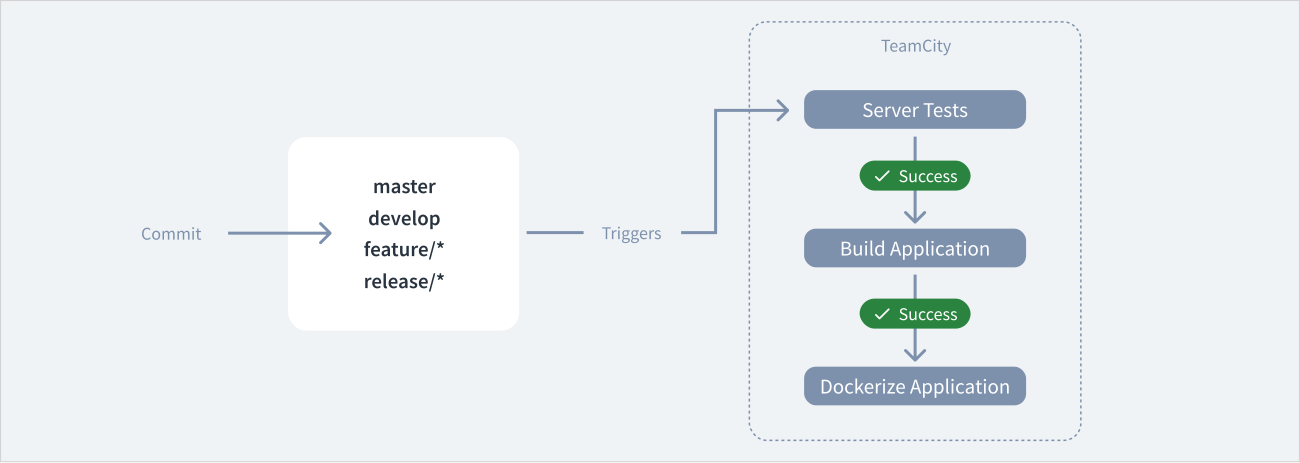
By default, when you commit changes to master, develop, feature/*, and release/* branches, you trigger a sequence of TeamCity builds in the following order:
- When a commit is made, Server Tests run automatically for the modified branch.
- When Server Tests pass, Build Application runs automatically.
- When Build Application passes, Dockerize Application runs automatically.
TeamCity builds for EnterpriseEngage
All the EnterpriseEngage applications come with a dedicated TeamCity project called DigitalPortals. The project includes the following builds:
-
Verifies changes to the code that you commit to a branch.
Triggered automatically. -
Runs build tasks, builds metadata, and publishes an EnterpriseEngage application as a Docker image.
Triggered manually. -
Deploy
Deploys EnterpriseEngage applications to a planet.
Triggered manually.
This TeamCity build is deprecated. Use the Planets app or EE Deployments API instead. -
Undeploy
Undeploys EnterpriseEngage applications from a planet.
Triggered manually.
This TeamCity build is deprecated. Use the Planets app or EE Deployments API instead.
You can run builds from this project for all or selected EnterpriseEngage applications.
Customize build configuration
You can use the CI/CD Manager API to customize the configuration of the TeamCity builds, their triggers, and parameters.
Schedule builds
You can schedule TeamCity builds to run automatically at a specific time. For details, see Schedule builds.