Change producer mid-term on a policy
In an agent portal, agents can transfer control of an existing policy from the current agent to another agent.
You can transfer control of a policy to another producer by processing a Producer Change transaction. This transaction can be done mid-term. After you transfer control of a policy to another producer, you can no longer access or modify the policy.
- Identify the policy transaction.
- Gather the producer change details.
- Submit and process the producer change.
Identify the policy transaction
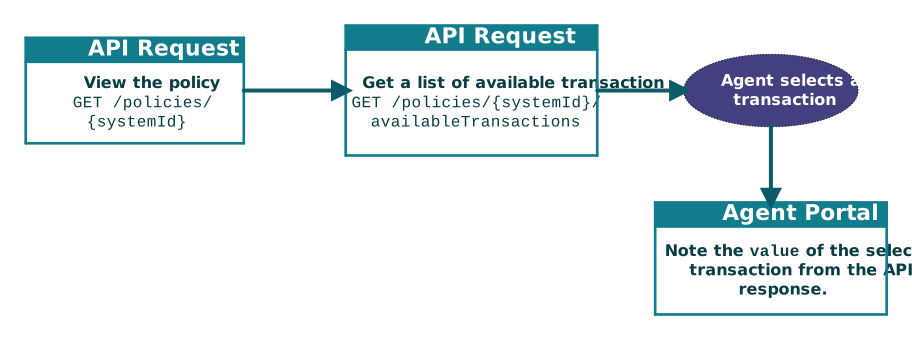
After you select a Producer Change transaction, the agent portal must note the code value of the transaction, because this code value is required in a later step to request the transaction.
- View the policy details:
- The portal submits the following API
call:
GET /policies/systemid - The portal displays the policy details provided in the response.
- The portal submits the following API
call:
- View the list of available transactions:
- The portal submits the following API
call:
GET /policies/systemid/availableTransactions - The portal returns a list of available transactions based on the API response.
- The agent selects the
Producer Changetransaction. - From the API response, the portal uses the value of the
Producer Changeoption.[ ... { "value": "Producer Change", "name": "Producer Change" }, { "value": "Endorsement", "name": "Endorsement" }, ... ]
- The portal submits the following API
call:
Gather the producer change details
- newProducerRef
- The agent portal calls one of the following APIs to determine valid
newProducerRefvalues:GET /providers?providerTypeCd=Producer&inNetworkOnly=true
or many other options within the GET /providers endpoint to find the producer to which you want to change. The agent then selects the appropriate code.GET /providers?providerTypeCd=Producer&inNetworkOnly=true&agencyCd=MyAgency - newSubProducerCd
- Producer selected from the API endpoint might have sub-producers. If so,
the portal can select the sub-producer that will control the policy.
This value, if it exists, is listed in the
subProducersobject of the response. Determine the validSubProducer.subProducerCdand use the value here. - effectiveDate
- Date on which the producer change is to take place.
- description
- Optional short description of the reason for the mid-term producer change.
- additionalDescription
- Optional detailed description for the mid-term producer change.
Submit and process the Producer Change transaction request
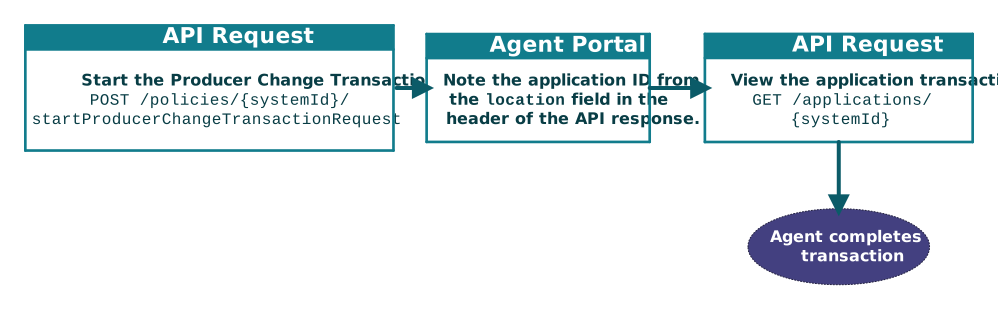
- Start the producer change transaction request:
- The portal executes the following API request:
Endpoint POST /policies/systemId/startProducerChangeTransactionRequestExample Request Body { "newProducerRef": "15", "newSubProducerCd": "", "effectiveDate": "2024-12-09", "description": "Producer is moving to another agency", "additionalDescription": "This policy needs to switch to the new producer right away." }Provide the
valueof the Producer Change transaction, such as thenewProducerRefandnewSubProducerCd, from the previous endpoint GET /providers.Note: The other values differ based on agent selections. - From the API response, note the
systemIDof the application in the location header:... location: https://hostname/coreapi/v5/applications/systemID ...
- The portal executes the following API request:
- View the new application
- The portal executes the following API
call:
GET /applications/systemid - The portal displays the Producer Change transaction details provided in the API response.
- The agent completes the transaction.
- The portal executes the following API
call:
What to do next
To complete the change and issue the policy, see Issue policy or refer quote to agent.