Add attachments in a service portal
The Consumer Service Portal (Service Portal) enables policyholders
to add attachments to claims and policies. Adding an attachment is a multi-stage process:
- Use the
multifileuploadservlet to upload one or more files to the InsuranceNow staging location. - Get the location and name of the attachment from the
multifileuploadresponse. - Add a reference to the attachment from the loss event, claim, or policy that points to the uploaded file(s).
- Adding an attachment to a loss event.
- To add an attachment to a loss event:
- The portal calls
POST /multifileupload/v3to upload the attachment. - The portal gets the attachment's location and file name from the response object.
- The portal calls
POST /claimeventsto add a reference to the attachment to the claim.
- The portal calls
- Adding an attachment to an existing claim
- To add an attachment to a claim:
- The portal calls
POST /multifileupload/v3to upload the attachment. - The portal gets the attachment's location and file name from the response object.
- The portal calls
POST /claims/systemId/documentsto add a reference to the attachment to the claim.
- The portal calls
- Add an attachment to a policy
- To add an attachment to a policy:
- The portal calls
POST /multifileupload/v3to upload the attachment. - The portal gets the attachment's location and file name from the response object.
- The portal calls
POST
                /policies/systemId/documents
to add a reference to the attachment to the policy.
- The portal calls
Note: When you upload two files in a single attachment, use the
compositeFile section of the request body to indicate the file names.
For file formats that can be converted to PDF, InsuranceNow creates a single PDF file, with
each attachment starting on a new page. For details of attachment behavior, see “Attachments”
in the
Application Guide.
Example: Add an attachment to a policy
This example provides the steps to add one or more files as an attachment to a policy. Similar steps apply to adding an attachment to a claim.
- Execute the following API call to upload one or more files to the InsuranceNow staging
location:
API POST /multifileupload/v3Request Body Form data with file upload. The following JavaScript example shows one way to upload one or more files to the InsuranceNow staging location prior to performing the actual attachment:<form id="formElem"> Upload: <input type="file" name="upload" accept="image/*"> <input type="submit"> </form> <script> formElem.onsubmit = async (e) => { e.preventDefault(); // First upload the selected file(s) to the InsuranceNow staging area (adjust the URL) let response = await fetch('/multifileupload/v3', { method: 'POST', body: new FormData(formElem) }); let result = await response.json(); // If upload successful, use the filename in "result" for the attachment operation . . . }; </script>You can test the parameters you pass by using Postman, as shown in the following example:The API response includes the path name of the file or files you need to reference when submitting the API to create the attachment.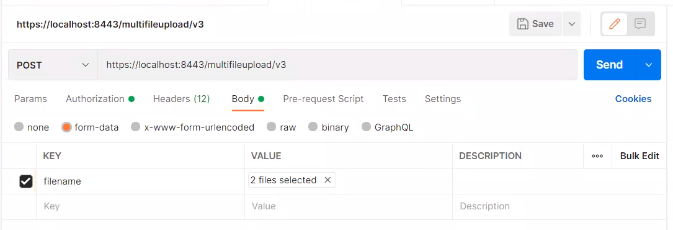
For example:{ "files": [ { "name": "joystick.png". "size": 4321 "thumbnailUrl": "innovation?rq=File&Filename=/data/upload/joystick-thumb.png" } ] }Note that each file you included in the upload is referenced in a separate sub-element under the
"files"element.If you are creating a Java implementation, the following example shows one way to accomplish the multifile upload:import okhttp3.MultipartBody; import okhttp3.RequestBody; import okhttp3.*; import java.io.File; public class mycode { OkHttpClient httpClient = new OkHttpClient.Builder().build(); RequestBody createFileRqBody(String filePath, String mediaType) { // mediaType example: "image/jpeg" File testFile = new File(filePath); String fileName = testFile.getName(); RequestBody requestBody = new MultipartBody.Builder() .setType(MultipartBody.FORM) .addFormDataPart("image", fileName, RequestBody.create(okhttp3.MediaType.parse(mediaType), testFile)) .build(); return (requestBody); } Response executeMultipart(String url, String method, Headers headers, RequestBody multipartBody) { HttpURL urlObj = HttpURL.parse(url); Request okHttpRequest = new Request.Builder() .url(urlObj) .method(method, multipartBody) .headers(headers) .build() return (httpClient.newCall(okHttpRequest).execute()); } // TODO: Create a headers object with authentication settings } - The service portal performs the following steps to identify the attachment template:
- The portal submits the following API call to get a list of attachment templates:
Endpoint GET /attachmentTemplates?container=ContainerType&containerRef=containerSystemIDExample:
GET /attachmentTemplates?container=Policy&containerRef=484 - The service portal provides the policyholder with a list of available attachment templates, based on the API response, and the policyholder selects one.
- From the API response, the service portal applies the id of
the attachment template that the policyholder wants to use to create the attachment.
For example:
{
  "attachmentTemplateListItems": [
    {
      "id": "HOPAPolicyAttachment0001",
      "name": "Proof of Prior Insurance",
      "_links": [
        {
          "rel": "self",
          "href": "https://hostname/coreapi/v5/attachmentTemplates/HOPAPolicyAttachment0001?
                container=Policy&containerRef=484"
        }
      ]
    },
    ...
    {
      "id": "PolicyAttachment3003",
      "name": "Miscellaneous",
      "_links": [
        {
          "rel": "self",
          "href": "https://hostname/coreapi/v5/attachmentTemplates/PolicyAttachment3003?
                container=Policy&containerRef=484"
        }
      ]
    },
...
- The portal submits the following API call to get a list of attachment templates:
- To add an attachment, the service portal performs one of the following steps:
- To upload one file as an attachment, it executes the following API call::
Endpoint POST /policies/systemId/documentsExample Request Body { "templateId": "PolicyAttachment3003", "description": "Picture", "filename": "joystick.png", "memo": "Accident picture" }- The templateId is the id associated with the attachment template.
- The filename is the name
field from the
multipfileupload/v3API response.
Note: The values will differ based on user input. - To upload multiple files in a single attachment, it executes the following API
call::
Endpoint POST /policies/systemId/documentsExample Request Body { "templateId": "PolicyAttachment3003", "description": "Pictures", "filename": "", "memo": "Accident picture", "compositeFile" : [ { "filename" : "AttachmentA.jpg" }, { "filename" : "AttachmentB.jpg" } ] }- Pass an empty string in the initial filename
parameter. In the example above,
""indicates an empty string. - The filename fields in the
compositeFilesection of the request body are the name fields from themultipfileupload/v3API response.
Note: The values will differ based on user input. - Pass an empty string in the initial filename
parameter. In the example above,
- To upload one file as an attachment, it executes the following API call::