Get builds and their artifacts
You can use the Build Management API to get build definitions, build details, a build number, and artifacts for a given build.
All sample requests in this guide include the following path parameters:
| Parameter name | Description |
|---|---|
tenantId | Tenant ID. |
starId | ID of a star. |
applicationName | Name of an application. |
buildType | Type of builds that are available for a given application. You can use the following values for respective applications: - Extension Layer (EA): Alpine_Build, Alpine_Install, Alpine_ServerTests - InsuranceSuite: IS_Test, IS_StaticAnalysis, IS_UpdatabilityCheck, IS_SmokeTests, IS_BehaviorTests, IS_Build, IS_ApiTests, IS_Dockerize, IS_Sentinel, IS_VerifyBlueGreen, IS_BuildSolr, IS_DockerizeSolr, IS_SecureTokenVerification - Guidewire Testing Framework: GT_LoadTests, GT_FrameworkUiTests, GT_ApiTests, GT_FrameworkTests - Jutro Digital Platform: Jutro_Test, Jutro_BuildAndDockerize, Jutro_UpgradeJutroCore, Jutro_WebVitals, Jutro_E2ETests - EnterpriseEngage: Portals_Test, Portals_Build, Portals_Deploy, Portals_Undeploy - Shared Packages: Shared_CodeStandardsVerifier, Shared_Publish, Shared_Test, Shared_UpgradeJutro |
buildNumber | Number of the build for which you want to get details or artifacts. |
artifactId | ID of the artifact for which you want to get the URL. |
Get a list of build definitions
Build definitions are actions available for a particular application. They consist of information about an application and a build type. You can check which build definitions are available for your applications.
To get a list of build definitions available for a star, send the following GET request:
curl -X 'GET' \
  '{baseURL}/api/v1/tenants/{tenantId}/stars/{starId}/build-definitions' \
  -H 'accept: application/json' \
  -H 'Authorization: Bearer ${ACCESS_TOKEN}'
A response contains a JSON object with a list of build definitions available for a star.
{
  "applicationsWithBuildDefinitions": [
    {
      "application": {
        "name": "ClaimCenter",
        "type": "ClaimCenter"
      },
      "buildDefinitions": [
        {
          "buildType": "IS_Build",
          "displayName": "Build And Package Solr",
          "description": "Build and package Solr artifacts."
        }
      ]
    }
  ]
}
Get a list of builds
A build contains information about a build definition and number. Based on the available build definitions, you can access build history to check all the builds for a given application or build type. With a list of builds, you can check a build number for a specific build to get its details.
The build history doesn't include personal builds. Personal builds are user-specific and aren't considered a part of the shared build history.
When a new build is waiting to be run, you won't get this build number. If you want to check the build details and status, get build details by its ID.
To get a list of builds, send the following GET request:
curl -X 'GET' \
  '{baseURL}/api/v1/tenants/{tenantId}/stars/{starId}/builds' \
  -H 'accept: application/json' \
  -H 'Authorization: Bearer ${ACCESS_TOKEN}'
You can narrow down the results using the following parameters:
-
applicationName -
buildType -
buildNumber -
status -
startedSinceIf you provide only the
startedSinceparameter, the response will return a list of the most recent builds that started running no earlier than the date specified in thestartedSinceparameter.If both the
startedSinceandstartedUntilparameters aren't provided, the response will contain a list of the most recent builds. -
startedUntilIf you provide only the
startedUntilparameter, the response will contain only builds that started before the date specified in thestartedUntilparameter.If both the
startedSinceandstartedUntilparameters aren't provided, the response will contain a list of the most recent builds.
You can't provide the same value for both the startedSince and startedUntil parameters. In such a case, you'll get the 400 Request has an incorrect format error.
The status parameter can have the following values:
-
RUNNING -
QUEUED -
SUCCESS -
FAILED -
CANCELED -
FAILED_TO_START -
HANGINGThe
HANGINGstatus appears when the run duration of a build exceeds the estimates, and the build sends no new messages for some time. -
UNKNOWN
For example, to list all the builds for the ClaimCenter application with the SUCCESS status, send the following GET request:
curl -X 'GET' \
  '{baseURL}/api/v1/tenants/{tenantId}/stars/{starId}/builds?applicationName=ClaimCenter&status=SUCCESS'\
  -H 'accept: application/json' \
  -H 'Authorization: Bearer ${ACCESS_TOKEN}'
A response contains a JSON object with a list of builds available for the ClaimCenter application with the SUCCESS status.
{
  "page": 0,
  "pageSize": 25,
  "hasNext": true,
  "data": [
    {
      "id": 1,
      "application": {
        "name": "ClaimCenter",
        "type": "ClaimCenter"
      },
      "buildType": "IS_Build",
      "number": 1,
      "status": "SUCCESS",
      "statusMessage": "Success",
      "branch": "main",
      "queuedDate": "2024-12-02T13:39:41Z",
      "startDate": "2024-12-02T13:43:41Z",
      "finishDate": "2024-12-02T13:48:35Z",
      "triggered": {
        "type": "user",
        "username": "jdoe",
        "date": "2024-12-02T13:39:41Z"
      },
      "comment": null,
      "revisions": [
        {
          "vcsBranchName": "master",
          "version": "b136fe9c9e4a5242c59cb2ea846e4ba28c94759e"
        }
      ],
      "statistics": {
        "queuedDurationMillis": 185,
        "buildDurationMillis": 3250
      },
      "tags": ["e2e-test"]
    }
  ]
}
Build Management API uses pagination that allows to return builds in pages, with a default number of 25 builds for each page. You can customize the number of builds displayed for each page by providing a value from 1 to 1000 for the pageSize parameter. The response includes the hasNext boolean parameter that indicates whether more pages are available. Use the page and pageSize parameters to navigate the full build history.
Get build details
You can get details of a specific build with:
-
A build ID is a unique identifier within the CI/CD server instance and is automatically assigned to each build.
-
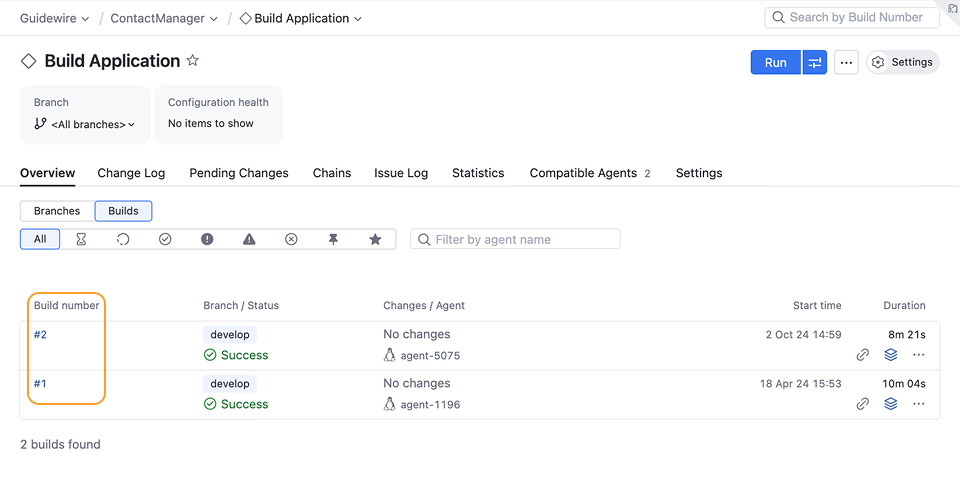
A build number is a unique identifier within a build definition. It's used in the build management system to track the build status and the software version that the build contains. The build number is assigned to the build once the build is running. The build number is used for build promotion and deployment to planets for InsuranceSuite Build # / Dockerize #.
In Build Management API, the build number corresponds to the build number used in TeamCity. When using Build Management API, include only number, without
#.
When you request build details using either build ID or number, you get the same build information. In case you don't have the build number yet, you can request build details with the ID.
Get build details by the build ID
By using the build ID, you can get details of a specific build for a specific star. You can use this request when a new build is waiting to be run and you don't have its build number yet.
To get details of a specific build, send the following GET request:
curl -X 'GET' \
  '{baseURL}/api/v1/tenants/{tenantId}/stars/{starId}/builds/{buildId}'\
  -H 'accept: application/json' \
  -H 'Authorization: Bearer ${ACCESS_TOKEN}'
A response contains a JSON object with a list of details about the specific build.
{
  "id": 1,
  "application": {
    "name": "ClaimCenter",
    "type": "ClaimCenter"
  },
  "buildType": "IS_Build",
  "number": 1,
  "status": "SUCCESS",
  "statusMessage": "Success",
  "branch": "main",
  "queuedDate": "2024-12-02T13:39:41Z",
  "startDate": "2024-12-02T13:43:41Z",
  "finishDate": "2024-12-02T13:48:35Z",
  "triggered": {
    "type": "user",
    "username": "jdoe",
    "date": "2024-12-02T13:39:41Z"
  },
  "comment": null,
  "revisions": [
    {
      "vcsBranchName": "master",
      "version": "b136fe9c9e4a5242c59cb2ea846e4ba28c94759e"
    }
  ],
  "statistics": {
    "queuedDurationMillis": 185,
    "buildDurationMillis": 3250
  },
  "tags": ["e2e-test"]
}
Get build details by the build number
You can get details of a specific build using its build number.
To get details of a specific build, send the following GET request:
curl -X 'GET' \
  '{baseURL}/api/v1/tenants/{tenantId}/stars/{starId}/applications/{applicationName}/build-types/{buildType}/builds/{buildNumber}'\
  -H 'accept: application/json' \
  -H 'Authorization: Bearer ${ACCESS_TOKEN}'
A response contains a JSON object with a list of details about the specific build.
{
  "id": 1,
  "application": {
    "name": "ClaimCenter",
    "type": "ClaimCenter"
  },
  "buildType": "IS_Build",
  "number": 1,
  "status": "SUCCESS",
  "branch": "main",
  "queuedDate": "2024-12-02T13:39:41Z",
  "startDate": "2024-12-02T13:43:41Z",
  "finishDate": "2024-12-02T13:48:35Z",
  "triggered": {
    "type": "user",
    "username": "jdoe",
    "date": "2024-12-02T13:39:41Z"
  },
  "comment": null,
  "revisions": [
    {
      "vcsBranchName": "master",
      "version": "b136fe9c9e4a5242c59cb2ea846e4ba28c94759e"
    }
  ],
  "statistics": {
    "queuedDurationMillis": 185,
    "buildDurationMillis": 3250
  },
  "tags": ["e2e-test"]
}
Get a list of artifacts
An artifact is a file or a set of files produced as the output of a build process. You can get a list of artifacts for a specified tenant, star, application name, build type, and build number. Then, you can use an artifact ID to get its URL and download an artifact.
To get a list of artifacts, send the following GET request:
curl -X 'GET' \
  '{baseURL}/api/v1/tenants/{tenantId}/stars/{starId}/applications/{applicationName}/build-types/{buildType}/builds/{buildNumber}/artifacts'\
  -H 'accept: application/json' \
  -H 'Authorization: Bearer ${ACCESS_TOKEN}'
A response contains a JSON object with a list of artifacts for the specified tenant, star, application name, build type, and build number. The response provides an artifact size in bytes.
{
  "artifacts": [
    {
      "id": "id",
      "file": "build/bc.war",
      "size": 100
    },
    {
      "id": "id",
      "file": "build/dictionary.zip",
      "size": 50
    }
  ]
}
Get an artifact URL
You can get a URL of a specific artifact by its ID for a specified tenant, star, application name, build type, and build number. You can use this URL to directly download the artifact.
The download URL expires after 15 minutes. If the downloading process starts before the expiration time, it will continue uninterrupted.
To get the artifact URL, send the following GET request:
curl -X 'GET' \
  '{baseURL}/api/v1/tenants/{tenantId}/stars/{starId}/applications/{applicationName}/build-types/{buildType}/builds/{buildNumber}/artifacts/{artifactId}/url'\
  -H 'accept: application/json' \
  -H 'Authorization: Bearer ${ACCESS_TOKEN}'
A response contains a JSON object with the artifact URL and the expiration time.
{
  "url": "https://bucket.s3.region.amazonaws.com/url.zip",
  "expirationTime": "2024-12-02T13:48:35Z"
}