Example flow for external users
The following diagram identifies the flow of authentication and authorization information for external users. Colors are used in the following ways:
- Orange - credentials information
- Blue - endpoint access information
- Green - resource access information
- Red - proxy user and session user information
Some values are used to determine multiple types of access. These values initially appear as black (when they do not apply to a single type of access), and then later appear in one or more specific colors (to reflect the value is being used at that point in the process for a specific type of access).
External account holder example
In the following example, an API call is triggered by Ray Newton, who is an external user, using a browser-based application.
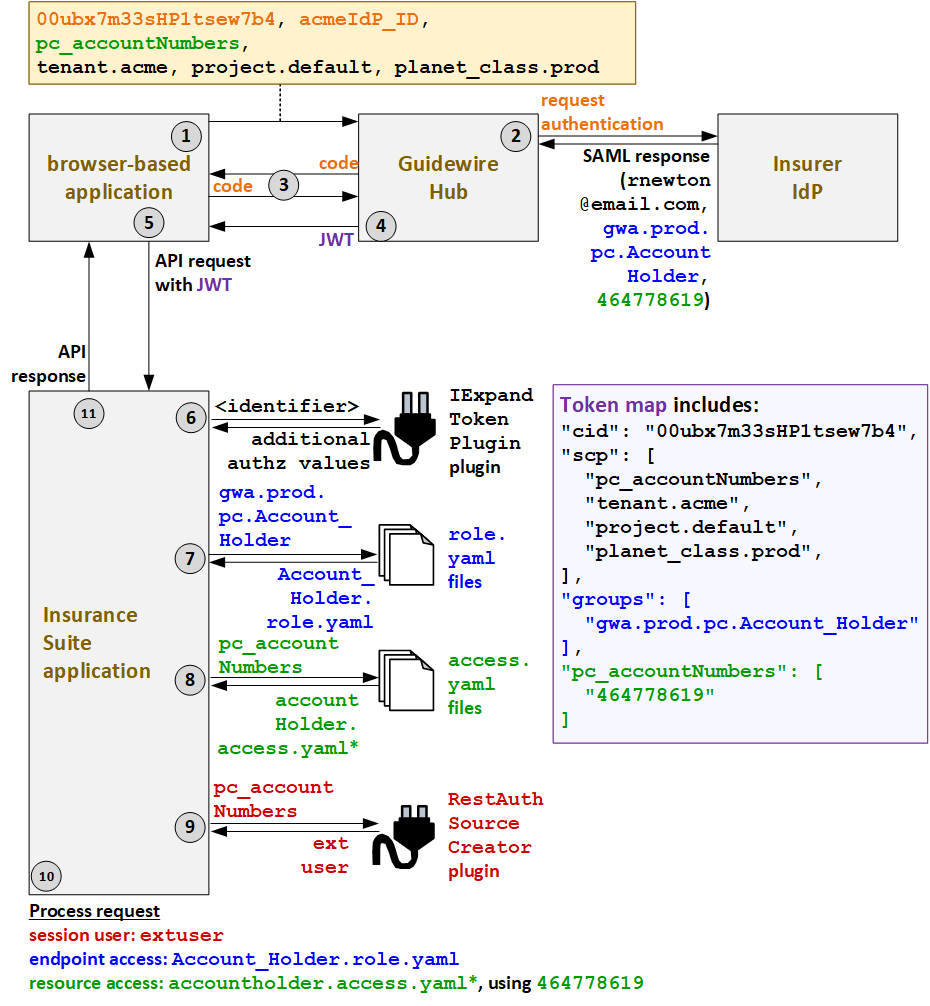
- When Ray triggers an API call, the caller application must first request a JWT from
Guidewire Hub. To initiate the process of getting the JWT, the caller application
submits its client ID (
00ubx7m33sHP1tsew7b4), the ID of the IdP (acmeIdP_ID), the application's resource access strategy (pc_accountNumbers), and additional deployment information (tenant.acme,project.default,planet_class.prod). - Guidewire Hub sends a request to the appropriate IdP to authenticate the user. The IdP
authenticates the user and provides a SAML response with information about the user,
such as the user's name (
rnewton@email.com). If API roles and/or resource access IDs are stored in the IdP, the SAML response may also include this information (such as the rolegwa.prod.pc.Account_Holderor the resource access ID464778619). - Guidewire Hub sends a code to the caller application. The caller application uses this code to request a JWT.
- Guidewire Hub generates a JWT and sends it to the caller application. This JWT
includes the client ID (
cid), ascptoken claim which names the resource access strategy (pc_accountNumbers) and additional deployment information. The JWT also contains any relevant information Guidewire Hub received in the SAML response, such as agroupstoken which names the user's API roles (gwa.prod.pc.Account_Holder), or apc_accountNumberstoken which names the user's resource access IDs (464778619). - The caller application sends the API request to PolicyCenter along with the JWT.
- PolicyCenter extracts the information in the JWT into a token map. Then, the IExpandTokenPlugin plugin calls any relevant authorization applications to retrieve any relevant additional auth values that must be added to or modified in the token map. (For external users, this could include API roles and/or resource access IDs that are not stored in the IdP.)
- PolicyCenter determines the endpoint access. Based on
the groups listed in the token map (
gwa.prod.pc.Account_Holder), theAccount_Holder.role.yamlAPI role file is used to define the endpoint access. - Next, PolicyCenter determines the resource access
strategy. Based on the resource access strategy value in the token map
(
pc_accountNumbers), it grants resource access as defined in theaccountholderaccess.yamlfiles. (* PolicyCenter starts withaccountholder_ext-1.0.access.yaml, but this file references additionalaccess.yamlfiles whose name starts with "accountholder".) - To determine which proxy user to assign to the session, PolicyCenter calls the
RestAuthenticationSourceCreatorplugin. The token map specified a resource access strategy ofpc_accountNumbers. So, the plugin returns the proxy user for external users:extuser. - PolicyCenter processes the request.
- The session user is the proxy external user:
extuser. - The endpoint access is defined by
Account_Holder.role.yaml. - The resource access is defined by
accountholderaccess.yamlusing the resource access ID of464778619.
- The session user is the proxy external user:
- PolicyCenter provides the response to the initial call.
External producer example
In the following example, an API call is triggered by Karen Egerston, who is an external
producer user, using a browser-based application.
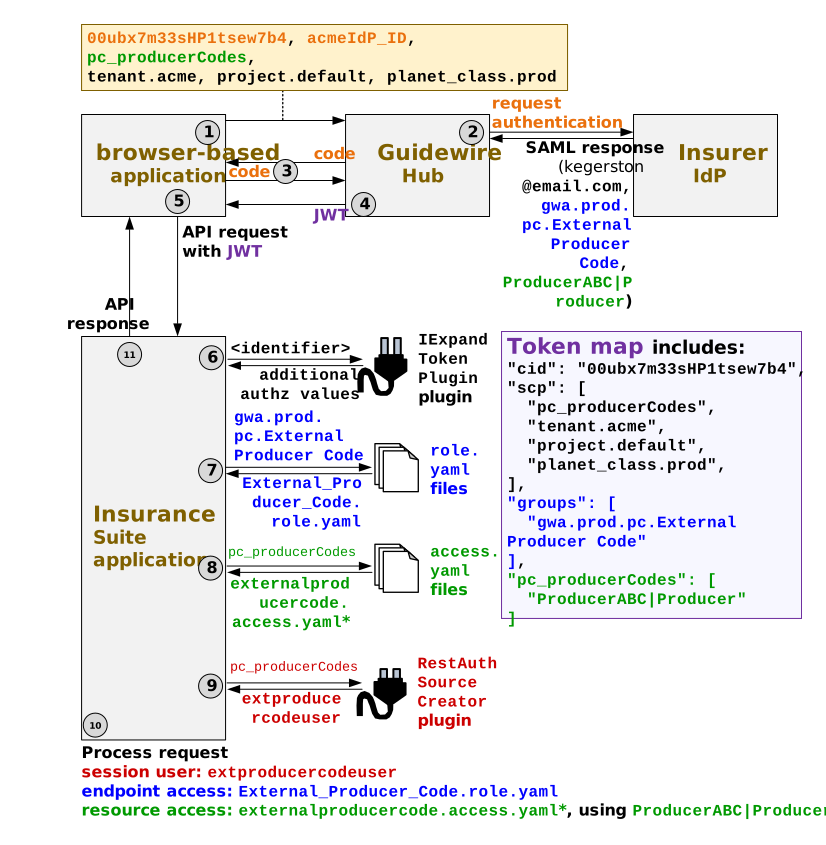
- When Karen triggers an API call, the caller application must first request a JWT from
Guidewire Hub. To initiate the process of getting the JWT, the caller application
submits its client ID (
00ubx7m33sHP1tsew7b4), the ID of the IdP (acmeIdP_ID), the application's resource access strategy (pc_producerCodes), and additional deployment information (tenant.acme,project.default,planet_class.prod). - Guidewire Hub sends a request to the appropriate IdP to authenticate the user. The IdP
authenticates the user and provides a SAML response with information about the user,
such as the user's name (
kegerston@email.com). If API roles and/or resource access IDs are stored in the IdP, the SAML response may also include this information (such as the rolegwa.prod.pc.External Producer Codeor the resource access IDProducerABC|Producer). - Guidewire Hub sends a code to the caller application. The caller application uses this code to request a JWT.
- Guidewire Hub generates a JWT and sends it to the caller application. This JWT
includes the client ID (
cid), ascptoken claim which names the resource access strategy (pc_producerCodes) and additional deployment information. The JWT also contains any relevant information Guidewire Hub received in the SAML response, such as agroupstoken which names the user's API roles (gwa.prod.pc.External Producer Code), or apc_producerCodestoken which names the user's resource access IDs (ProducerABC|Producer). - The caller application sends the API request to PolicyCenter along with the JWT.
- PolicyCenter extracts the information in the JWT into a token map. Then, the IExpandTokenPlugin plugin calls any relevant authorization applications to retrieve any relevant additional auth values that must be added to or modified in the token map. (For external users, this could include API roles and/or resource access IDs that are not stored in the IdP.)
- PolicyCenter determines the endpoint access. Based on
the groups listed in the token map (
gwa.prod.pc.External Producer
            Code
), theExternal_Producer_Code.role.yamlAPI role file is used to define the endpoint access. - Next, PolicyCenter determines the resource access
strategy. Based on the resource access strategy value in the token map
(
pc_producerCodes), it grants resource access as defined in theexternalproducercodeaccess.yamlfiles. (* PolicyCenter starts withexternalproducercode_ext-1.0.access.yaml, but this file references additionalaccess.yamlfiles whose name starts with "externalproducercode".) - To determine which proxy user to assign to the session, PolicyCenter calls the
RestAuthenticationSourceCreatorplugin. The token map specified a resource access strategy ofpc_producerCodes. So, the plugin returns the proxy user for external producer code users:extproducercodeuser. - PolicyCenter processes the request.
- The session user is the proxy external user:
extproducercodeuser. - The endpoint access is defined by
External_Producer_Code.role.yaml. - The resource access is defined by
externalproducercodeaccess.yamlusing the resource access ID ofProducerABC|Producer. - For access to internal or sensitive notes and documents associated with the
accessible resources, permissions are optionally defined in
External_Producer_Code.role.yaml. For more information, see API role special permissions
- The session user is the proxy external user:
- PolicyCenter provides the response to the initial call.