Configuring the schema file for generated endpoints
Within the context of Cloud API, a schema file defines the structure of one or more resources. This information is used for GETs, POSTs, and PATCHes.
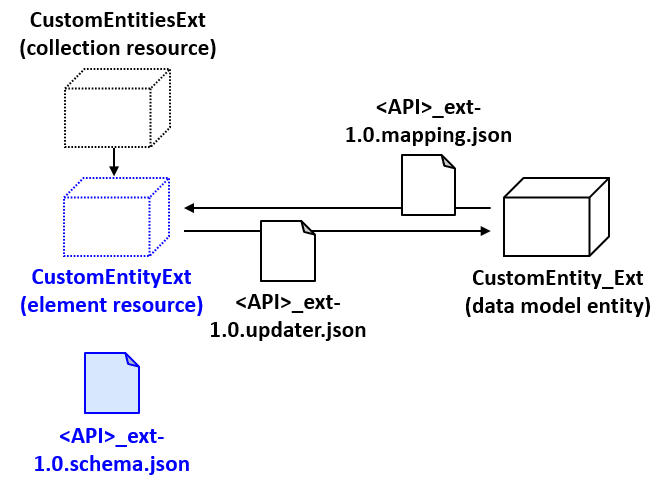
The following sections provide an overview of configuring schema files for generated endpoints. For a complete description of how to configure schema files, see Endpoint architecture.
Overview of schema file syntax
A schema file contains a definitions section that lists one or more
schemas. Each schema is used to structure an API resource. For each schema, the
following attributes are specified:
- A
titleanddescription, which is used for API definition documentation. - The resource
type, which is typically set toobject. - A list of
properties.Each property includes:- A
titleanddescription, which is used for API definition documentation. - A
type, which defines the JSON datatype of the property (for scalar values). - A
ref, which defines the URI reference for the property (for compound values such as typekeys). - Optional attributes as needed for the business functionality of the property.
- A
For example, the following is a portion of the schema for the base configuration
Activity resource:
"Activity": {
  "title": "Activity",
  "description": "An `Activity` is an assignable item that represents a task to be done, a decision to be made, or information to be aware of",
  "type": "object",
  "properties": {
    "activityPattern": {
      "title": "Activity pattern",
      "description": "The code of the `ActivityPattern` used to create this activity and set its initial values",
      "type": "string"
      ...
      }
    },
Modifications made to the schema file
The base configuration includes a set of API-specific extension schema files. The purpose
of these files is to define schema information for custom resources for a given API.
These files are named using the pattern <API>_ext-1.0.schema.json,
where <API> is the internal name of the API. For example, the
common_ext-1.0.schema.json file is used to define schema
information for custom resources in the Common API. You can access extension schema
files in Studio through the integration -> schemas -> ext -> <API>.v1
node.
(There is an exception to the previous statement. When you add endpoints to
the Job API, schema modifications are not made to a
job_ext-1.0.schema.json file, but rather to the
policyperiod_ext-1.0.schema.json file.)
Resource-level information
The REST endpoint generator adds the following resource-level information to the schema:
    "<resourceName>": {
      "title": "<custom entity name>",
      "description": "<custom entity name>",
      "type": "object",
      "properties": {
           ...
        }
      }
    }
The id field
The REST endpoint generator adds an id field to the
properties section of the schema.
      "properties": {
        "id": {
          "title": "ID",
          "description": "The unique identifier of this element",
          "type": "string",
          "readOnly": true
        },
        ...
      }
Data model fields added by the REST endpoint generator
The REST endpoint generator also adds the following types of fields to the
properties section of the schema:
- Scalar fields whose datatype resolves to a String, Boolean, Integer, BigDecimal, or DateTime
- Compound data fields whose datatype resolves to a MonetaryAmount, CurrencyAmount or Typekey
For each field:
- A
title,description, andtypeproperty are added- If the data model entity has values for
titleanddescription, the REST endpoint generator uses those for thetitleanddescriptionproperties. Otherwise, it generates a default value based on the entity's name.
- If the data model entity has values for
- If the data model field has
nullokset to true, the REST endpoint generator also specifies
for the schema field."x-gw-nullable": true
For example, suppose you generated endpoints for a CustomEntity_Ext
entity with the following fields. None of the fields have title or
description information. All of which have
nullok set to true:
Description(a varchar field)IsActive(a Boolean field)ActiveDate(a datetime field)ActiveCount(an integer field)
The REST endpoint generator adds the following to the schema:
"properties": {
"activeCount": {
"title": "Active count",
"description": "Active count",
"type": "integer",
"x-gw-nullable":
        true
},
"activeDate": {
"title": "Active date",
"description": "Active date",
"type": "string",
"format": "date-time",
"x-gw-nullable": true
},
"description": {
"title": "Description",
"description": "Description",
"type": "string",
"x-gw-nullable": true
},
"isActive": {
"title": "Is active",
"description": "Is active",
"type": "boolean",
"x-gw-nullable": true
},
...
}
}How other data model settings affect schema field generation
For any given column in the data model:
- If the
getterScriptabilityfield is set to anything other thanall, the REST endpoint generator does not create a field in the schema for the column. - If the
setterScriptabilityfield setting is set to anything other thanall, the REST endpoint generator adds"readOnly": trueto the schema field. - If
nullokis set to false, the REST endpoint generator adds"requiredForCreate": trueto the schema field.
For example, suppose you generated endpoints for a CustomEntity_Ext entity with the following fields:
GetterHidden- A Boolean whosegetterScriptabilityfield is set tohiddenSetterHidden- A Boolean whosesetterScriptabilityfield is set tohiddenNullOkFalse- A Boolean whosenullOkfield is set tofalse
The REST endpoint generator adds the following to the schema. Note that there is no
schema field for the getterHidden field:
      "properties": {
        "nullOkFalse": {
          "title": "Null ok false",
          "description": "Null ok false",
          "type": "boolean",
          "x-gw-extensions": {
            "requiredForCreate": true
          }
        },
        "setterHidden": {
          "title": "Setter hidden",
          "description": "Setter hidden",
          "type": "boolean",
          "readOnly": true
        },
        ...
      }
    }
Additional configuration work to do
You are responsible for the following configuration work:
- Removing any schema fields that were created by the REST endpoint generator but which correspond to fields that are not to be exposed to Cloud API
- Adding definitions for any fields that must be exposed to Cloud API but that were not created by the REST endpoint generator
For more information on how to configure scalar and compound datatype properties in a schema, see Adding scalars and Adding compound datatypes.