PrivateLink connections
To keep your data secure and reduce latency, you can set up private access to your applications without exposing them to the public Internet. You can connect your applications and Guidewire Cloud over AWS PrivateLink, using private IP addresses. AWS PrivateLink provides connections between AWS Virtual Private Clouds (VPCs), with no data transmitted over the public Internet.
For more information about AWS PrivateLink, see https://aws.amazon.com/privatelink.
Access to Outbound PrivateLink connections is limited to users participating in the Platform Packaging and Pricing model.
You can connect your Guidewire Cloud applications with external systems in two ways:
-
Inbound connections
Inbound connections come from the outside of your network.
External systems access Guidewire Cloud through APIs. For example, users log into the InsuranceSuite web interface, or an external system like Salesforce calls Guidewire Cloud APIs.
For details on how to create inbound AWS PrivateLink connections, see Configure inbound PrivateLink.
-
Outbound connections
Outbound connections come from the inside of your network.
Guidewire Cloud applications connect to external services. This includes third-party tools and your own internal systems.
For details on how to create outbound AWS PrivateLink connections, see Manage outbound connections.
Supported apps, tools, and services
By default, Cloud Platform apps, tools, and services are accessible only through the public Internet. Access to other services, including Guidewire Home tools, is available only through the public Internet.
You can configure AWS PrivateLink connections for the following apps, tools, and services.
Inbound connections
You can configure inbound PrivateLink connections for:
-
Access to APIs to InsuranceSuite apps and Integration apps.
-
Connection to the Read Replica instance.
Access to Read Replica instances is available only through the AWS PrivateLink connection. Access through the public Internet isn't supported.
-
User interface access to Bitbucket, TeamCity, and InsuranceSuite apps.
You need to configure routing of the user interface requests through PrivateLink.
Outbound connections
You can configure outbound PrivateLink connections for integrations from the InsuranceSuite and Integration apps to services running in your Amazon Virtual Private Cloud (AWS VPC).
AWS PrivateLink inbound connections
You can configure inbound PrivateLink connections for the following use cases:
-
Database Read Replica access.
-
API access to applications such as ClaimCenter, PolicyCenter, and Integration Gateway, from services running in your AWS VPC using PrivateLink.
-
User interface access to Bitbucket, TeamCity, and InsuranceSuite apps, with routing of the user interface requests configured through PrivateLink.
Cross-region connections
You can create PrivateLink inbound connections when your AWS VPCs and the corresponding Guidewire Cloud VPCs are in different AWS regions.
During provisioning, provide a list of the AWS regions where you want to create PrivateLink connections.
Limitations
Before configuring PrivateLink inbound connections, you need to consider the following limitations:
-
You can configure up to 20 AWS accounts to allow access to the inbound PrivateLink connection.
-
When your AWS VPCs and the Guidewire respective NPE, pre-prod, or prod VPCs are in the same AWS region, ensure that there's at least one matching Availability Zone (AZ) between the GWCP VPC and your PrivateLink endpoint service. For details on how to check Availability Zones, see Check infrastructure information.
-
To ensure high availability, Guidewire recommends at least three matching Availability Zones (AZ) between the GWCP VPC and your PrivateLink endpoint service. To configure an inbound connection, you need at least one matching AZ.
-
You can configure PrivateLink inbound connections for accessing API (HTTPS port 443) or for the Read Replica add-on. Within your VPC, you need to handle DNS and routing to ensure requests reach Guidewire domains.
-
You can have only one PrivateLink endpoint service for each Guidewire Cloud quadrant.
-
Guidewire provides only VPC endpoint services (ES) and doesn't provide any other network configuration to support PrivateLink connectivity.
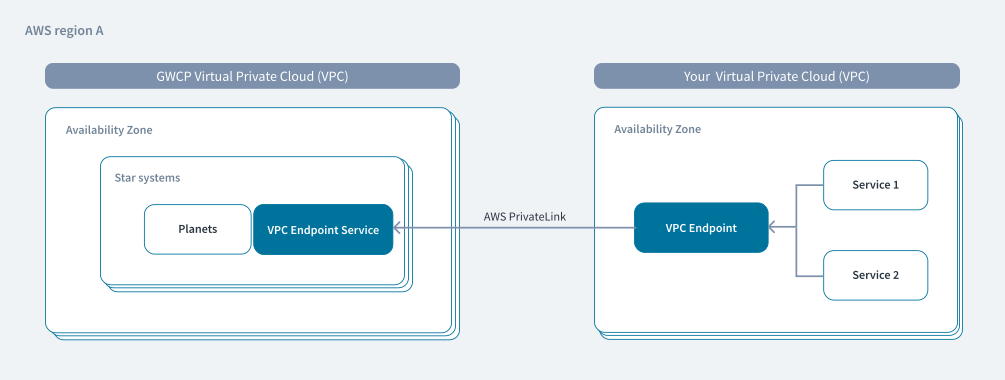
Prerequisites
When you request PrivateLink access, provide Guidewire with the 12-digit account numbers that you want to add to your connection. For example, 123456789012 or 234567890123.
Guidewire then provides you with the following information:
-
VpcEsID
VPC endpoint service identifier of the form
vpce-svc-ID. -
VpcEsName
VPC endpoint service name, for example
com.amazonaws.vpce.us-east-1.vpce-svc-ID. -
VpcEsZones
Availability zones, for example
use1-az1,use1-az2,use1-az3. -
API base URL
URL of the form
https://app-planet-tenant-star.api.cluster-galaxy.guidewire.net, for examplehttps://cc-dev-mytenant-mystar.api.rho15-andromeda.guidewire.net
Configure inbound PrivateLink
To set up PrivateLink, first work with your AWS architects and solution partners. Working with AWS ensures that your PrivateLink solution is consistent with AWS best practices and standards. Once you are ready to set up PrivateLink, request provisioning using the Community Case Template, Create New InsuranceSuite PrivateLink (Ingress) (TEN-0120) and then submit the request in Salesforce.
To configure an inbound PrivateLink connection with Guidewire Cloud:
- Create security groups.
- Create a VPC endpoint.
- Create a private hosted DNS zone.
- Create a star record for the hosted zone.
- Update IP allowlist.
The following procedure is an example, provided primarily for reference. Your configuration might require additional setup. For more specific guidance, consult your network manager.
Create security groups
To create the necessary security groups to attach to the PrivateLink VPC endpoint:
-
In the AWS VPC dashboard, select Security groups.
-
Create the security groups.
Create groups with appropriate inbound rules that authorize your internal client subnets to route traffic through PrivateLink.
Create a VPC endpoint
To create a VPC endpoint:
-
In the AWS VPC dashboard, select Endpoints.
-
Select Create endpoint.
-
For Name tag, enter a name for the endpoint.
-
Under Service category, select Endpoint services that use NLBs and GWLBs.
-
In Service name, enter the VPC endpoint service name (VpcEsName) provided to you by Guidewire.
-
In VPC, select the target VPC.
-
In Availability Zones, select the availability zones provided to you by Guidewire.
-
In Security groups, select the security groups that allow access from the specified availability zone subnets.
-
Select Create endpoint.
Create a private hosted DNS zone
To create a private hosted DNS zone:
-
In the Amazon Route 53 dashboard, select Hosted Zones.
-
Select Create hosted zone.
-
For Domain name, enter the fully-qualified domain name of the hosted zone that connects with the Guidewire Cloud quadrant.
-
For Type, select Private hosted zone.
-
Under VPCs to associate with the hosted zone, select the applicable region and VPC.
-
Select Create hosted zone.
Create a star record for the hosted zone
To create a star record for the hosted zone:
-
On the detail screen for the hosted zone, select Create record.
-
For Record name, type
*. -
In Record type, select
CNAME. -
In Value, enter the DNS record from the VPC endpoint.
Note:Use the DNS address appearing at the top of the DNS names list for the endpoint.
-
Select Create records.
Update IP allowlist
Update Guidewire Cloud with the PrivateLink private IP CIDR, as well as the IP CIDR of the individual machine (or subnet for multiple machines) used to connect to PrivateLink.
AWS PrivateLink outbound connections
You can configure outbound connections for the following applications:
- InsuranceSuite
- Integration Gateway Apps
When you create a PrivateLink outbound connection for a planet, it applies to both InsuranceSuite and Integration Apps configured on this planet.
For details on how to create PrivateLink connections, see Create an outbound connection.
Cross-region connections
You can create PrivateLink outbound connections when your AWS VPCs and the corresponding Guidewire Cloud VPCs are in different AWS regions.
Limitations
Before configuring PrivateLink outbound connections, you need to consider the following limitations:
-
When your AWS VPCs and the Guidewire respective NPE, pre-prod, or prod VPCs are in the same AWS region, ensure that there's at least one matching Availability Zone (AZ) between the GWCP VPC and your PrivateLink endpoint service. For details on how to check Availability Zones, see Check infrastructure information.
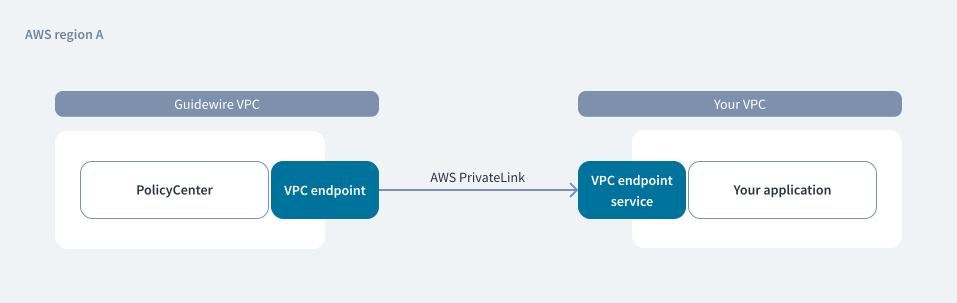
-
You can use up to three unique PrivateLink endpoint services for each star system.
-
You can use PrivateLink endpoint services in dev, pre-prod, and prod star systems.
-
For each planet, you can create up to 20 connections.
Prerequisites
Before you create a PrivateLink outbound connection:
-
Create the PrivateLink Endpoint Service in your VPC.
For details, see Endpoint service in AWS documentation.
-
Make your endpoint services available to Guidewire.
Add the permissions that allow Guidewire to connect to your endpoint service. AWS principals can privately connect to your endpoint service by creating a VPC endpoint. For details on how to check the
AWS Principal, see Check infrastructure information.Include Guidewire subnet CIDRs in your IP allowlist as Guidewire will send requests from those IPs. For details on how to check the
Guidewire subnet CIDRs, see Check infrastructure information.Accept the endpoint connection request from Guidewire. For details, see Accept or reject connection requests in AWS documentation.
Recommendations
Guidewire recommends using an API Gateway on the customer’s VPC to expose multiple services, which allows you to create fewer PrivateLink endpoints.
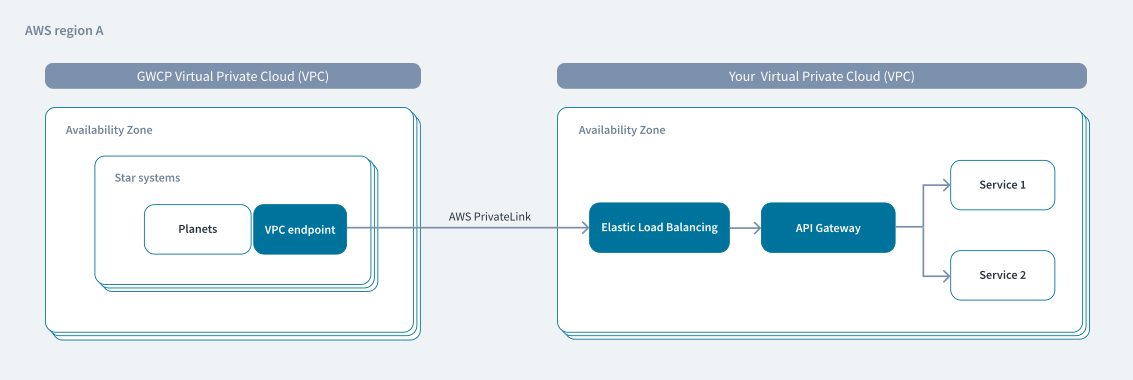
Create an AWS PrivateLink connection
Use the Certificates app to create, edit, and delete AWS PrivateLink connections.
For details on how to check infrastructure details and manage outbound AWS PrivateLink connections, see Manage outbound connections.