Why metadata?
Motivation
Don't give users code. Give them a way to extend functionality without limiting their ability to upgrade. Allow them to take new releases more easily. Help them quickly adapt to changes in the data model. Allow them to build more than one variant of an app, so they can adapt to their business, adapt to their consumers, adapt to their personas.
Introduction
Jutro metadata provides a low-code, adaptable abstraction from pure code. It provides standardization of structure and patterns to ensure consistency, security and upgradability.
Because metadata is just text, it can be imported, manipulated and modified dynamically without compiling code.
Metadata is applicable to more than just code: configuration, i18n, theme/css, security, data queries/filters, etc. Users can generate metadata from different input sources. Also, metadata can be used to generate other different outputs. Metadata is upgradable and can be documented for non-coders.
Benefits of metadata and why we invest in it
Codeless/low code, zero compile
- can be created by a non-coder - No JavaScript, React or JSX knowledge required. Generate/create/cut/paste metadata as desired.
- can minimize security issues - Metadata is in JSON format which is text-based and does not allow JavaScript to be embedded.
- can be generated - Well-structured metadata can be generated from many different sources (e.g., APD, swagger definitions, etc.)
- can be swapped out at runtime without recompiling - Metadata is processed at runtime to allow quick preview, dynamic extension, and overrides based on user persona or access level.
- can be validated with JSON schema - Metadata can be validated for content and completeness using JSON schema at any stage, while writing after being generated, and at runtime.
- other companies moving to metadata - Metadata is used to replace XML-based and other configurations for the backend. Metadata is a cloud strategy for many other companies, like Salesforce, SAP, etc.
Morphable/adaptable/extendable
- overrides, extensions Metadata is easy to extend and override. All rules of merging can apply. For example, change labels, reorder fields, redirect callbacks, etc. Jutro provides the ability to do structure-based overrides (e.g., I want to make the first component of this form read-only) as well as ID/path-based overrides (e.g., I want to change the label of the 'save' button no matter where it appears on the form; or I want to apply data constraints to the input field for 'postal code').
- reorder fields, position in/out of containers Metadata makes it easy to reorder fields, nest and un-nest into containers, etc., without touching code. This allows a non-coder to adjust the layout and order without having to ask a developer to make the change. It also allows multiple variants to be created and applied at runtime.
- editable/readonly When metadata is rendered, it is easy to apply a property across all "fields". For example, make a form 'read-only' if the user is not allowed to edit the fields, or make it 'editable' when they are allowed. Metadata allows for 2 different layouts for 'editable' vs. 'readonly'. It really opens up the flexibility for adjusting the UI.
- swap/switch components Metadata can be used to configure which component to render. For example, the user needs to pick a single value from a list. There are many different components that can support single select. The metadata provides one by default, but the user can choose to use one of the other alternatives: single select, dropdown select, toggle or radio buttons. All of these changes can be made without affecting the underlying code.
- override default components Metadata can infer which component to render based on the data type. A component map allows for customization at the app level. For example, the default component for a 'number' data type can be configured to render using "MyCustomNumberSpinner". Or the Jutro "DateField" could be swapped out for "LunarDateField" in any place where this is rendered.
- extend with additional components A component map can be used to extend the components available for use inside metadata. Apps can add custom components and reference them and configure properties just as if they were provided by Jutro OOTB.
- apply constraints Metadata can be used to define constraints like 'required', 'max length', etc. Metadata can also be combined with JSON schema to infer constraints from the data definitions and apply to components being rendered. For example, the data definitions define 'field X' as type 'integer' with a min and max value. Those constraints can be injected into the component at runtime to render the appropriate component and apply the constraints.
- iterable Metadata supports 'iterable' and can be used to map an array of data to an individual set of components for each item. This can be mapped to a single component or a series of components and has been used to render cards (for each item), inline forms (one for each item), etc.
- easy to manipulate in visual editor Metadata is structured and easy to manipulate in a text editor or a visual editor. Metadata also makes it easier to render, manipulate and output from a visual editor. See examples below in the visual editor section.
Abstraction/indirection
- component mapping - Metadata helps extract definition from implementation. Component mapping provides the ability to map from datatype or component name to runtime
<component\>. This also allows an app to override/extend the behavior without having to modify the code (as long as components with similar interface/signatures are swapped). - callback mapping - Metadata helps avoid JavaScript injection because embedded JavaScript is not allowed. This leads to a pattern where callback names can be exposed and the metadata is configured to call one of those pre-defined callback names. Then, at runtime, the mapped callback function is used.
- className mapping - Metadata abstracts styling so that a
classNameapplied in metadata can be converted or extended at runtime to another class. This is helpful when using css modules and the class names are generated at compile time. - layouts as peer to content - You can apply layouts independently of the content and avoid injecting a
<div>into the metadata structure just for layout.
Standardization of patterns/types/behavior
- component types and interface/api - Metadata defines several component 'types' and their expected properties. There are metadata types for app, floorplan, wizard, page, element, container, field, action (button or link), layout, iterable, codeless component, themes, etc.
- more than just forms - Metadata format, typing, validation, etc., can be used for more than just UI. It can be extended to represent behavior, data retrieval and other configuration.
- templates/slots/actions - Metadata can be used to define templates and patterns for others to populate. For example, in PCX, we can define a "list" pattern and metadata + code to go with it. The consumer is then free to populate the content within those boundaries. We can control how much or how little can be manipulated by metadata vs. hand-coded.
Advanced data features
- binding Metadata - Has a simple, yet powerful binding mechanism. A
pathproperty is used to get the value to be rendered, set anonChangecallback, set data constraints and set validation messages to display to the users. This applies to field components as well as columns in a datatable (which can be displayed only or editable). - JSON schema validation - The path specified in metadata can be paired with JSON schema validation to provide constraints and data validation to be applied to fields and columns.
- structural content - The path binding allows the data to have a different structure than the UI. You can move the fields around on a page without affecting the data binding, and vice versa. The
pathproperty supports nested data structures and arrays.
i18N support
- string extraction from metadata and code - Developers have the flexibility to define i18n messages in metadata and/or code. Tools can extract messages from code and metadata into a file suitable for translation, upload to TSM, etc.
- visual translation/editing - Metadata allows for easy manipulation of strings defined in it, including spellchecking, auto-id generation, and so on. Spellchecking, auto-id generation, etc. A visual editor could also be created that only allows translation and prevents any other changes to the metadata.
Upgradability
- structured content - Structured text is easier to parse and update than JavaScript code with variables, conditionals, etc. This structured content is something that we define here at Guidewire defines, so we know how to interpret and use it.
- migration - Migration leverages similar technology to metadata overrides and extensions and just makes them permanent.
- component/property differencing - Metadata is easy to compare, difference, and merge
- component/property usage analytics - Metadata makes it easy to scan projects for inventory of the components and properties used. No need to wait until runtime or parse code to get this information.
Floorplans
floorplan metadata follows similar strategy as UI metadata - Floorplan metadata has all the benefits of UI metadata. It can be extended, overridden, validated, etc. Developers can define and configure a floorplan for the app and then override/extend for specific pages. For example, a general floorplan is defined for the app, but you want to hide or override some parts of it for the home page.
Jutro Floorplan Metadata - an example of app-level and page-level floorplan definitions
Theming
theme metadata follows similar strategy as UI metadata - Theme metadata has all the benefits of UI metadata. It can be extended, overridden, validated, etc. It can be manipulated offline or at runtime as needed
Generation
Can be generated from other sources
There are many sources that can be used to generate metadata. The generated metadata may be a form or an entire flow. Metadata can be generated:
- as a starting point for heavy customization
- with the ability to upgrade
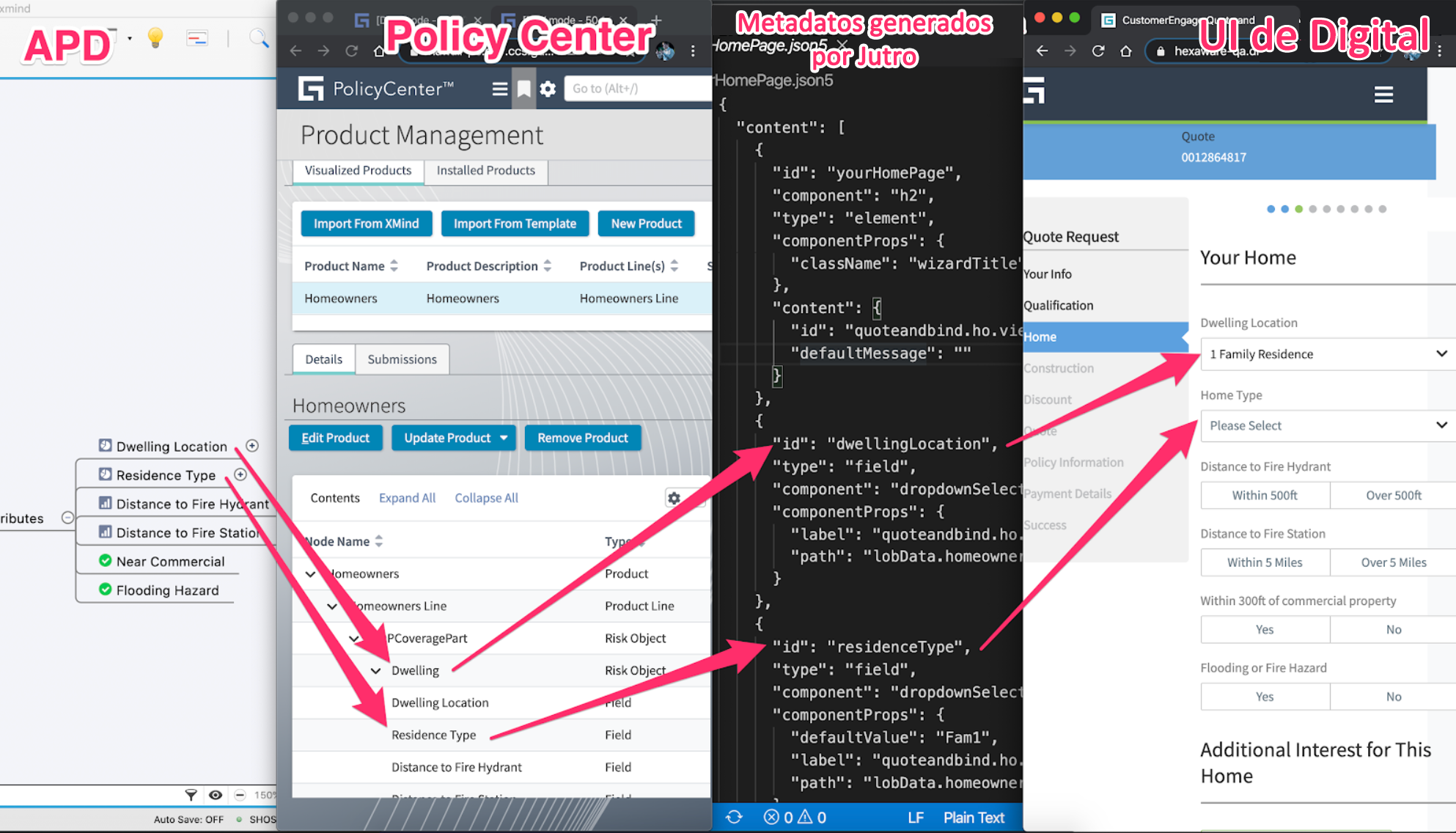
The following image is an example of generating a Jutro front end from Advanced Product Designer.
Developer experience (Visual Studio Code)
- JSON schema validation of metadata - Jutro generates JSON schema for the general metadata structure as well as for individual components and their properties. See Jutro Aspen demos.
- typeahead - VS Code provides typeahead support via JSON schema when editing metadata files. See Jutro Aspen demos.
- metadata snippets - Jutro generates a few metadata snippets (and we can generate more) that will fill in larger sections of metadata with the ability to tab between the main areas that should be entered by the developer. See Jutro Aspen demos.
Visual editors
Experience manager
Experience Manager is an example of a visual editor that renders metadata and allows limited manipulation without ever having to learn metadata itself.
Jutro metadata editor for Digital
Here is a POC showing direct manipulation of metadata inside an EM-like editor
PCX app configuration (concept)
To learn what PCX is, read about the PCX framework on Confluence.
Here is a POC showing editing of a PCX application by manipulating an application tree with pages and business components, and a properties panel for modifying properties. It is similar to Experience Manager, but without the center canvas.
This is an easy way to quick-start application development and metadata manipulation without exposing metadata directly. At the same time, you can get a working prototype without investing too much in the WYSIWYG canvas.
We can still leverage all of the other features of metadata and show a live preview that renders as the metadata changes.
Storybook/documentation
storybook examples/knobs generate metadata for copy/paste - Jutro uses storybook to showcase various components, examples and documentation. Examples and documentation all use metadata that can be copy/pasted into an application.
Preview/visual snapshots
the ability to render metadata without a lot of bootstrapping - Metadata representation of pages, etc., allows several unique testing, validation and feedback mechanisms. Jutro has tooling to 'preview' a component/page/other. This preview can be used to create visual snapshots to compare/detect differences between builds or releases. It can be used to compare/detect changes between different themes on the same component/page; different breakpoints, etc.
Drawbacks of metadata
- It is not JSX. Everything that metadata can do, JSX can do better
- Metadata is more difficult to work on without a visual (or hybrid) editor.
- Like any component/design system, there is a learning curve. Writing in metadata (JavaScript object syntax) vs. JSX (html element syntax) is challenging. Both are challenging without visual rendering.
- We've explicitly removed JavaScript from metadata. Developers could see this as an impediment to just coding in differences, but it also keeps the metadata cleaner and more upgradable.
When to use metadata? And when to use JSX?
Initial Decision Tree for Metadata vs JSX based UI
In PCX, the division becomes clearer.
- Use metadata to "assemble" apps and to extend business components.
- Use metadata or JSX to define reusable building blocks like business components, custom columns, layouts.
- Use JavaScript for data retrieval, manipulation and state management (though PCX is using metadata to help describe common data patterns as well). PCX App Construction
Use metadata when...
- the content is something that consumers are likely to want to define/extend/manipulate in some way
- it looks/feels like a form or datatable (Jutro has spent time simplifying use cases like these to help streamline implementation and maintenance)
- the data may change shape, constraints between uses or releases
- there is already a component/pattern that leverages metadata for the design you are implementing
Use jsx when...
- creating a component or pattern as a one-off
- creating a component or pattern to be reused by others (consider ways metadata could be provided to the external interface/API to make it more adaptable)
- using 3rd-party components that don't need to be consumed by metadata
Are we investing too much by supporting metadata AND jsx?
Most of the investment in metadata has already been made. We are adding a few more features (like strict metadata validation, upgradability, and moving a few new components like floorplans to be metadata driven), but the core metadata definition and runtime has remaining unchanged since Elixir → Jutro.
Jutro uses JSX to build all of the pieces and parts of metadata and components. So we need to build those anyway. We can improve how those are built and use TypeScript (instead of PropTypes) to make consumers who use JSX more efficient. And we can still work to expose new functionality as metadata for content that should be extensible/upgradable by the customer.
Alternative approaches, e.g., JSX or js configs
| Metadata aspect | JSX |
|---|---|
| can be created by a non-coder | Learning curve for metadata is way steeper then for JSX. JSX has many online howtos, helpers, Stack Overflow etc., so in the end it is faster to learn. Actually, how many of our consumers are indeed non-coders? |
| can be generated | Harder to generate but doable. How many of our apps will be auto-generated without a touch of the dev? |
| can be swapped out at runtime without recompile | Is it really impossible? |
| can be validated with JSON schema (runtime validation), can be driven by JSON schema | Can be verified with TypeScript checks even better... (compile-time only). |
| There are no "non-developer" personas; no one needs "no-code, low-code" assembly. |