Upgrade steps (6.5.0 - 8.0.0)
Some versions of Jutro require manual upgrade steps. If you are upgrading from a version that is earlier than the most recent version, you must apply the manual steps in order. Start from your current version and apply the manual steps for each version up to the latest version.
8.0.0
This is a major version, so there are some breaking changes.
Webpack 5
If you have an older application that you would like to use webpack 5, remove the USE_LEGACY_WEBPACK=true variable from your .env file. See the webpack 5 docs for more information about migration.
ESLint new rules
We introduced new ESLint rules. We encourage you to refactor your code and follow the standards, however if you'd rather disable the new rules, modify .eslintrc.js as follows:
module.exports = {
    extends: [require.resolve('@jutro/build-tools/eslint-strict-config/index')],
    rules: [
        'import/no-relative-packages': 'off',
        'default-param-last': 'off',
        'react/jsx-no-useless-fragment': 'off',
        'import/no-import-module-exports': 'off',
        'no-only-tests/no-only-tests': 'off',
        'prefer-regex-literals': 'off',
        'no-promise-executor': 'off',
        '@typescript-eslint/no-this-alias': 'off',
        'no-dupe-class-members': 'off',
        'react/jsx-no-constructed-context-values': 'off',
        'react/no-unused-class-component-methods': 'off',
        'no-promise-executor-return': 'off',
        'no-unsafe-optional-chaining': 'off',
        'react/no-arrow-function-lifecycle': 'off',
        'react/no-unused-state': 'off',
    ]
};
Peer dependencies
To hide peer dependency warnings, run npm config set legacy-peer-deps true.
PromptService removal
The PromptService has been removed. Use the Prompt component from react-router-dom (https://v5.reactrouter.com/core/api/Prompt).
Switch from husky 4 to husky 7
Commands are defined differently in husky 7 than in husky 4. Follow the steps below to migrate your commands:
- Remove the
huskyconfig object from yourpackage.jsonfile - Add the following lines to the
scriptsobject in yourpackage.json:
"husky-hook-commit-msg": "commitlint -e",
"husky-hook-pre-commit": "lint-staged",
...
"postinstall": "husky install",
- At the root of your project, run the following commands:
-
rm -rf .git/hooks -
npm install -
npx husky add .husky/pre-commit "npm run husky-hook-pre-commit" -
npx husky add .husky/commit-msg "npm run husky-hook-commit-msg"
Known issue with playwright module when running npm install
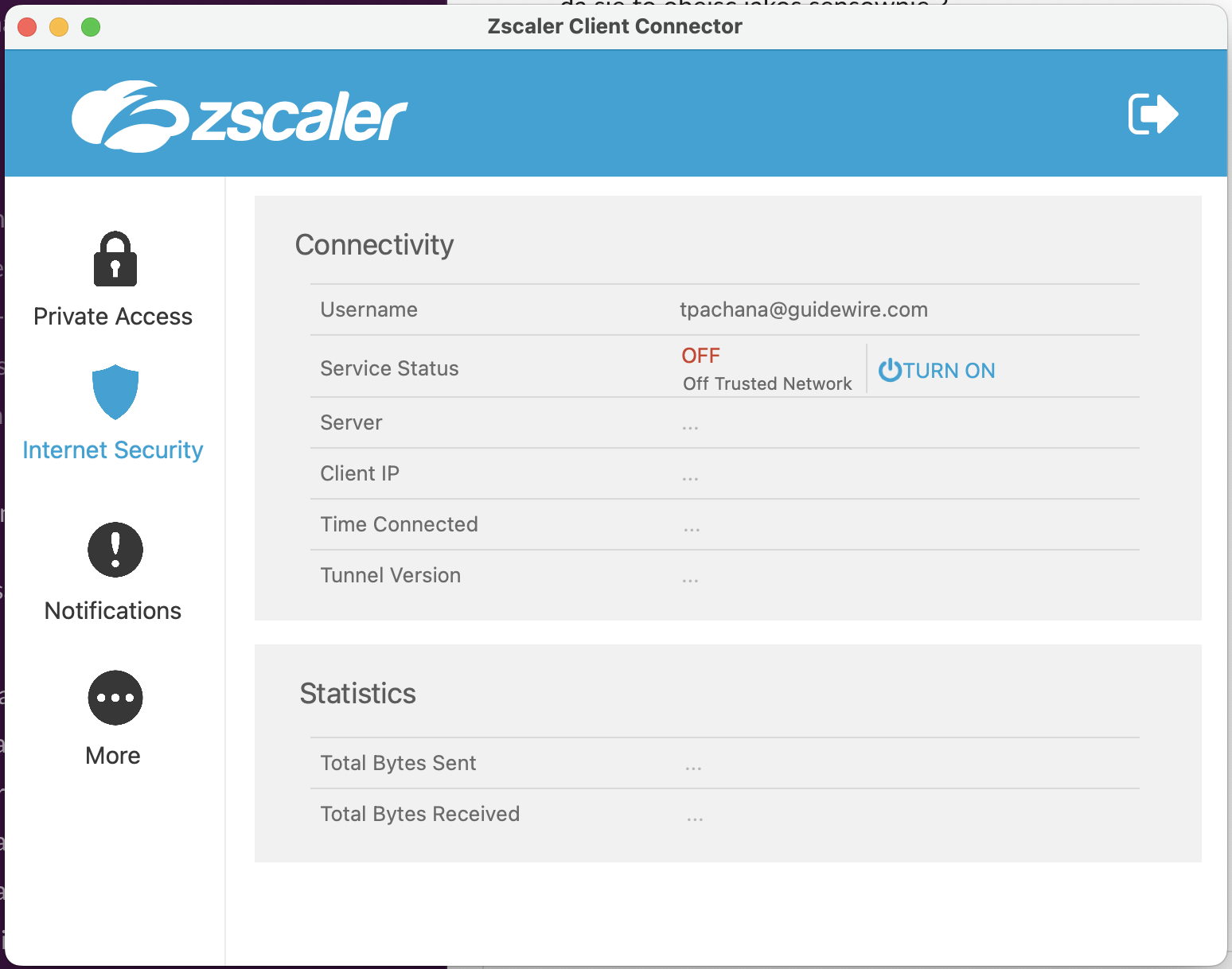
If you are connected to ZScaler and you try running npm install, the command will try to install the playwright module as a dependency of @jutro/e2e-tests and will fail.
This is a certificate issue and you could use on of the following workarounds:
-
(Recommended) Download the custom CA Certificate provided by Guidewire network administrators and provide it to npm in one of the following ways:
-
Run the command:
npm config set cafile <Path to Certificate>/ca-bundle.pem -
Use the env variable:
For MacOS:
echo "export NODE_EXTRA_CA_CERTS=<Path to Certificate>\bundle.pem" >> $HOME/.bashrcFor Windows:
[System.Environment]::SetEnvironmentVariable("NODE_EXTRA_CA_CERTS", "C:\<Path to Certificate>\ca-bundle.pem", "Machine")
-
-
Temporarily disable the "Internet Security" section in Zsaler for the time of dependencies installation (npm install / yarn install) in the project:
7.5.0
There are no manual upgrade steps for most apps and upgrade is mostly automated.
7.4.3
There are no manual upgrade steps for most apps and upgrade is mostly automated.
Disabled codemods
We identified issues with codemods that automatically upgrade deprecated components to their replacements. These codemods have been disabled. The following components are affected:
Table, which would have becomeTableAdapterMapArea, which would have becomeLocation
Table and MapArea have also had their deprecated status removed.
Dependency versions
The only major exception is that we changed the version of Node to 14.18.3. Make sure you update your environments and builds to use this version of Node.js.
- Node version: 14.18.3
- Versión de NPM: 6.14.15
7.3.0
There are no manual upgrade steps for most apps and upgrade is mostly automated. The only breaking change exists if you have e2e tests in your app.
Removed GT: UI
We removed GT: UI due to security concerns. Jutro apps no longer have the infrastructure for running e2e tests. If you have e2e tests, you can make them work using GT: UI, but Jutro does not support that functionality or provide assistance on setting that up.
7.2.0
There are no manual upgrade steps for most apps and upgrade is mostly automated.
The only major exception is if you use the useSyncData helper for DataView components. See How to upgrade.
In 7.2, there is a new default implementation for the filtering and searching callbacks, as Jutro now distinguishes callbacks for specific columns and data types using filterCallbacksMap.
To make it to work correctly, you must pass a new prop onComponentRender from useSyncData to TableView/ListView components.
If you only check simple string equality the filtering works for these columns without needing to write custom callbacks. Make sure that an id of a column matches the path of the filter input.
filterCallbacksMap has two attributes: columns and datatypes, each one being an object containing the callbacks.
filterCallbacksMap: {
    columns: {
         insuredName: ({ filterValue }) => ({ row }) =>
                checkStringEquality(row.insuredName, filterValue),
         // rest of the callbacks...
    }
}
Changes in microapps in 7.2.0
Microapp rendering enhancements
The jutro-app, jutro-router, jutro-floorplan, and jutro-lab-preview-microapp components have been optimized so that they won't render unnecessarily when there are route changes or when navigating back to routes that render the same components.
7.1.0
There are no manual upgrade steps for most apps and upgrade is mostly automated. The only major exception is if you use the Table component.
See How to upgrade.
Upgrade from Table to TableView
When you upgrade to 7.1.0, all instances of Table will be automatically migrated to the TableAdapter component. Once the upgrade script has run, you need to complete some manual steps to migrate from TableAdapter to TableView.
TableAdapter takes all the props that Table takes and all the props that TableView takes. This allows you to gradually change your code and eventually replace TableAdapter with TableView.
TableAdapter also contains column adapter components. Column adapters help you migrate to the correct column components in TableView.
TableAdapter and column adapters are automatically "deprecated" and will be removed in 8.0.0, so you need to fully migrate to TableView before then.When the automated upgrade is complete, you need to migrate TableAdapter manually:
-
Add
@jutro/lab-preview-dataviewto yourpackage.json(if it's not there yet). -
Run your application and look at console warnings. They tell you what steps you need to take to migrate to
TableView.For example, a console warning may tell you that the
titleprop is not supported and you should use aDataViewTitlecomponent. To get rid of this warning, remove the prop and use the component instead.As part of fixing console warnings, you will also be prompted to replace all column adapters with column components.
You can also start using features which you were not able to use before, like sorting, pagination, and more. For details, see our docs about table views.
7.0.0
New validation
The MetadataForm component will now use the new validation mechanism by default.
If you use validation anywhere in your app, make sure to upgrade to the new mechanism. Old validation will be removed in 8.0.0.
If you need to keep the old validation for now, you can make it work by adding the following prop to your MetadataForm:
<MetadataForm isUsingNewValidation={false} />
Upgrades and microapps
If you use microapps, you should coordinate to upgrade all apps to the same major version range. You may encounter problems if you combine different major Jutro versions like 6.x apps with 7.x apps.
Microapps will now be imported with request headers which ensure that the latest assets are being retrieved. While changes are not required for local development, in production microapps must be configured to allow the following headers:
- Cache-Control
- Pragma (for backwards compatibility only with HTTP/1.0 clients)
Okta changes
@okta/okta-auth-jshas been upgraded to version 5.6.0.JUTRO_AUTH_EXPIRE_EARLY_SECONDSwill now only work for local development on localhost. It will be forced to 30 seconds in other environments.token.valuehas been removed.token.accessToken,token.idTokenortoken.refreshTokenshould be used instead, depending on token type.- HTTP requests will not send cookies by default anymore.
- Cookie storage (through
JUTRO_AUTH_STORAGE=cookie) is not supported anymore, and will now default tolocalStorage,sessionStorageormemoryStoragebased on availability.
Component changes and removals
-
The
usePortalprop from theTypeaheadMultiSelectFieldcomponent will now default to true. -
The
EditCancelSaveTitleBarcomponent has been made internal only. -
The
MetadataFormcomponent will now use the new validation mechanism by default. -
The
JsonDataTablecomponent has been deprecated and is now removed, along with theextractAPIFromSchemafunction. -
The
invalidDateprop from theDateFieldcomponent will now default to true. -
The
storybookModeprop from theGlobalizationChoosercomponent has been deprecated and is now removed, along with the associated props (style,innerStyle). -
The
autoCompleteprop from theInputFieldandDateFieldcomponents has been deprecated and is now removed. -
The
ColorPickercomponent has been deprecated and is now removed. -
The
googleMapsApiKeyprop has been removed from theMapAreacomponent. UseonGoogleMapsApiKeyinstead. -
The static functions
showModal,showAlert,showConfirmfromModalNextProviderhave been deprecated and are now removed. Use the functions fromModalNextContentlike so:const { showAlert } = useContext(ModalNextContext);
showAlert(props);
Breaking changes in lab-preview packages
-
The
disabledparameter in metadata addon configuration from@jutro/lab-preview-storybook-presetwas renamed todisableas shown below:parameters: {
metadata: {
disable: true;
}
} -
The
sortedColumnprop has been removed from theuseAsyncDatahook.
Theming
- The Cortina theme is no longer available in
@jutro/theme-styles. - Support for themes using the old mechanism (
rootStyle,componentStylesconfig values) has been removed.
Other breaking changes
-
jutro-uiconfig: thevalidateContentFromMetadatafunction has been deprecated and is now removed. Use a customonValidationChangehandler instead to validate a form, as shown below:const [isValid, setIsValid] = useState(false);
const onValidationChange = useCallback(newIsValid => {
setIsValid(newIsValid);
}, []);
if (!isValid) {
// Show some validation error
}
return (
<MetadataForm
...
onValidationChange={onValidationChange}
...
/>
); -
jutro-components: the deprecated Date helpersformatDateToDataType,parseDateShapeToDate,isDateShapeInRangehave been removed. -
jutro-auth: thetokenAuthOptionsfunction has been deprecated and is now removed. UseauthTokenHandler instead, as shown below:const request = new HttpRequestBuilder(baseUrl).addHandler(authTokenHandler); -
jutro-app: TheApplicationRootcomponent's propglobalizationSettingsnow requires agetDefaultTimeZonefield. -
Upgrade to
eslint-plugin-reactinsidejutro-build-toolscould cause the following errors:JSX props should not use functions react/jsx-no-bind
error JSX props should not use functions react/jsx-no-bindFollow the documentation here to either resolve or ignore the errors.
-
Upgrade to
stylelintinsidejutro-app-template,jutro-build-toolscauses the following error:Unexpected invalid position @import rule no-invalid-position-at-import-ruleA new rule
no-invalid-position-at-import-rulehas been added in 13.13.0 (#5202). Follow the documentation here to either resolve or ignore the errors. -
Upgrade to
eslint-plugin-jsdocinsidejutro-app-templatecould cause the following error:Syntax error in type: jsdoc/valid-typesFollow the documentation here to either resolve or ignore the errors.
-
The
metadata.schema.jsonhas been moved to a different location and is now a dependency of thejutro-clipackage. The path to the schema has changed from../node_modules/@jutro/uimetadata/common/json-schema/metadata.schema.jsonto../node_modules/@jutro/cli/node_modules/@jutro/uimetadata/common/json-schema/metadata.schema.json. -
The Linter fails in the following two files:
-
tests/lighthouse/login-script.js -
tests/utils/getTranslations/index.js
-
To resolve the issue, add the following at the top of these two files:
/* eslint-disable */
Changes in microapps in 7.0.0
Hosting a micro app on the web server
Due to the heavily reliance on the data defined in the asset-manifest.json file exposed by the microapp, it is essential that the web server that hosts it doesn't allow for caching this file on the client side.
You can resolve this by attaching appropriate HTTP response headers to this file.
For more on this read the docs on hosting a micro app on the web server.
6.6.0
There are no manual upgrade steps for this version and upgrade is mostly automated.
Known issues
Panel
Passing fluid to Card (when migrating form Panel) no longer works. It used to work because we passed the prop by mistake, but we updated the Card API.
If you want to render a full-width panel card, use:
<Card
  id="tablePanel"
  isPanel
  fullWidth>
  {children}
</Card>
NPM login
NPM login now requires you to allow unsafe permissions. Add the following to your npmLogin.sh or equivalent:
npm config set unsafe-perm true
Also, see this PR for reference.
Breaking changes in lab preview components
filtersandonFiltersChangereturned fromuseSyncDataare grouped underfilteringPropsrenderSearchinDataViewSearchhas been renamed torender- column definitions in ListView and TableView need to be wrapped in the
<DataViewColumns>component
DataViewFiltering
initialFiltersrenamed todefaultFiltersfiltersrenamed toinitialFiltersrenderFiltersrenamed torenderInlineFiltersfilterUiPropsrenamed touiProps
DataView
- moved row selection props to the
DataViewSelectioncomponent - moved search props to the
DataViewSearchcomponent - moved pagination props to the
DataViewPaginationcomponent - moved filtering props to the
DataViewFilteringcomponent - moved
actionsPositiontoDataViewColumnsConfiguration - moved
isLoading,renderLoader,loaderMessage,renderLoaderProps,isError,renderError,errorMessage,renderErrorProps,noRowsMessage,renderNoRows,renderNoRowsPropsto theDataViewOverlaycomponent internalClassNames.wrapperremoved. Use theclassNameprop instead.- moved and renamed the
headerActions,renderHeaderActionsandwrapHeaderActionsprops. Use:<DataViewHeaderActions
renderHeaderActions={...}
render={...}
>
<HeaderAction/>
<HeaderAction/>
{...etc}
</DataViewHeaderActions> - moved and renamed the
titleandrenderTitleprops. Use:<DataViewTitle title={...} render={...} />
See How to upgrade.
6.5.0
There are no manual upgrade steps for this version and upgrade is mostly automated.
Breaking changes in lab preview components
-
filtersandonFiltersChangeprops returned fromuseSyncDataare grouped underfilteringProps -
initialFilters in DataViewFiltering has been renamed to defaultFilters.
-
prop
renderSearchinDataViewSearchhas been renamed torender -
extract actionsPosition to DataViewColumnsConfiguration
-
Prop
filtersinDataViewFilteringhas been renamed toinitialFilters -
renderFilters in
DataViewFilteringhas been renamed to renderInlineFilters -
prop
filterUiPropsinDataViewFilteringhas been renamed touiProps -
isLoading,renderLoader,loaderMessage,renderLoaderProps,isError,renderError,errorMessage,renderErrorProps,noRowsMessage,renderNoRows,renderNoRowsPropsprops have been moved toDataViewOverlay -
all row selection related props have been moved. Use
<DataViewSelection {...selectionProps} />child component. -
removed sorting props from Table/List Views;
-
internalClassNames.wrapper in DataViews has been removed, use className prop instead
-
moved search props to the new DataViewSearch component
-
all pagination related props have been moved. Use
<DataViewPagination {...paginationProps} />child component. -
DataView props for filtering have been moved to a new component
DataViewFiltering. -
headerActions, renderHeaderActions and wrapHeaderActions props have been moved and renamed. Use the following component:
<DataViewHeaderActions
  renderHeaderActions={actions}
  render={renderFunction}>
  <HeaderAction {...props} />
</DataViewHeaderActions> -
title and renderTitle props have been moved and renamed. Use
<DataViewTitle title={...} render={...} />child component. -
introduced new context structure
-
added ability for props and elements registration with context
-
column definitions in ListView and TableView need to be wrapped in
<DataViewColumns>component.showHeadersprop is moved to the new component.
Changes in microapps in 6.5.0
Deprecations for non-namespaced props
From Jutro 6.5, passing props which are used by Jutro to configure the microapp must be done by nesting them in the jutro prop (configOverrides, launchPropOverrides, componentMapExtensions). After 7.0 these props will not be registered by Jutro if passed directly to a microapp at root level.
See also 'jutro prop namespace'.
Microapp wrapper component
With Jutro 6.5 you can now use a Microapp wrapper component which handles lazy and suspense loading for you, as well as supporting custom error boundary and loader components.
Proper authentication error
In Jutro 6.5, embedding an authenticated microapp inside a non-authenticated shell app does not cause it to crash. Instead, an authentication error is shown.
See How to upgrade.