Usage
Overview
The AI chat component provides a dedicated, multi-turn interface for insurance professionals to interact with our underlying AI model. It is engineered to facilitate complex inquiries and draft content while maintaining context across a session.
When to use
- Agentic experiences: Use when a workflow involves multiple conversational steps that rely on maintaining context throughout a session to facilitate reasoning across turns (for example, multi-step analysis).
- Natural language interaction: Use when users need to ask follow-up questions, pursue multiple lines of inquiry, or initiate actions across the solution using conversational prompts.
When not to use
- Single-turn interactions: For single-use or pre-made prompts that do not require follow-up, embed the output directly in the page instead of opening a chat.
- Changes to the page: Actions that make changes to the main page, such as filling out forms, refreshing content, or embedding visuals, generally do not need to initiate chat.
Anatomy
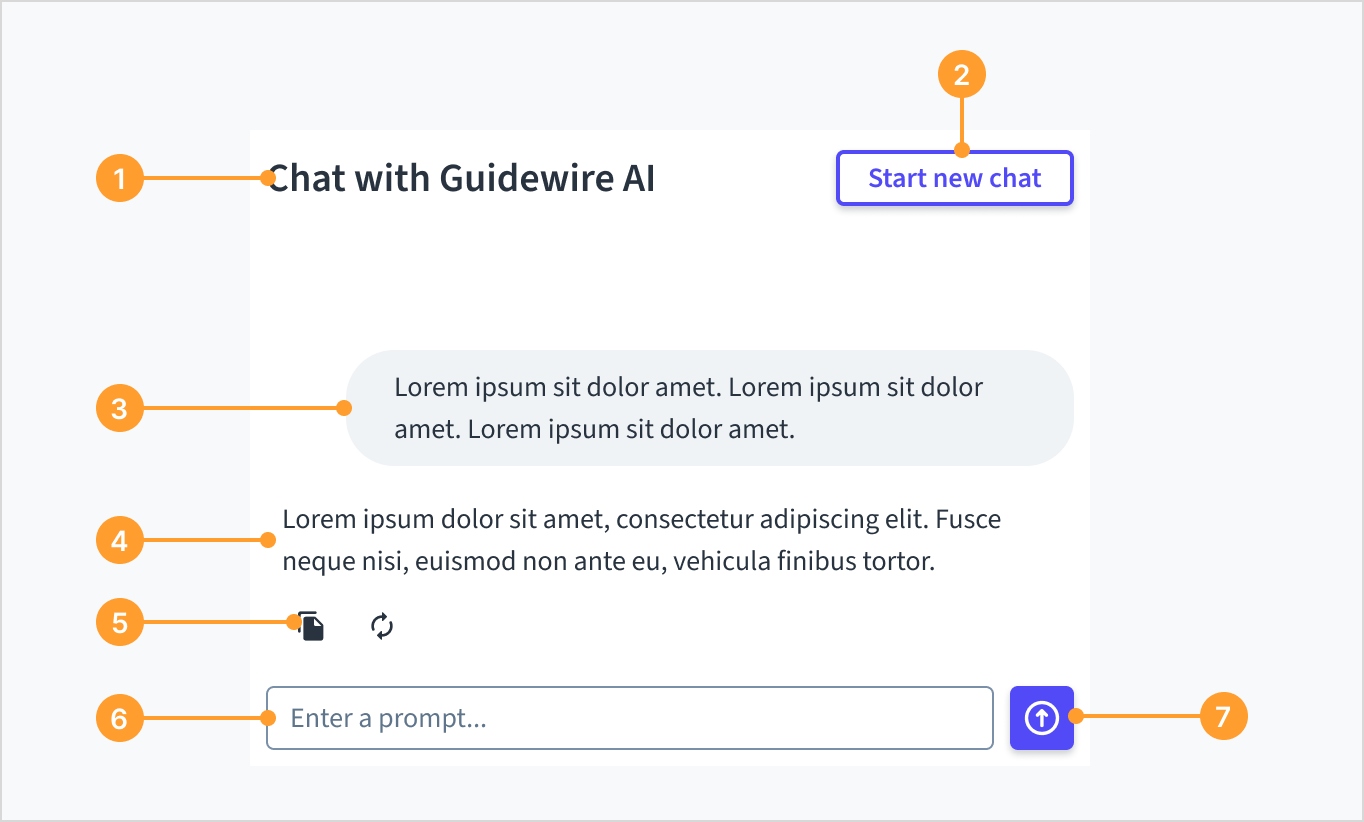
The AI chat component consists of the following elements:
- AI assistant header: Displays the specific feature or product name.
- “Start new chat” button: A secondary action button that clears the current conversation history and initiates a fresh session. Guidewire recommends implementing a confirmation step for this action to prevent accidental data loss.
- User message: A right-aligned container for the user's input.
- AI response: A left-aligned text area for displaying the AI's output.
- Utility actions: Functional icons displayed below the AI response or user request (for example, Copy and Retry).
- Prompt input: A text area for user queries. This field includes placeholder text and supports multi-line input for longer prompts.
- Send button: Submits the message to the AI model.
Message actions
Utility actions enable users to interact with message history. The available actions differ depending on whether the message is from the user or the AI.
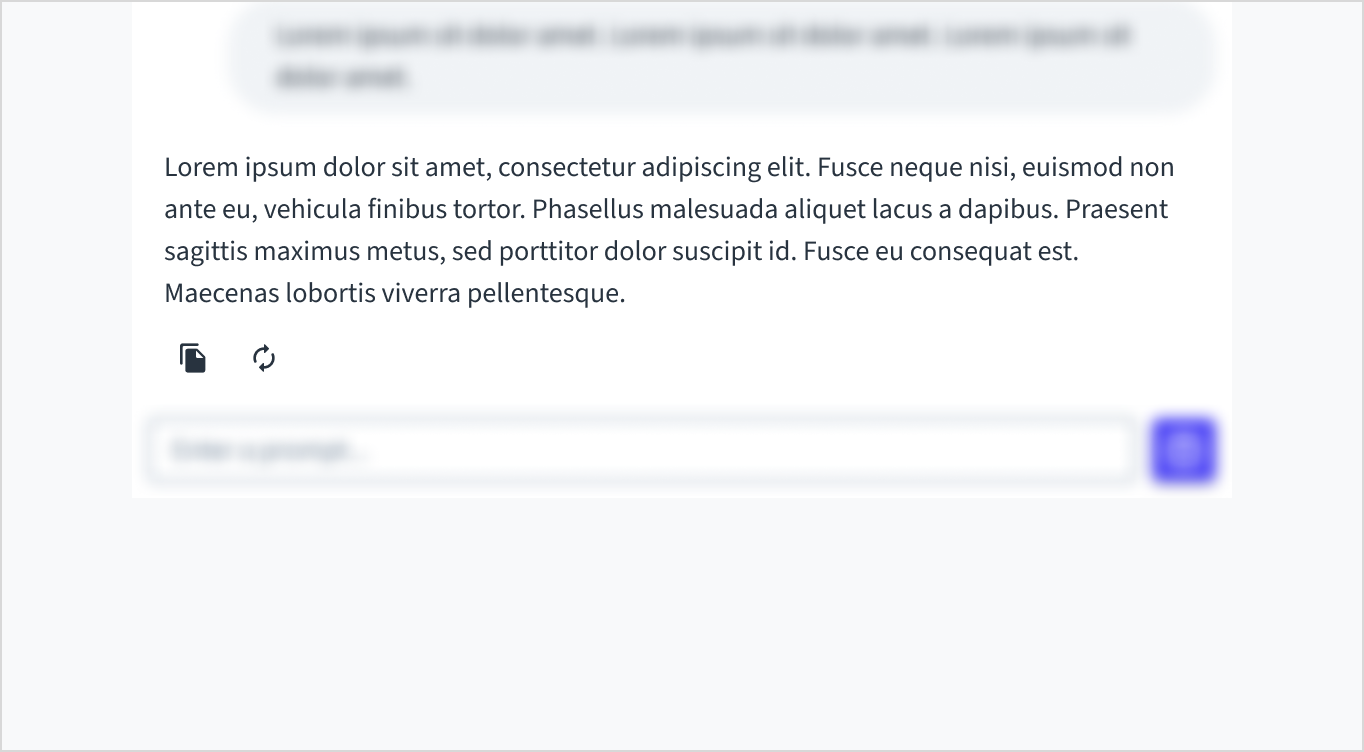
AI responses include Copy and Retry actions.
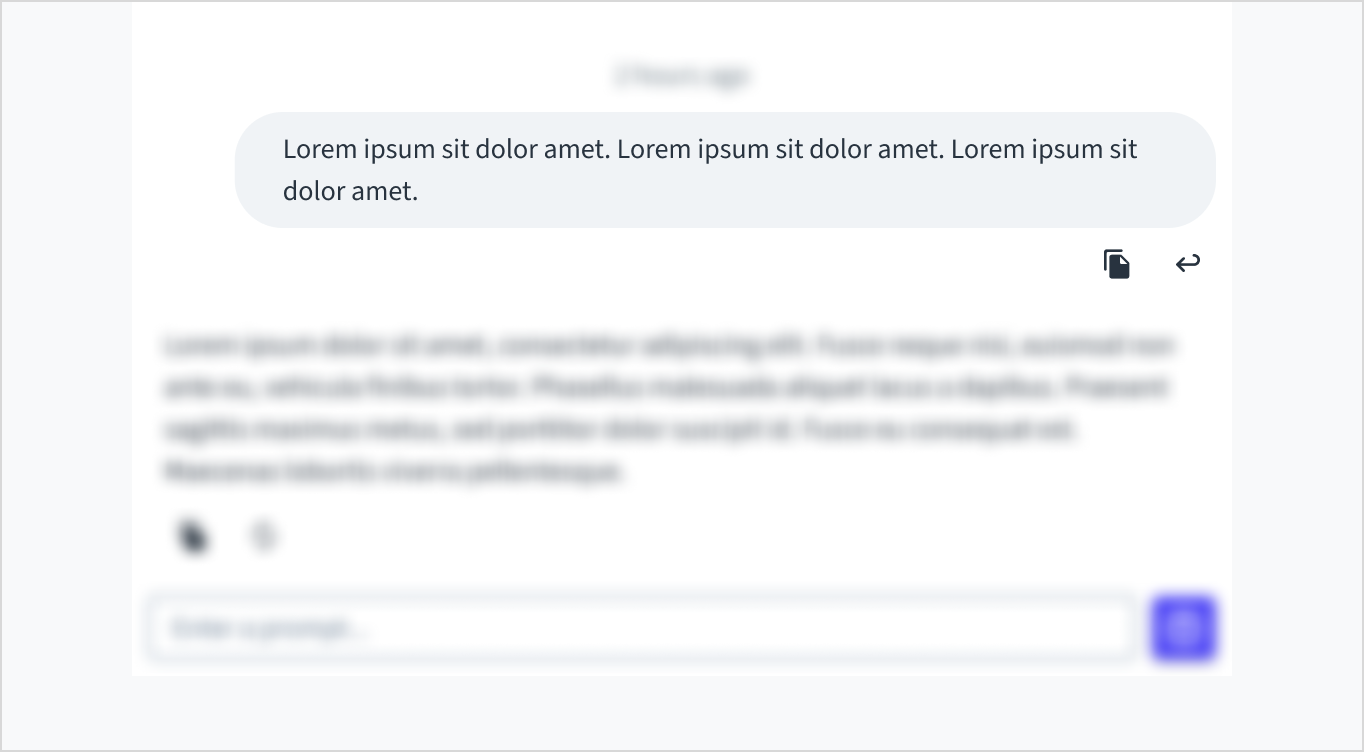
User prompts include Copy and Re-run actions.
Placement
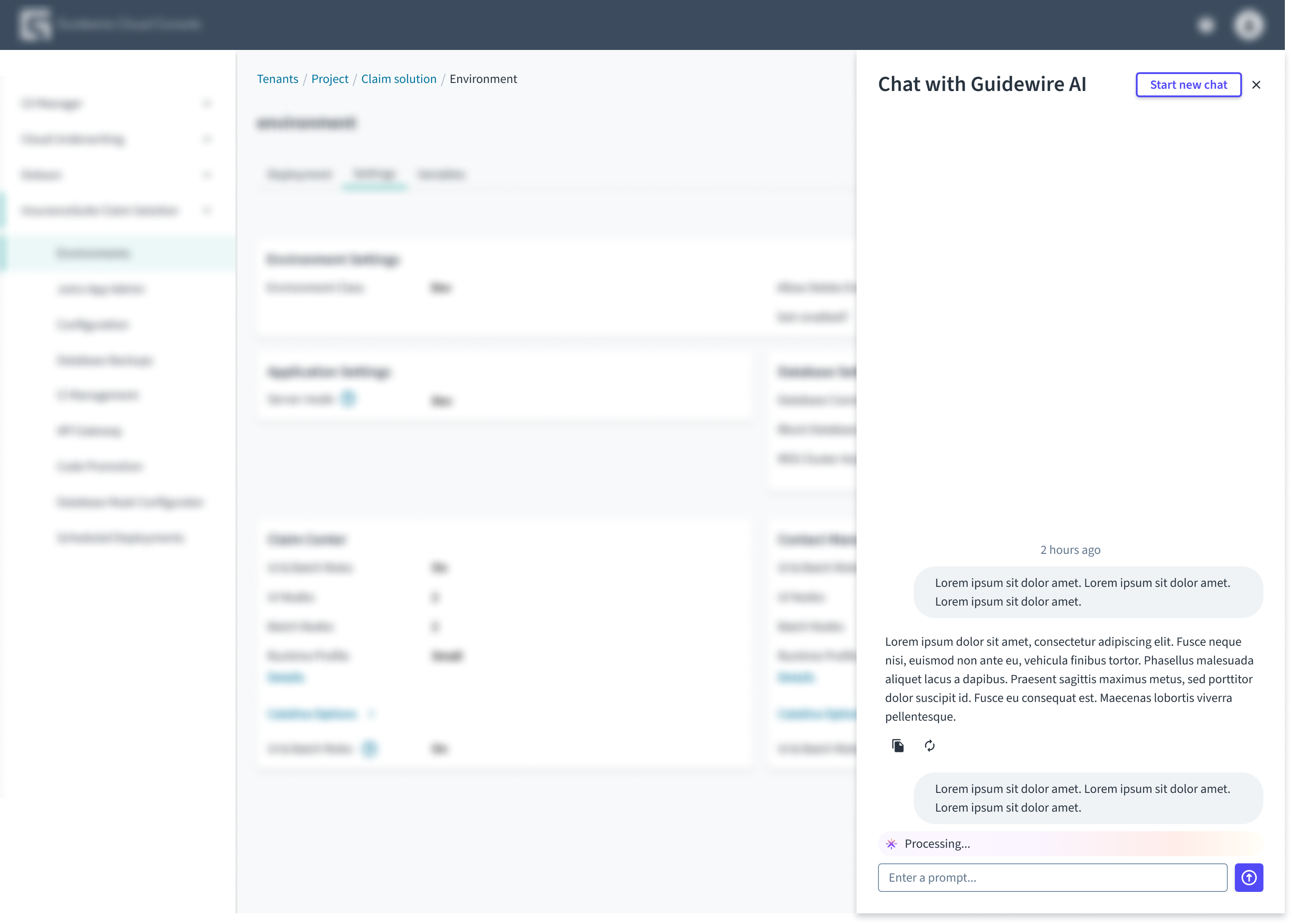
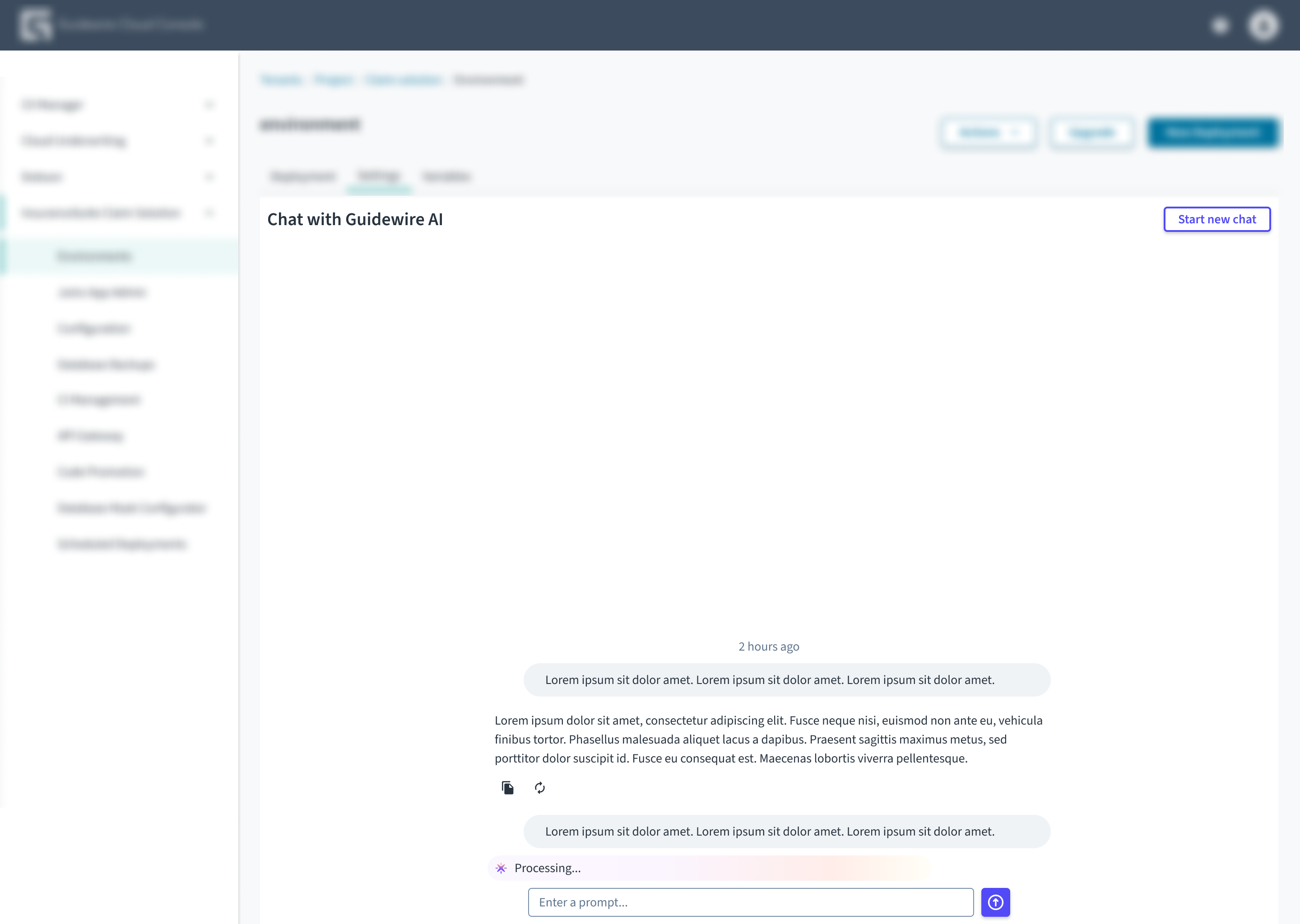
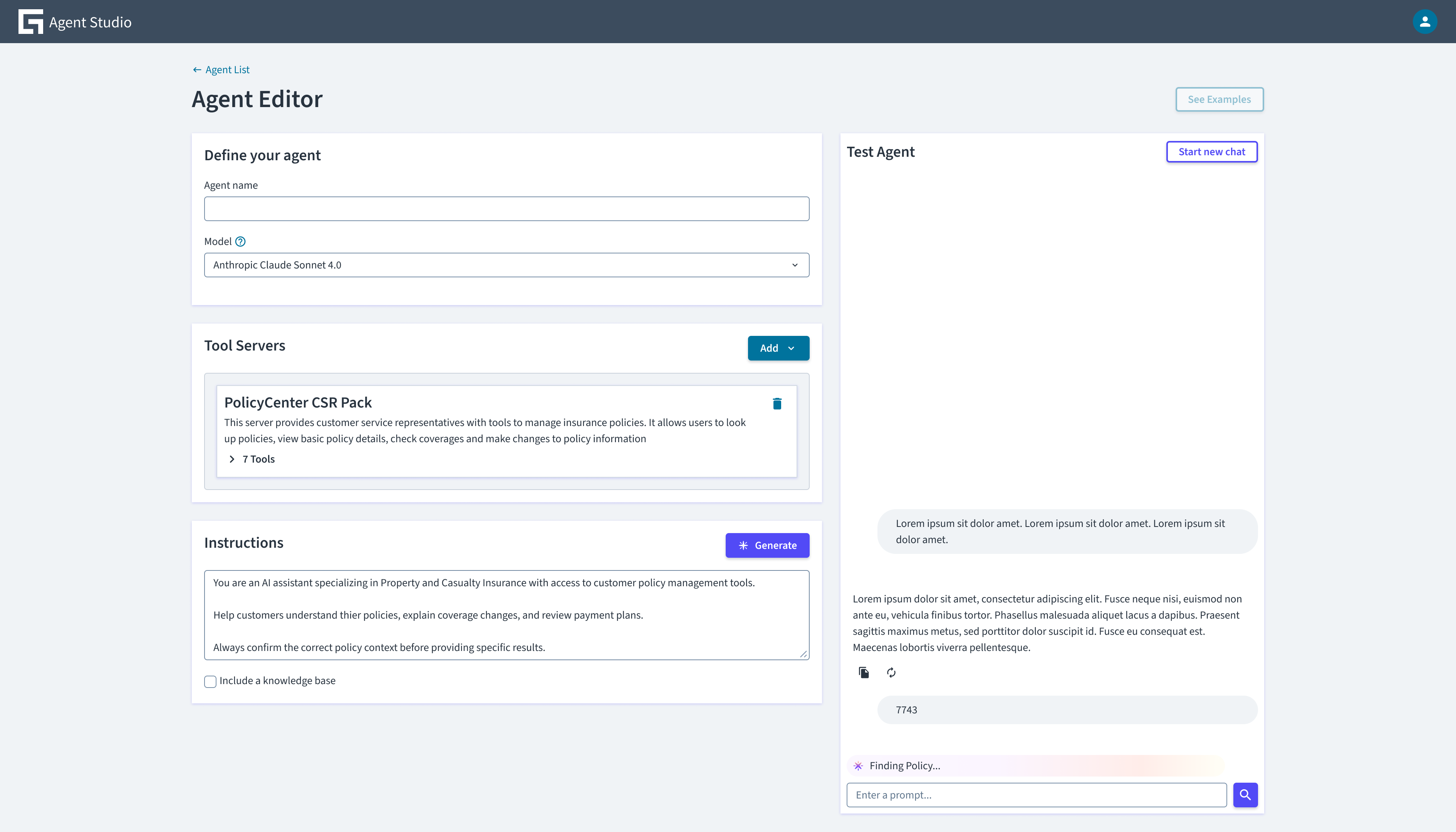
The AI chat component is designed to be flexible and can be placed within various UI patterns. Recommended implementations include: drawer, full-page interface, and embedded.
Note: The AI chat component does not include these containers. Developers must implement the surrounding UI pattern (such as a modal or drawer) separately.
Use drawer chat for multitasking workflows where the user needs to reference page content (like claim details) while interacting with the assistant.
Use full-page chat for complex, deep-dive sessions or research tasks where the conversation is the primary focus of the user's workflow.
Use embedded chat for workflows where the chat acts as a persistent companion to a primary task, allowing users to work and converse side-by-side (for example, Agent Studio).
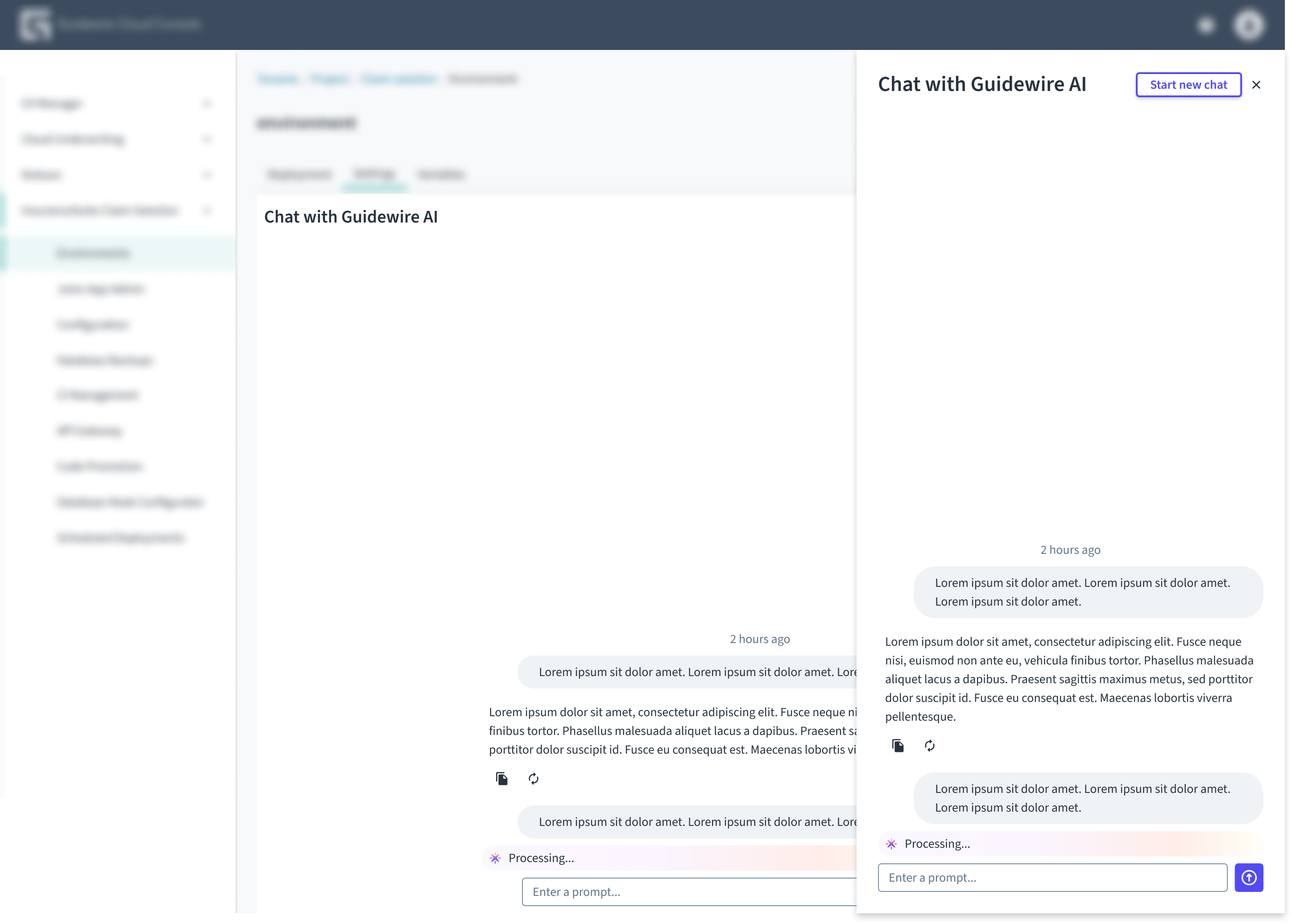
Don't display two AI chats at the same time.
Behaviors
States
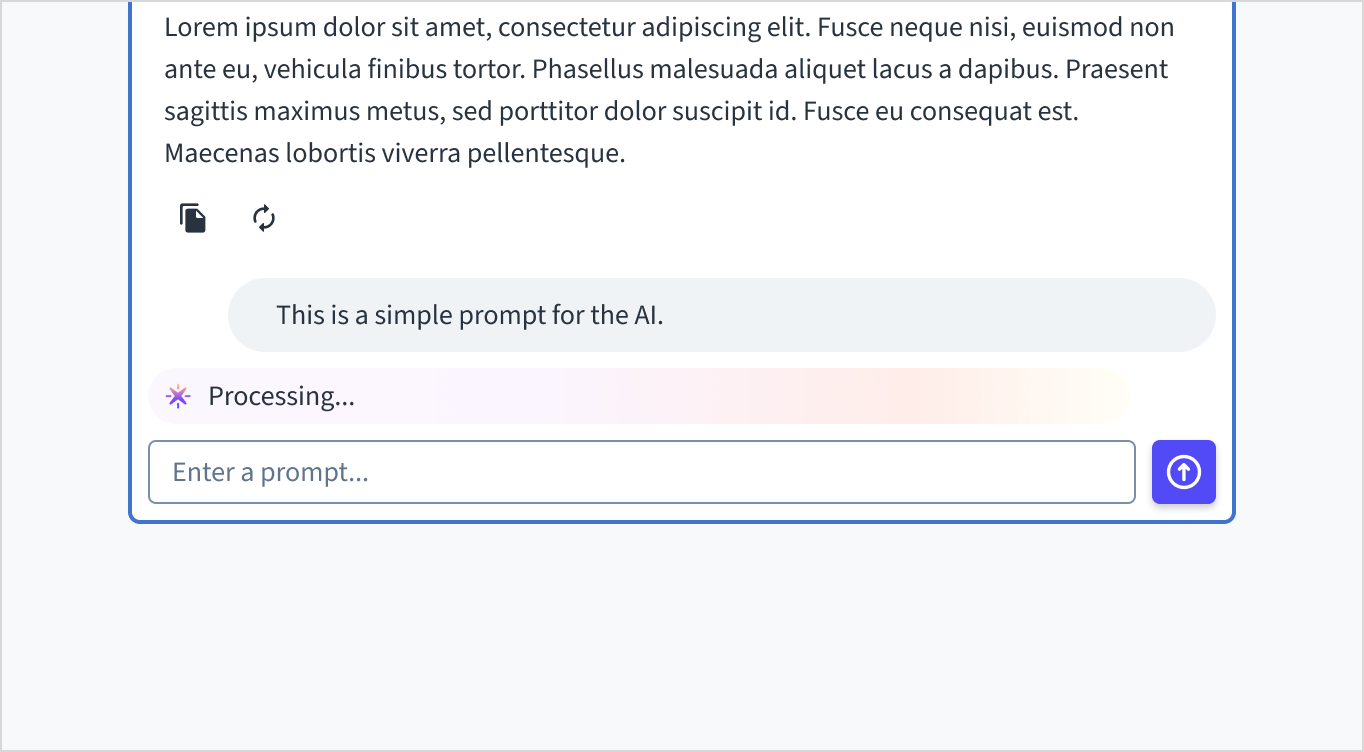
When the AI is generating a response, a status indicator appears within the chat conversation.
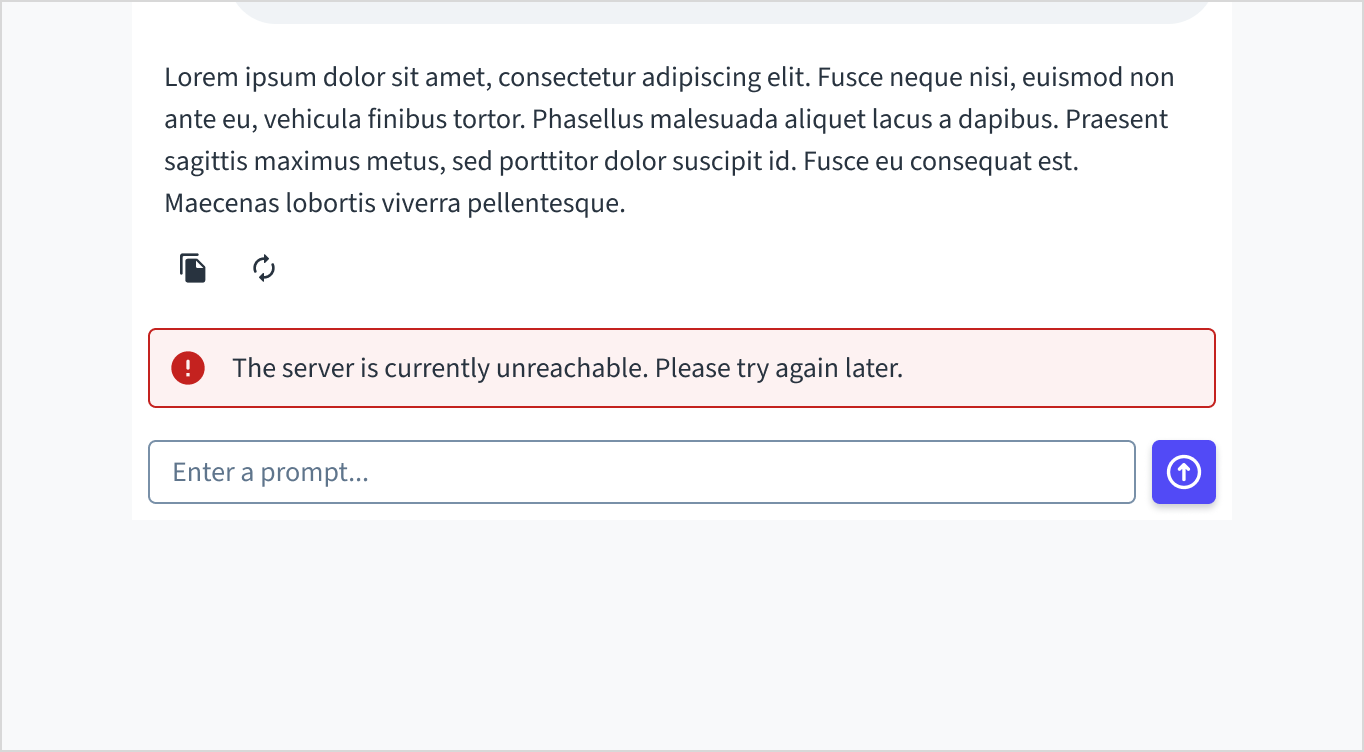
When an error occurs, an inline notification appears within the chat conversation.
Out-of-scope prompts
The prompt input remains active at all times to ensure the interface does not appear broken. If a user enters a query that falls outside the assistant's specific knowledge or capabilities:
-
The assistant provides a standard response indicating it cannot help with that specific request.
-
The assistant automatically displays a suggestions list as follow-up buttons to guide the user back to supported workflows.
You can configure the component to re-display the initial list of pre-defined suggestions after a task is completed, rather than generating dynamic AI follow-up questions.
Content
General writing guidelines
- En todos los aspectos del diseño de las interfaces de productos de Guidewire, utilice mayúsculas como se usan en las oraciones. No use mayúsculas en todas las palabras.
- Use verbos en tiempo presente y voz activa en la mayoría de las situaciones.
- Use contracciones comunes para darle al texto un tono más natural e informal (pauta correspondiente al inglés).
- Use un lenguaje sencillo. Evite la jerga innecesaria y el lenguaje complejo.
- Las palabras y las oraciones deben ser breves.
AI-specific guidelines
- Non-human persona: Don't attribute human qualities, gender, or personal names to the assistant. Avoid verbs that imply cognition or agency.
- Status indicators: When the system is working, use approved feedback loops like "Processing..." or "Just a moment..."
- Transparency: Clearly identify the AI chat assistant as an automated system. Establishing this boundary sets the right user expectations and maintains trust.
- Brevity: Focus on efficiency. Provide only the information required to complete the user's goal, avoiding unnecessary filler or excessive detail.
Accessibility
The AI chat component represents a complex interactive region used to perform conversational actions. It includes input fields, dynamic content areas, and action buttons.
This component is designed to meet WCAG 2.1 AA accessibility guidelines. The contrast ratio of textual elements against their background is above 4.5:1. Non-textual content that conveys meaning and keyboard focus indicators have a contrast ratio of at least 3:1 with their adjacent colors.
However, changes made by the content author or the specific implementation context can affect accessibility conformance.
Follow the guidance below and refer to the WAI-ARIA Authoring Practices when using this component in your applications:
- Labels: Ensure the prompt input field has an accessible label (for example,
aria-label="Type your message"). Action buttons represented by icons (like Copy or Retry) must have descriptive aria-label attributes.
- Focus management: When the chat opens, focus must move immediately to the chat container or input field. When a message is sent, focus must remain in the input field. When closed, focus must return to the triggering element.
- Dynamic content: The chat uses ARIA live regions to announce incoming AI responses to screen readers. Ensure these regions are not obstructed by custom implementations.
- Keyboard navigation: All chat functions must be operable through keyboard only, including typing, sending, navigating messages, opening menus, and uploading files.
Code
function ChatPanel() {
  const { messages, sendMessage, status, errorCode, startThread } =
    useMerlinChat({
      baseUrl: 'https://your-base-url',
      agentPath: '/your/agent/path',
      authToken: 'your-auth-token',
    });
  return (
    <AIChat
      chatTitle="Chat with Guidewire AI"
      messages={messages}
      status={status}
      errorCode={errorCode}
      onSendMessage={sendMessage}
    />
  );
}
Import statement
import {
    AIChat,
    useMerlinChat,
 } from '@jutro/experimental-ai-components';
Component contract
Asegúrese de comprender la superficie de la API de componentes del sistema de diseño, así como sus implicaciones, ventajas y desventajas. Obtenga más información en nuestra introducción a la API de componentes.
Properties
AIChat props
chatTitleobligatorio
DescripciónTitle to display in the chat header.
messagesobligatorio
Tipo(AIChatUserMessage|AIChatAssistantMessage)[]
DescripciónList of messages in a conversation with an AI chat assistant. Messages sent by users would be AIChatUserMessage objects. Messages sent by an AI assistant would be AIChatAssistantMessage objects. Supplied by the useMerlinChat hook.
onSendMessageobligatorio
Tipo(message: string) => void
DescripciónFunction called to send a user message. Supplied by the useMerlinChat hook.
statusobligatorio
Tipo'ready' | 'submitted' | 'streaming' | 'loadingThread'
DescripciónThe current operational state of the AI chat. Supplied by the useMerlinChat hook.
agentDescription
DescripciónDescription text shown below welcomeMessage.
aiMessageCustomActions
TipoAIChatAIMessageCustomAction[]iconobligatorio
DescripciónIcon shown for the action button.
labelobligatorio
DescripciónTooltip and label for the action.
onClickobligatorio
Tipo(message: AIChatAssistantMessage) => void
DescripciónFunction called when the action is activated. The message argument uses the AI chat assistant message that the action is activated on.
DescripciónAdditional action buttons to show on assistant messages.
chatName
DescripciónName of chat used in the disclaimer text.
errorCode
DescripciónError code indicating a problem encountered in the AI chat. When defined, the component automatically displays an error notification. Supplied by the useMerlinChat hook.
initialPromptValue
DescripciónInitial text to write in the prompt text area.
initialSuggestions
TipoAIChatSuggestion[]labelobligatorio
DescripciónDisplay text for the suggestion.
promptobligatorio
DescripciónText sent when prompt is clicked.
icon
TipoReactElement | ComponentType
DescripciónIf not specified, it has a sparkle icon.
DescripciónAn array of suggested messages to add to an empty prompt text area.
onClose
DescripciónIf provided, renders a close button in the header that calls the provided function.
onNewChat
DescripciónIf provided, renders a new chat button in the header that calls the provided function.
welcomeMessage
DescripciónHeading shown when there are no messages.
AIChatUserMessage props
contentobligatorio
roleobligatorio
DescripciónThe role of the speaker of this message. For an AIChatUserMessage it will always be user.
AIChatAssistantMessage props
contentobligatorio
regenerateobligatorio
DescripciónFunction to run when the regenerate option is selected for this message.
roleobligatorio
DescripciónThe role of the speaker of this message. For an AIChatAssistantMessage it will always be assistant.
timestampobligatorio
DescripciónTimestamp of message given in epoch milliseconds.
Hooks
useMerlinChat
This hook is used to connect your AI chat component to your Merlin chat API.
const { messages, sendMessage, status, errorCode, startThread } =
  useMerlinChat({
    baseUrl: 'https://your-base-url',
    agentPath: '/your/agent/path',
    authToken: 'your-auth-token',
  });
It takes the following arguments:
baseUrl (string): base URL for the Merlin API.agentPath (string): agent path for routing requests.authToken (string): authorization token sent in request headers.
It returns the following values:
messages (AIMessage[]): a list of AIChatUserMessage and AIChatAssistantMessage objects, containing all messages sent to and from your Merlin AI chat agent in the current conversation.sendMessage ((prompt: string) => Promise<void>): a function to send the users' messages to your Merlin AI chat agent.status ('submitted' | 'streaming' | 'ready'): current status of your Merlin AI chat agent.errorCode ('ERROR'): if present, an error occurred on your Merlin AI chat agent.threadID (string | undefined): the threadID generated and returned by Merlin. The first message sent by a user to Merlin does not have a threadID assigned, Merlin will generate the threadID and return it in its first response.startThread ((initialThreadId?: string) => void): resets the chat state (clears messages, status, and errors) and starts a new conversation. Optionally, accepts a unique ID to assign to the new thread.loadThread ((threadId: string) => void): Loads an existing conversation by thread ID.
In order to integrate with Merlin, the consumer needs to create and deploy an agent following Merlin instructions.
For more information on the Project Merlin framework, see the AI platform documentation.
Translation keys
There are five translation keys associated with the AIChat component:
| Key | Used for |
|---|
| jutro-ai-components.AIChatMessages.copy | aria-label value for the copy button |
| jutro-ai-components.AIChatMessages.regenerate | aria-label value for the regenerate button |
| jutro-ai-components.AIChatMessages.upVote | aria-label value for the upvote button |
| jutro-ai-components.AIChatMessages.downVote | aria-label value for the downvote button |
| jutro-ai-components.AIChatMessages.rerun | aria-label value for the rerun button |
| jutro-ai-components.AIChatPrompt.sendLabel | aria-label value for the send button label |
| jutro-ai-components.AIChatPrompt.promptLabel | aria-label value for the prompt box |
| jutro-ai-components.AIChatPrompt.promptPlaceholder | aria-label value for the prompt placeholder text |
Escape hatches
Para obtener más información, consulte nuestra documentación sobre escotillas de escape.
Examples
Check out the Usage section for details about how to design an AI chat properly, and the different configuration options available.
Basic example
A basic AI chat implementation consists of a useMerlinChat hook combined with an AIChat component that uses value from the hook. The hook handles communication with the Merlin Chat AI API.
function ChatPanel() {
  const { messages, sendMessage, status, errorCode, startThread } =
    useMerlinChat({
      baseUrl: 'https://your-base-url',
      agentPath: '/your/agent/path',
      authToken: 'your-auth-token',
    });
  return (
    <AIChat
      chatTitle="Chat with Guidewire AI"
      messages={messages}
      status={status}
      errorCode={errorCode}
      onSendMessage={sendMessage}
    />
  );
}
For more information on the Project Merlin framework, see the AI platform documentation.