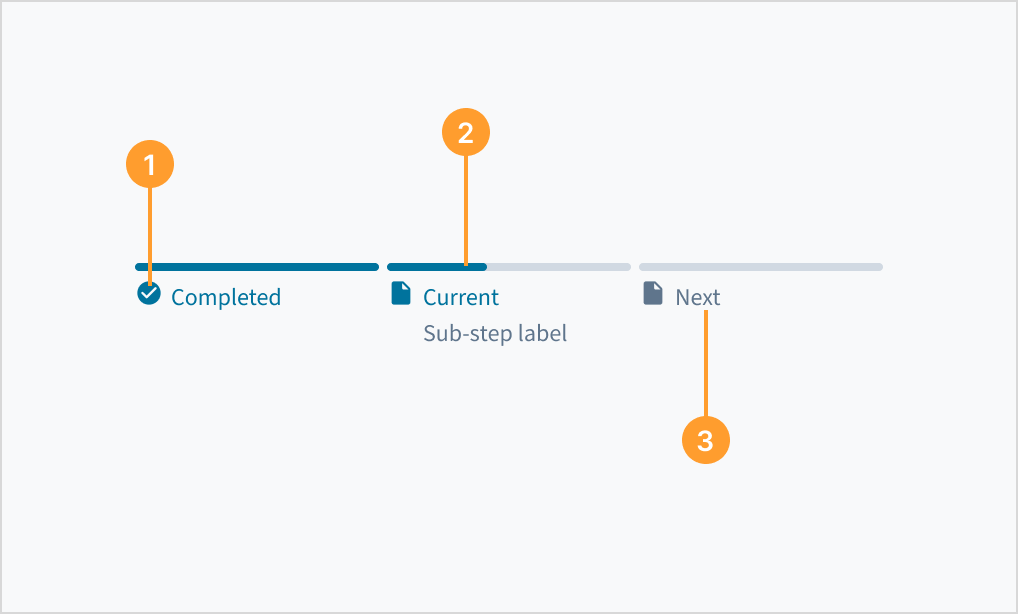
Phasenfortschrittsbalken
Beispiele
Im Abschnitt Verwendung finden Sie Informationen zum korrekten Design eines Phasenfortschrittsbalkes und den verschiedenen von Guidewire bereitgestellten Konfigurationsoptionen.
Einfaches Beispiel
Zeigt den Fortschritt als eine Reihe von Phasen an, die wiederum eine Reihe von Teilschritten aufweisen.
<PhaseProgressBar
    phases={[
        {
        icon: BusinessCenterIcon,
        id: 'your-business',
        steps: [
            {
            title: 'Completed phase first step',
            visited: true
            },
            {
            title: 'Completed phase second step',
            visited: true
            }
        ],
        title: 'Completed Phase'
        },
        {
        icon: InsertDriveIcon,
        id: 'final-details',
        isError: false,
        steps: [
            {
            active: true,
            title: 'Active step',
            visited: true
            },
            {
            title: 'Next step'
            }
        ],
        title: 'Current phase'
        },
        {
        icon: CreditCardIcon,
        id: 'payment',
        steps: [
            {
            title: 'Next phase step 1'
            },
            {
            title: 'Next phase step 2'
            },
            {
            title: 'Next phase step 3'
            }
        ],
        title: 'Next phase'
        }
    ]}
    />
Interaktives Beispiel
Dieses Beispiel zeigt, wie sich der Phasenfortschrittsbalken ändert, wenn ein Benutzer die einzelnen Schritte in den einzelnen Phasen ausführt.
const [currentStage, setCurrentStage] = useState(0);
const [currentStep, setCurrentStep] = useState(0);
const initialPhases = [
    {
    title: 'First Phase',
    icon: BusinessCenterIcon,
    id: 'your-business',
    steps: [
        {
        title: 'First step',
        visited: true,
        active:true,
        },
        {
        title: 'Second step',
        visited: false
        },
        {
        title: 'Third step',
        visited: false
        }
    ],
    },
    {
    title: 'Second phase',
    icon: InsertDriveIcon,
    id: 'final-details',
    isError: false,
    steps: [
        {
        title: 'First step',
        visited: false,

        }
    ],
    }
]
const [phases, setPhases] = useState(initialPhases);
const [disableButton, setDisabledButton] = useState(false);
const [disableBackButton, setDisabledBackButton] = useState(true);
const [labelState, setLabelState] = useState("info")

const moveToNext = () => {

    let nextPhases = phases;
    let stage = currentStage;
    let step = currentStep;

    nextPhases[stage].steps[step].visited = true;
    nextPhases[stage].steps[step].active = false;


    if (stage == 0) {
        (step < 2) ? setCurrentStep(++step) : (stage = 1, step=0, setCurrentStage(stage), setCurrentStep(step));
        nextPhases[stage].steps[step].active = true;
        setDisabledBackButton(false);
    } else {
        setDisabledButton(true);
        setLabelState("success");
    }

    setPhases(nextPhases);
}

const moveBack = () => {

    let nextPhases = phases;
    let stage = currentStage;
    let step = currentStep;

    nextPhases[stage].steps[step].visited = false;
    nextPhases[stage].steps[step].active = false;

    if (stage == 1) {
        stage = 0
        step = 2
        setCurrentStage(stage)
        setCurrentStep(step)
        nextPhases[stage].steps[step].active = true
        nextPhases[stage].steps[step].visited = false;
        setLabelState("info");
        setDisabledButton(false);
    }
    else {
        (step > 0) ? setCurrentStep(--step) : (stage = 1, step=0, setCurrentStage(stage), setCurrentStep(step));
        nextPhases[stage].steps[step].active = true;
        if (step == 0){
            setDisabledBackButton(true);
        }
    }

    setPhases(nextPhases);
}

<JutroWrapper>
    <PhaseProgressBar
        phases={phases}
        />
        <br/>
        <InfoLabel type={labelState}>Phase: {phases[currentStage].title}</InfoLabel>
        <InfoLabel type={labelState}>Step: {phases[currentStage].steps[currentStep].title}</InfoLabel>
        <br/><br/>
        <Button label="previous" onClick={moveBack} disabled={disableBackButton}></Button>
        <Button label="next" onClick={moveToNext} disabled={disableButton}></Button>
</JutroWrapper>
Error Example
You can highlight when there is an error within a phase.
<PhaseProgressBar
    phases={[
        {
        icon: BusinessCenterIcon,
        id: 'your-business',
        steps: [
            {
            title: 'Completed phase first step',
            visited: true
            },
            {
            title: 'Completed phase second step',
            visited: true
            }
        ],
        title: 'Completed Phase'
        },
        {
        icon: InsertDriveIcon,
        id: 'final-details',
        isError: true,
        steps: [
            {
            active: true,
            title: 'Active step',
            visited: true
            },
            {
            title: 'Next step'
            }
        ],
        title: 'Current phase'
        }
    ]}
    />
OnClick Example
You can add a function that runs when the phase title is clicked.
function MakeToast (text: string) {
        ToastProvider.toast({
            message: text,
            autoClose: 3000,
          })
    }

<ToastProvider />
<PhaseProgressBar
    phases={[
        {
        icon: BusinessCenterIcon,
        id: 'your-business',
        steps: [
            {
            title: 'Completed phase first step',
            visited: true
            },
            {
            title: 'Completed phase second step',
            visited: true
            }
        ],
        title: 'Completed Phase',
        onClick: () => {MakeToast("Completed clicked")}
        },
        {
        icon: InsertDriveIcon,
        id: 'final-details',
        steps: [
            {
            active: true,
            title: 'Active step',
            visited: true
            },
            {
            title: 'Next step'
            }
        ],
        title: 'Current phase',
        onClick: () => {MakeToast("Current clicked")}
        }
    ]}
    />