Pattern contribution for designers
As a UX designer, if you identify a potential pattern, work with the Jutro UX team to add it to the pattern library. This enables other teams at Guidewire and our customers to reuse the pattern.
To start this process, connect with the Jutro UX Team by adding your topic to Jutro UX team agenda. Meetings take place every Tuesday. During the session, you can present your use cases, findings, or mockups to help us understand the need. After the pattern request is approved, you can add the pattern as a Jira EPIC to the Jutro pattern backlog by cloning issue JUT-17994.
Pattern contribution process
The pattern contribution process is meant to be completed in one week. Follow these six steps as you work on the pattern:

Here's an explanation of what occurs in each step.
Step 1: Discovery
| Approximate time to complete | 1 day |
|---|---|
| Jobs to be done |
|
| Artifacts from this phase |
|
During the discovery step, the UX designer embarks on a journey to explore uncharted territory. They gather essential information and insights that will guide the entire design process. There isn't a one-size-fits-all approach to this step. It varies depending on the project's scope, but some common elements remain consistent.
For competitive/market research, check other sites and design systems to better understand what others are working on in the same field.
Document and link best practices that you come across. For example, articles from the Nielsen Norman Group are reliable and backed by research. Keep in mind regional trends when designing the pattern.
Preserve all artifacts and links related to this phase in the Discovery page of the Figma pattern.
Step 2: Definition
| Approximate time to complete | 4 hours |
|---|---|
| Jobs to be done |
|
| Artifacts from this phase |
|
After completing the discovery step, you can start defining stakeholders and use cases. When it comes to selecting stakeholders, include developers early in the process. This is important so that they have enough time to identify implementation problems. In the Definition page of the Figma patterns template, you'll find examples of how to frame use cases. Keep in mind that, because you're working on a Jutro pattern, the outcome of your work must be agnostic. This means that it needs to address all the use cases you gather, not just your use cases.
Estimate when you will finish work on the pattern so that you can schedule meetings with stakeholders in advance. You can use the EMEA UX clinic or the AMER UX clinic to complete the design review, but please remember that all stakeholders listed must be present. You can also use the weekly Jutro UX meeting to complete the review.
Step 3: Concepts
| Approximate time to complete | 1 day |
|---|---|
| Jobs to be done |
|
| Artifacts from this phase |
|
During the concepts phase, you create low-fidelity explorations and ask questions. Stakeholders give feedback about the ideas that you generate.
See the following for an example of what low-fidelity explorations look like:
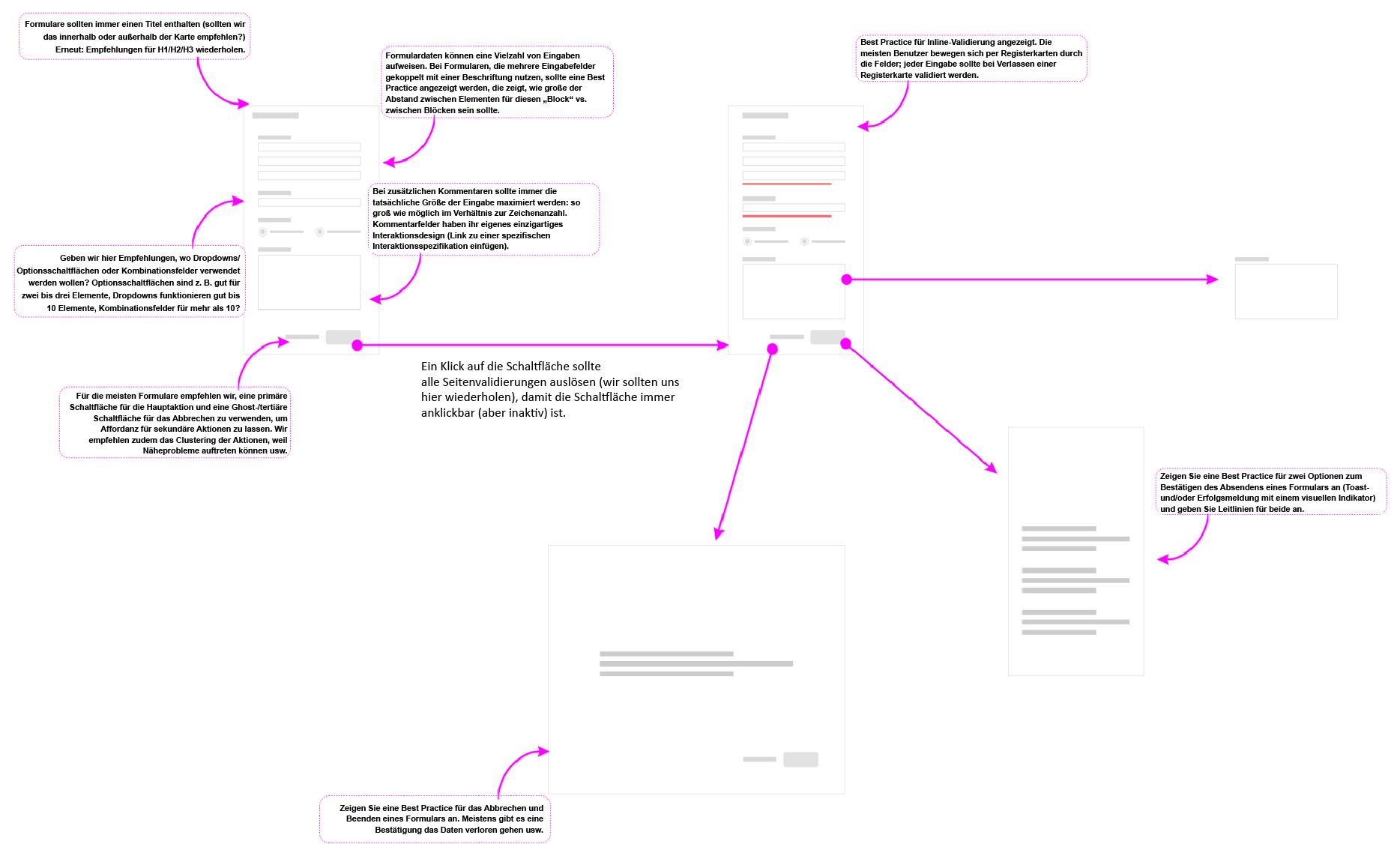
At this stage of the pattern creation process, focus is on the flow and asking as many questions as possible. You engage in extensive talks with stakeholders to determine what's in scope for now, what can be done in the next iteration of the pattern, and what's out of scope.
You can find a template to record all of this information in the General information page of the Figma patterns template.
Step 4: Design
| Approximate time to complete | 1 day |
|---|---|
| Jobs to be done |
|
| Artifacts from this phase | Designs added to the Figma Design page |
Now that you've defined the scope of the pattern, it's time to begin work on the hi-fi designs. We ask that you use Jutro components whenever you can. If you find any gaps, contact the Jutro UX Design team using the #ask-jutro-design Slack channel. As you design, it's important to keep in mind responsiveness and accessibility. Our accessibility specialist Raphael Clegg-Vinell is here to help if you have any questions. After you review the designs with stakeholders, you must publish the designs in the Figma pattern library. For questions on how to publish, contact the Jutro UX Design team.
Step 5: Documentation
| Approximate time to complete | 1 day |
|---|---|
| Jobs to be done |
|
| Artifacts from this phase | Documentation added to the Figma Documentation page |
Documenting patterns is essential for preserving knowledge, ensuring consistency, promoting efficiency, and supporting effective communication and decision-making. As the UX designer who is working on the pattern, you're responsible for creating the first draft of the documentation.
Refer to the Documentation page of the Figma patterns file for the template that we use. You'll also find examples that you can refer to as you craft the documentation. After you finish the first draft, please tag our UX writer, Hunter Nielsen. He will review the documentation and work with you to make any edits that are necessary.
At the end of this process, your work appears in the Figma Documentation page. The UX writer publishes the final draft of the documentation to the Jutro documentation site.
Step 6: Dev handoff
| Approximate time to complete | 4 hours |
|---|---|
| Jobs to be done |
|
| Artifacts from this phase | Designs added to the Figma Dev handoff page |
The last step, but also an important one, is to make sure that you prepared all specifications for the devs. If there are behaviors or animations that are important for the pattern's look and feel, make note of them. Not everything can be captured as designs in Figma. Sometimes we have to explicitly call out a behavior. After preparing the specs, contact our Jutro UX developer, Angelo Kandah, so they can ask questions.
See the following for an example of what specs look like:
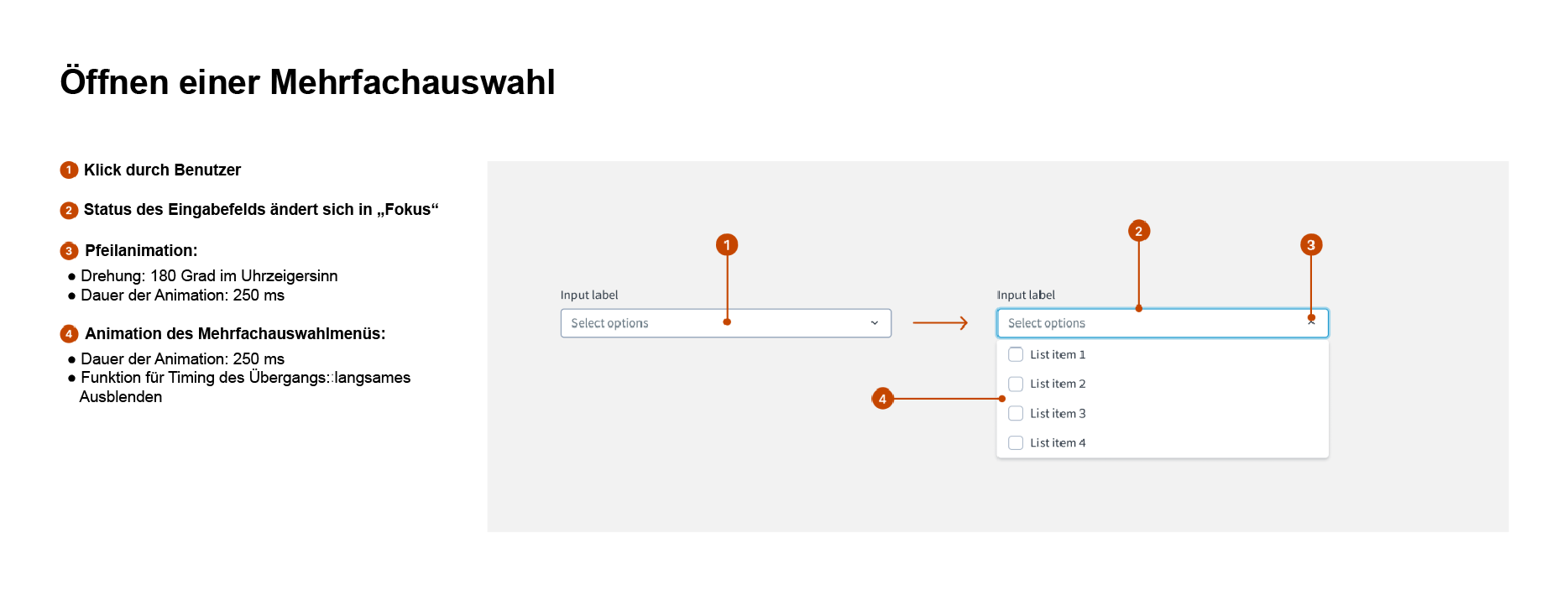 Example of component specs
Additional considerations
After you have finalized the pattern designs, make sure to add those designs to the Jutro pattern library and republish the library. This ensures that everyone else can access your updates.
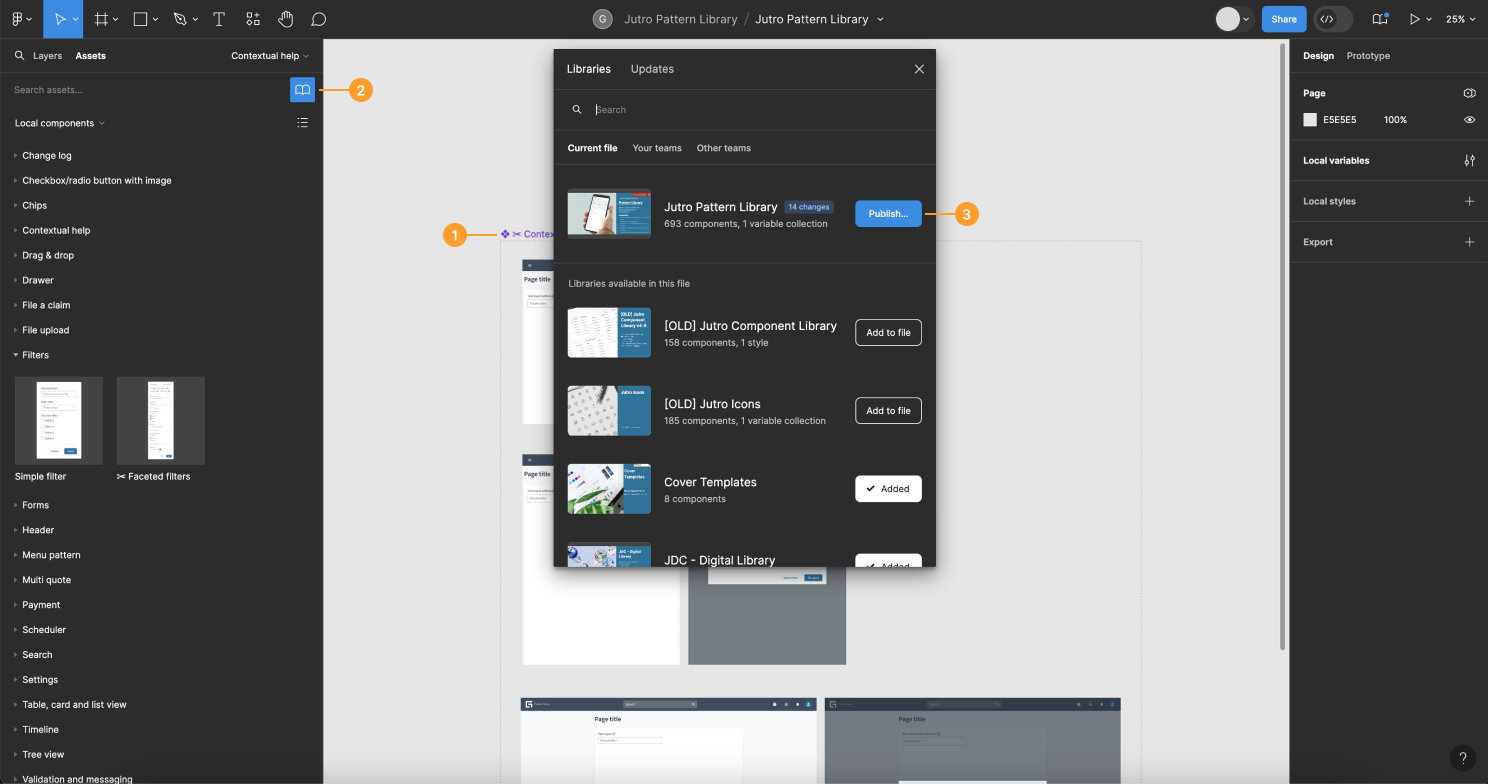
To add your pattern to the Jutro pattern library:
- Add your pattern as a component in the "Jutro Pattern Library".
- Select the Library icon to open the Libraries dialog.
- Select Jutro Pattern Library, then select Publish.
When the pattern is ready for designers to use, announce it in our communication channels. This includes the #ux-general-internal Slack channel or the UX team meeting.
Connect with us
Every week we have Jutro UX team meetings. You can add a topic to the agenda using the design system service hours Confluence page.
Have questions that weren't answered here? Contact the Jutro UX Design team: #ask-jutro-design