Upgrade manifesto
Published: August 2020 Have comments or feedback? Add them here.
Definitions
Guidewire Jutro Applications - web applications built by internal Guidewire teams in order to provide a product UI for internal use and external
customers (applications like GCH or GCC)
Insurer Web applications - Jutro-based web applications built by Guidewire customers
LTS - Jutro version that is on long term support
Audience
This manifesto is aimed at Guidewire Product Development and customers of Digital applications within the following use cases:
Assumption is: Jutro coding guidelines have been followed and Jutro OOTB look and feel is used.
- Guidewire Jutro Applications, such as GCC and Cloud Rules etc. that have been partially built with Jutro, want to continuously uptake the latest version of Jutro without breaking their application, and with minimal effort.
- Guidewire Jutro Applications that are using Jutro application structure and components (like floorplans) want to continuously uptake the latest version of Jutro without breaking their application, and with minimal effort.
- Guidewire Digital applications that want to uptake the latest version of Jutro to include as part of the Digital release, without breaking their application and with minimal effort.
Digital Customers: This manifesto as a whole is not aimed at Digital customers as these should be synced with the Digital cadence instead. However some of the guidelines can and are used by the Digital internal Guidewire team as a consumer of Jutro.
What to expect from new versions of Jutro?
Jutro is continuously evolving with the addition of new components and capabilities, but also by improving and evolving the UI/UX of the components.
Improved UI/UX
Consumers can expect each version of Jutro to include an evolved UI/UX compared to the previous version. These can range from minor tweaks to bigger or wider UI/UX changes. We will always call out UI/UX changes when we believe these disrupt our consumers' applications. All the changes introduced will always be in line with our vision, which normally goes through a research and validation process.
New or improved functionality (and also bug fixes, architectural changes, refactors and performance improvements)
We are continuously improving and adding new functionality in order to enable our consumers' use cases. The introduction of improvements may lead to the deprecation of old functionality, followed by its removal. This may lead to the introduction of breaking changes to applications that leverage the removed functionality. More details below in the "deprecation" section.
Versioning and cadence of releases
| X. | Y. | Z. |
|---|---|---|
| major | minor | patch |
Patch
- When a hotfix is mandatory to fix one or more critical issues found in Jutro (example - bug, or a security issue)
- Patch releases are an exception rather than a rule.
- Typically applied only to the latest active minor version or active LTS versions
Contains
- only: critical Bug fixes and/or security fixes.
Doesn't contain:
- New functionality
- Deprecations
- Breaking changes (exception can be where the patch delivers a security issue fix)
Minor
- Monthly
- Release date is flexible and happens after every 2 sprints.
- Every 6 months one of the minor versions is promoted as LTS according to the Guidewire release cadence
Contains
- Bug fixes
- New features and functionality
- (Can contain) Deprecations
- (Can contain) Removal of deprecations that are older than 6 months and not used by consumer. The removal of such deprecations would require prior communication to all consumers.
Major
- Not more than yearly (every two ski-releases)
- Only when breaking changes that might affect customers are unavoidable (For example, if Node.js or another core-like React library version that has been used is no longer supported, or if an upgrade is required for security reasons)
Contains
- Bug fixes
- (Can contain) Removed deprecations
- (Can contain) Breaking changes
Are major releases still needed?
There are multiple scenarios where we believe a Major release will be needed, such as upgrade of foundational aspects like React or Node.js, which has breaking changes itself.
It's also worth mentioning that the introduction of breaking changes is industry standard in frontend technologies. This includes not only in frontend languages like Angular, React, and Vue, but also JavaScript runtimes like Node.js. It can be seen as well in other technologies like Java.
How Guidewire facilitates the update?
We are measuring the features and components used by the customers in a safe way in their own environments, and send only the data to Jutro statistic. Specifically, we measure what components are used based on Guidewire internal projects and xEngage reference applications.
This provides information on migrations to the new functionality in case of deprecations.
Before dropping any deprecated feature, we are making sure that there are no customers that will be affected, or there is a minimal number of affected customers, who we notify in advance and support in migration.
Is there more details about breaking changes in Jutro?
Changes that should be marked as breaking
Deprecations
See:
Change of ownership
There might be situations where the ownership of a given Jutro functionality is changed to a different team. Typically this happens when the functionality developed and maintained by Jutro has only one consuming application and the Jutro team doesn't foresee that to change. When that's the case, the Jutro team and the consuming team will agree on the change of ownership, the code and knowledge are transferred to the consuming team and removed from the Jutro side.
Changes of ownership won't affect any other consuming team, but will still be referred in the release notes under the "Change of ownership" section.
Upgrade path vs non-upgrade path
Description of what's considered to be within the upgrade path and what's not.
Upgradable vs not upgradable
In this page when we refer to something as "not upgradable" it means that if breaking changes are introduced, the consuming application will need to overcome these manually, either by changing or adapting their implementation. Something referred to as "upgradable" means that it can be programatically upgraded (through codemods for example).
Core functionality - Jutro OOTB
In this context core functionality is the Jutro OOTB functionality published with every release. These packages include all the Jutro components and functionalities developed by the Jutro team.
The core functionality is blackboxed, which means the source code is not accessible which prevents modifications and also protects Jutro's IP. The fact that it's blackboxed, makes the core functionality of Jutro upgradable and it's simply an exercise of replacing all the packages. This is done using Jutro CLI.
Consuming application code
The consuming application code is all the code to implement an application, consisting of Presentation Metadata, React/JS code, CSS and Custom Components, and so on.
Presentation metadata
Presentation metadata is upgradable, as long as it's valid Presentation Metadata against the Jutro schema.
Presentation metadata is by far the most upgradable part of Jutro. It's machine language which obeys to a contract defined by Jutro, which makes it predictable, upgradable and easy to manipulate.
Upgrade path
- Use valid Jutro presentation metadata. Valid against Jutro's schema.
- For statically (manually) written presentation metadata files (Digital 11+ use case): Every time there are changes to the metadata, the Jutro release will include a script that migrates the metadata to the new version. This is available through the Jutro CLI.
- For auto generated metadata: The team owning the metadata generation will need to reflect these changes in their auto generator.
Non-upgrade path:
- It's possible to create custom presentation metadata. This can be by implementing new functionality or through new components,
- Custom metadata is not within the upgrade path.
- If you have presentation metadata files that contain custom and OOTB metadata, we can't guarantee upgradability of these.
How do I know if my presentation metadata is valid by Jutro's guidelines?
We deliver schema and tooling with every release to validate the presentation metadata.
How will the presentation metadata be upgraded?
Jutro releases are complemented with a set of CLI scripts that allow you to upgrade your presentation metadata to the new version.
I'm on version 4.1 and want to upgrade to 4.3 skipping 4.2, how does the script work?
The upgrade scripts are built based on the previous version released. That means Jutro 4.3 will include scripts to upgrade from 4.1 and 4.2 and from 4.2 to 4.3. The CLI allows you to choose to which version you want to upgrade (in this case to 4.2 or 4.3).
Will metadata change between minor versions and will my metadata stop working?
Jutro metadata changes in minor versions are additive.
Presentation metadata can change between minor versions, but it's not expected to affect consuming applications. If, for example, we rename a property of a component, we will introduce the new one and deprecate the old one. While the old one will still work, the upgrade script will take the old property and rename it accordingly.
JSX/Javascript
JSX/Javascript is not guaranteed.
Given the free form of how it can be implemented, it makes it very difficult to predict and therefore upgrade.
To date there is some functionality in Jutro that can only be invoked through JSX/Javascript - an example of that is rendering modals on a screen. When breaking changes are introduced, the consuming team will have to adapt heir implementation.
Will deprecations be used?
We will use deprecations whenever possible, so that we can support the old functionality and the new functionality in parallel. The functionality is then dropped on the following major release of jutro. Deprecations of JSX/Javascript only functionality will be listed in the release notes.
When can I expect breaking changes to happen?
With every major release.
Will there be tooling to upgrade JSX/Javascript?
Jutro-related components changes in many cases are covered by the codemods, but it is not guaranteed that functionality will be working in the same way after the upgrade without manual changes required.
CSS
This is still work in progress but there are two ways to modify the look and feel of a Jutro based application:
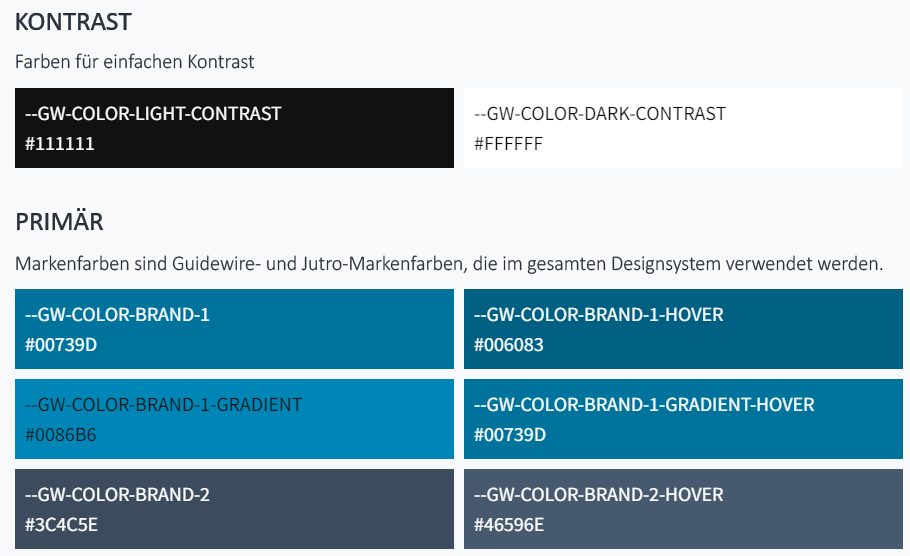
Overrides of CSS Variables using Jutro Theming UPGRADABLE:
- CSS variables provide capabilities to modify the look and feel of an application
- These variables are defined by Jutro which make them predictable and easy to manipulate in the future
- It might mean we create upgrade scripts in the future the same way we have for presentation metadata.
- Example below:
CSS overrides - NOT UPGRADABLE:
- CSS overrides are extremely flexible but not upgradable;
- These rely on HTML classes and IDs of the page elements
- Changes to these across releases will be frequent
- There's no way to guarantee upgradability of these
- CSS selectors are written in free form and are very difficult to predict
Custom components
The way custom components are built impacts upgradability. There are three types of custom components:
Composite components (pure metadata) - Upgradable
Composite components that leverage existing Jutro OOTB components. No extension of functionality.
- Example: 2 select boxes together, with no dependency on each other whatsoever.
- A use case is the reuse of 2 or more Jutro components across different places.
- Creating a composite component helps to avoid repeating the same metadata with every reuse.
- Reuse across the same page is already possible.
- Creating an actual component based purely on metadata - no JSX - that can be reused across the application isn't possible yet. Work in progress.
- This will be within the upgrade path as long as it uses valid metadata.
- Pure metadata components don't need to be static, they can use, for example, the iterable metadata functionality to dynamically render elements from a data source. This would still classify as upgradable.
Custom component extends Jutro capabilities (custom logic)
Components that use one or more Jutro component as the skeleton and extend its capabilities to perform some type of logic.
- Example: Expiry date in a credit card. It can be built with 2 select boxes (month and year). When the year selected is the current one, the months that are in the past should not be shown.
- This type of component should be built part with metadata and part with javascript.
- The visual part of it should be done in metadata. This is upgradable.
- The logic needs to be implemented with Javascript. This is not upgradable.
Custom component based on 3rd party library
This one is actually similar to the custom component with custom logic, except the content comes primarily from a 3rd party component.
Our rollout process - we test new releases with consuming applications
As part of our release process we will automatically run the test suite of Jutro consuming applications. This has two benefits:
- Helps identify issues with our release that haven't been spotted before.
- If there are no issues, it shows to our consuming applications that they can safely take the new version of Jutro.
It's required from consuming applications to have a reasonable test coverage.
How does this happen?
When a new release is ready to go, our pipeline will:
- Create a branch of the consuming application;
- Pull the new version of Jutro;
- Upgrade Jutro by running the upgrade scripts;
- Run the automated tests from the consuming application;
- Report is generated;
- If everything above went well, the branch will be ready to be merged to the main branch to the consuming application;
How can I rely on the output of this pipeline and automated upgrade?
It's extremely important that your application is well covered with automated tests. It's the only scalable way to guarantee the results of the pipeline are trustworthy, which will enable fast cadence upgrades.
Version support
How many versions behind are supported?
- Internal Guidewire policy requires all Jutro-based Guidewire application to be within n-2 minor versions
- External teams - depends on contract, but common requirement to stay in n-2 ski-releases, that's what's supported by Jutro
Will features be back ported?
No. In order to benefit from new features the consuming team needs to upgrade.
Measuring release quality
Functionalities introduced in the context of upgradability
Aspen: Jutro NBC VPMOM