Upgrade steps (5.4.0 - 6.4.0)
6.4.0
There are no manual upgrade steps for this version and upgrade is mostly automated.
See How to upgrade.
Known issues
When changing the value prop of a rendered Address component in Storybook, it remains on the previous value. To change this behaviour, the component needs to be re-rendered each time it gets a new value. For this purpose, you can use the key prop with a unique value, for example 'key: ${Math.random()},'.
Changes in microapps in 6.4.0
componentMap extensions for microapps
You can test your new metadata components in a microapp using componentMapExtensions. Depending on whether your microapp is in production mode, or in dev or test mode, you extend the componentMap using different prop namespaces. Read more in the section 'extending the componentMap for microapps'.
6.3.0
There are no manual upgrade steps for this version and upgrade is mostly automated.
See How to upgrade.
Known issues
When you run jutro-cli generate component, it creates your files normally, but the folder names can contain some HTML entities, like &39;, or a wrong folder name, like undefined. You can rename files, folders, and references to mitigate the issue.
6.2.0
Changes in microapps in 6.2.0
Microapp fonts and assets loading
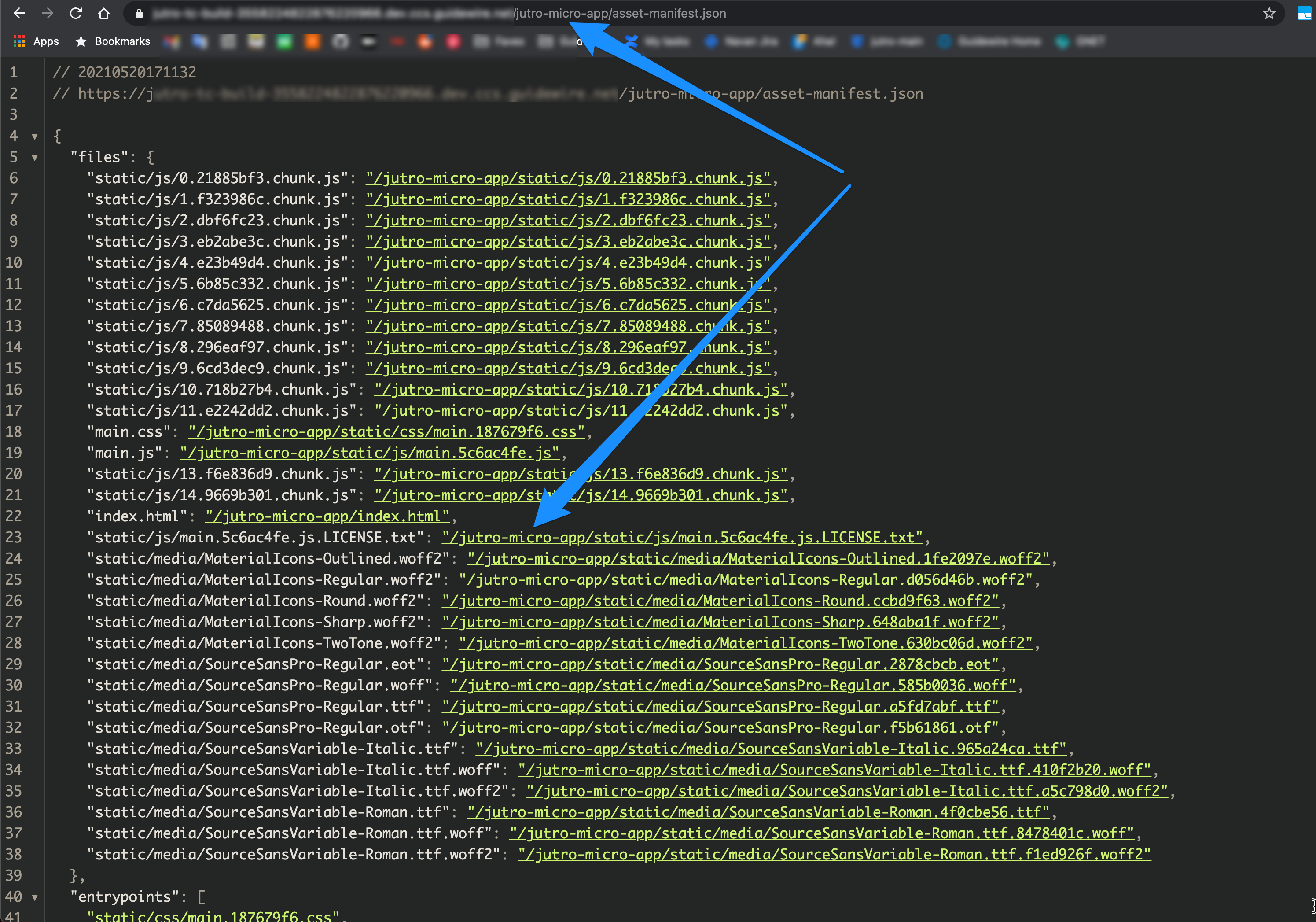
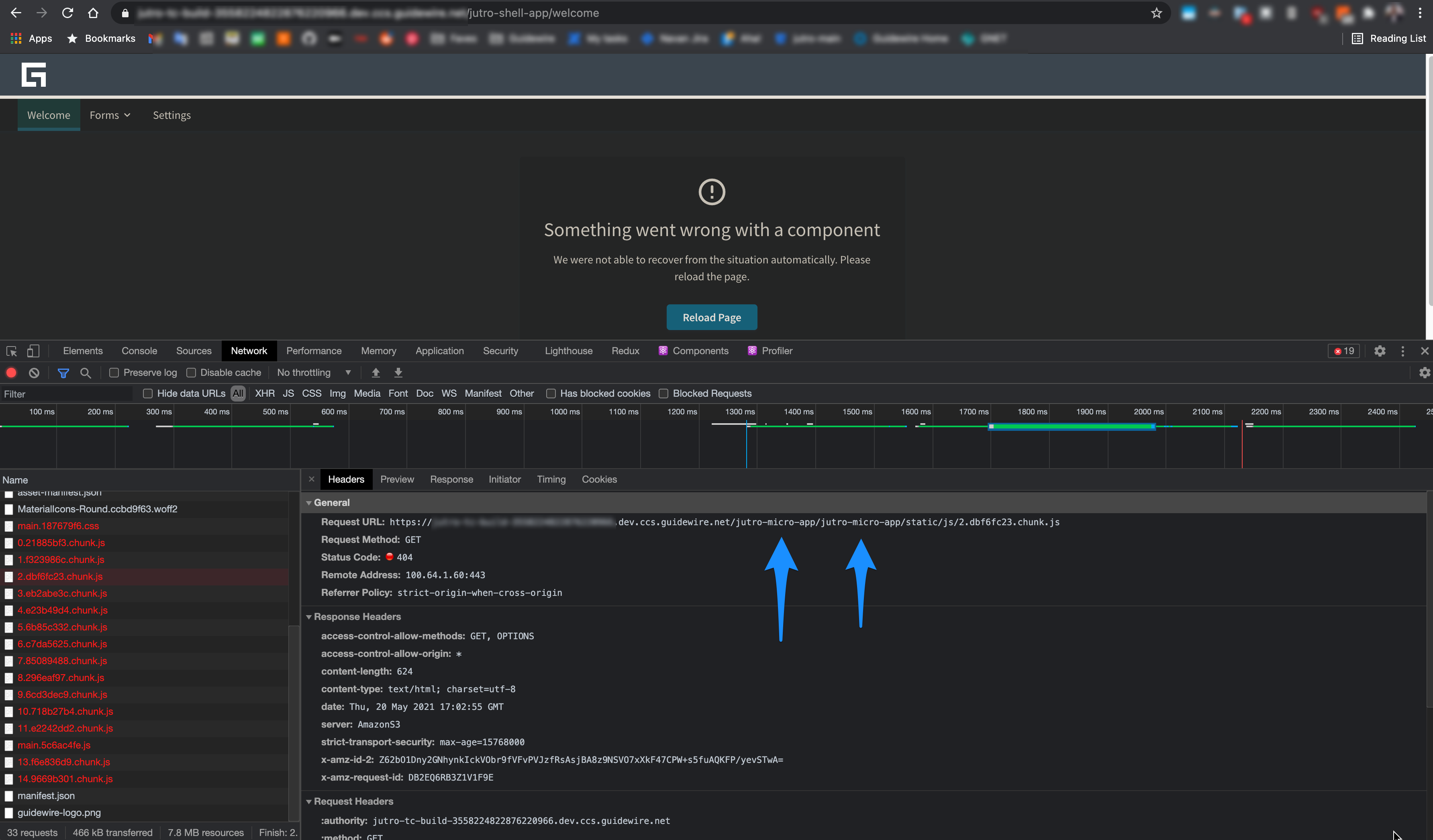
From Jutro 6.2.0, Jutro will attempt to replace relative URLs for microapp assets declared in the asset-manifest.json, like font files, with their absolute URLs pointing at the microapp location. Prior to this change, these assets would fail to load since they are not served by the shell server.
To be able to change that, Jutro needs microapp deployments to add appropriate CORS headers to the server responses for the static/js and static/css assets.
Microapp AppFloorPlan automatic footer hiding
From Jutro 6.2.0, you don't need to manually adjust your AppFloorPlan footers based on the application embedding mode. Jutro will hide them automatically for you.
Microapps no longer duplicate a nested url path
Starting in Jutro 6.2.0, microapps served on deeply nested backend urls with the homepage config set in package.json will properly load their code chunks without duplicating the nested url path in the chunk loading requests.
Upgrading
There are no manual upgrade steps for this version and upgrade is mostly automated.
See How to upgrade.
Don't forget about our automated upgradability.
6.1.0
Known issues
6.0 Shell and 6.1 microapps version compatibility
If you host microapps as a shell, upgrade it to version 6.1.0. There is a bug where 6.1.0 microapps are not compatible with 6.0.0 shells.
Modals and access to context providers (translations, redux)
As the static methods for ModalNextContext have been deprecated, useContext or ModalNextEmitter must be used instead, depending on whether the call to the ModalNextProvider is within the scope of the provider or not.
Instead of using the static call:
ModalNextProvider.showAlert(props);
Use the following, depending on whether the call to the ModalNextProvider is within the scope of the provider or not.
-
For calls to functions from within the scope of
ModalNextProvider, use:const { showAlert } = useContext(ModalNextContext);
showAlert(props); -
For calls outside a provider context, create or get a reference to
ModalNextEmitterfed to Jutro'sstartfunction props and call:modalEmitter.showAlert(props);
Upgrading
There are no manual upgrade steps for this version and upgrade is mostly automated.
See How to upgrade.
Don't forget about our automated upgradability.
6.0.0
Upgrades and microapps
If you use microapps, you should coordinate to upgrade all apps to the same major version. You may encounter some problems if you combine different major Jutro versions like 5.x apps with 6.x apps.
Changes to Jest
There is a problem with mocks. Update your configItems.js to include:
module.exports = [
    'paths',
    {
        name: 'jest',
        overrides: {
         resetMocks: false,
         ...
        }
    },
   ...
]
Changes in .npmrc and npmLogin.sh
Change your project-level (not the global/private one!) .npmrc to match this:
engine-strict=true
node-options="--max-old-space-size=4096"
registry=https://artifactory.guidewire.com/api/npm/jutro-suite-npm-dev/
always-auth=true
If you use an npmLogin.sh file, replace the following scopes:
@jutro:registry@elixir:registry@gwre-g11n:registry
With login to just one registry: https://artifactory.guidewire.com/api/npm/jutro-suite-npm-dev/. Your final npmLogin.sh may look similar to this:
#!/bin/bash
set -eux

npm-cli-login -u ${ARTIFACTORY_USERNAME} -p ${ARTIFACTORY_PASSWORD} -e sys-your-service-account@guidewire.com -r https://artifactory.guidewire.com/api/npm/jutro-suite-npm-dev
npm config set registry https://artifactory.guidewire.com/api/npm/jutro-suite-npm-dev/
npm config set always-auth true
npm config set unsafe-perm true
sys-your-service-account with your service account name.For more details, please see:
New version of Node-Sass
We updated Node-Sass from version 4.x.x to version 5.0.0. Make sure you update yours, if you refer to a different version.
New environment variables
Add these two new .env variables to your Jutro app
DISABLE_ESLINT_PLUGIN=true
FAST_REFRESH=false
You need DISABLE_ESLINT_PLUGIN to work with our CI pipeline. The team behind react-scripts added eslint as a pre-step to the build script so adding this variable makes the build run as before they made the change.
FAST_REFRESH (only needed in dev .env) is a new type of Hot module reloading mechanism. This is enabled by default and blocks our hot module loading mechanism. We may decide to leverage this at some point in the near future.
This should be handled by three-way merge during your automatic upgrade, but it may not work if your .env files are highly customized.
Okta changes
@okta/okta-reacthas been removed from dependenciesAuthProvideronAuthSessionExpiredprop has been removed. Use tokenManager events returned byAuthContextif you need to act on token expiration event.AuthProviderauthErrorComponentis now required.AuthContextmethodsgetAccessToken,getIdToken,getDecodedAccessTokenandgetDecodedIdTokenhave been changed to synchronous methods.
Change all code like:
authContext.getAccessToken().then((token) => {
  if (token) {
    setTenantName(getTenant(token));
  }
});
to
const token = authContext.getAccessToken();
if (token) {
  setTenantName(getTenant(token));
}
or
if (authContext.accessToken) {
  setTenantName(getTenant(authContext.accessToken));
}
- By default
isAuthenticated/authenticatedwill be true if bothaccessTokenandidTokenare valid AuthContextloginadditionalParamssignature has been changed (second param acceptssignInWithRedirectoptions)@okta/okta-auth-jsimplements "active" token autoRenew. Previously tokens would be renewed or removed when callingtokenManager.get. Now they will be renewed or removed in the background. IfJUTRO_AUTH_AUTO_RENEWis true, tokens will be renewed before expiration. IfJUTRO_AUTH_AUTO_RENEWis false, tokens will be removed from storage on expiration, and the application will log out. This only applies to usingtokenManager-getAccessToken,getIdTokenandgetTokenByKeyalready behaves like that.@okta/okta-auth-jstokenManager.getno longer implements autoRenew functionality (autoRenew is done by a separate process withinTokenManager). Even with autoRenew, it is possible that the token returned from the TokenManager may be expired, since renewal is an asynchronous process. The new methodtokenManager.hasExpiredcan be used to test the token and avoid this potential race condition.tokenManager.hasExpiredcheck is already performed for tokens stored in state.Other@okta/okta-auth-jsworth mentioning features:- Adds cross tabs communication to sync auth state (https://github.com/okta/okta-auth-js/releases/tag/okta-auth-js-4.1.0)
- Uses native fetch, if available (https://github.com/okta/okta-auth-js/releases/tag/okta-auth-js-4.6.0)For more informations refer to
@okta/okta-auth-jsdocumentation.
Changes in logging
As a security best practice, we stopped logging stack traces for errors captured by the ErrorBoundary component to the production console logs. If you need to see stack traces for production errors, you need to enable an analytics backend integration.
Updating the Jutro CLI
Starting in Jutro 6.0.0, the Jutro CLI will prompt you to update to the latest CLI version if your current version is outdated.
Other breaking changes
- jutro-components:
DropdownMenuAvatarmetadata type is changed from action to container - HashedStylesheets are not available for the direct imports anymore.
- tests: test-runner from jutro-e2e-tests is removed
- theme: remove deprecated ThemeChooser from jutro-theme package
- tests: jutro-e2e-tests is removed, jutro-e2e-tests-internal is renamed to jutro-e2e-tests
- support for CommonJS-specific lazy loading is removed
- packages-builds: Packages don't come with CommonJS output anymore and expose ESM by default
- theme: Banff and Banff (consumer) themes are no longer available
- jutro-components: removed the
AppFloorPlanDesigncomponent - components: removed the deprecated
AppFloorPlanprops structure - theme:
removeDevicePropsparameter is removed fromextendWithBreakpointValuesanduseBreakpoint. Breakpoint props aren't returned from these methods anymore.
Changes in microapps in 6.0.0
Automatic header hiding
Starting with Jutro 6.0.0, you don't need to manually adjust your AppFloorPlan headers based on the application embedding mode. Jutro will hide it automatically for you.
Adaptable FloorPlan height
Starting with Jutro 6.0.0, the microapp's AppFloorPlan will no longer take a fixed 100vh height when embedded. Now, you can let the microapps inherit the height from the element where they are inserted or allow them to wrap its content's height if the parent element has not defined any height.
Jutro props namespace
Starting with Jutro 6.0.0, you can namespace Jutro's props to avoid collision with user-space props. For example:
<MicroApp
  remoteScope="sample-micro-app"
  jutro={{
    configOverrides: {
      someConfig: 'Micro-app config value',
    },
    launchPropOverrides: {
      routerBasename: '/welcome',
    },
  }}
  sampleProp="Sample prop"
  sampleCallback={() => console.log('Callback from shell')}
/>
5.4.0
There are no manual upgrade steps for this version and upgrade is mostly automated.
See How to upgrade.
Changes in microapps in 5.4.0
Automatic error boundaries
Starting in Jutro 5.4.0, microapps will have a Jutro ErrorBoundary put around them by default. This boundary element can be customized by passing a second argument to the importMicroApp function.
Optional flag for disabling Jutro sharing
Starting in Jutro 5.4.0, a new boolean environment variable called MICRO_APP_SHARE_JUTRO is available to optionally disable Jutro package sharing for microapps in case of severe Jutro version mismatch with its shell.